If you enter XD01 in S/4HANA the way you created customers in ECC, the business partner screen of transaction BP opens instead of the customer master screen. Nothing is misconfigured; this is how SAP designed it. After reading this, you will be able to explain what happened to the customer and supplier master transactions (which ones go to BP and which are obsolete) and walk through what has to be in place, and in what order, before a system conversion.
The source is section 3.19, "S4TWL - Business Partner Approach", of the Simplification List for SAP S/4HANA 2023 (FPS1–3, document version 1.35, 2025-02-25). The 2025 conversion guide (document version 3.0) says the online Simplification Item Catalog, which requires a login, replaces the PDF list, so the wording below follows the public 2023 PDF. The item (SAP Note 2265093) is also in the 2025 guide's table of preparation tasks. The text and attachments of the note require a login and were not read, and the numbers and names in the screen example are made up.
BP became the single point of entry for customers and suppliers
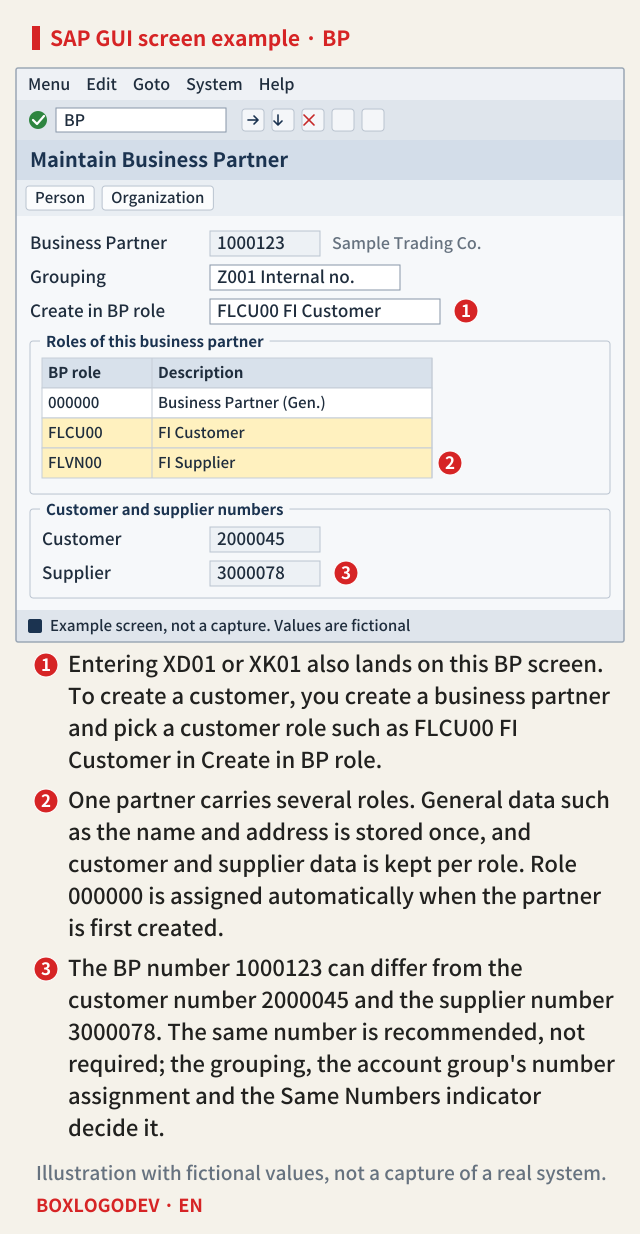
In ECC, XD01 created a customer (debtor) centrally, and XK01 created a supplier (creditor) centrally. The Simplification List points out that the customer master and the vendor master were redundant object models, and says that the mandatory target approach in S/4HANA is the business partner approach. BP is now the leading object and the single point of entry to create, change and display master data for business partners, customers and suppliers. The user interface in S/4HANA is transaction BP; there is no separate screen just for customers or suppliers.
The list also names advantages. In the old transactions one customer was tied to one account group, while one BP can carry several roles; general data used by all roles is kept once, and only the data each role needs is stored per role.
The BP topics for S/4HANA 2025 FPS02 on the SAP Help Portal describe the same structure. A business partner is created in one or more roles, central data such as the name, address and bank details is created only once, and the General Business Partner role is assigned automatically. Customer roles include FLCU00 (FI Customer) for company code data and FLCU01 (Customer) for sales area data; supplier roles include FLVN00 and FLVN01. When you create a business partner, the system creates the matching customer or supplier master record at the same time. The example below is a simplified drawing of creating an organization with the FI customer role.
Transactions redirected to BP, and obsolete ones
The answer to the title is in the table of section 3.19. It splits the transactions that are not available in S/4HANA on-premise into 34 that are redirected to transaction BP and 11 that are obsolete. XD01 is in the first group, so entering it opens the BP screen. The figure below copies the whole table.
Two things need care when you read the table. First, the same ending does not mean the same group. XK06 is redirected to BP, while XD06, FD06 and VD06 are obsolete. Second, the table only gives the group. Which role BP opens in after a redirect, and which message appears when an obsolete transaction is called, are not in this section, so they are not covered here.
SAP NOTES
Transactions redirected to BP, and obsolete ones
As listed in section 3.19 of the 2023 Simplification List
Redirected to transaction BP (34)
XD01 → BP- XD01–XD03 · VD01–VD03 · FD01–FD03
- XK01–XK03 · XK06 · XK07
- MK01–MK03 · FK01–FK03
- MAP1–MAP3 · VAP1–VAP3
- V-03 · V-04 · V-05 · V-06
- V-07 · V-08 · V-09 · V-11
Obsolete (11)
XD06- FD06 · FK06 · MK06 · VD06 · XD06
- MK12 · MK18 · MK19
- V+21 · V+22 · V+23
What is left in their place
BP- No separate customer or supplier screens
- BP alone creates, changes and displays
- A role decides customer or supplier
On-premise. The 2025 item lives in the online Simplification Item Catalog, so this figure copies the table of the 2023 PDF.
A conversion needs CVI first
When you convert a system from ECC to S/4HANA, this change becomes a master data issue. The list says that only SAP Business Suite customers with customer/vendor integration (CVI) in place can move to S/4HANA on-premise by conversion. CVI synchronizes business partners with customer and vendor master records. The list adds that SAP plans to check that CVI has been introduced in the pre-checks and the technical conversion procedure for 1511 through 2020, and that a system without CVI will be declined. The business partner approach was not mandatory for SAP Simple Finance, on-premise edition 1503 and 1605.
Numbers have to be decided first too. The list asks you to answer whether the BP number and the customer or supplier number should be the same, and says this is recommended but not mandatory. The number assignment topic on SAP Help (2025 FPS02) shows that the number depends on the BP grouping you choose and the account group assigned to it. If both use internal number assignment, the system also assigns the customer or supplier number automatically; if the account group uses external number assignment and the Same Numbers indicator is set, the BP number becomes the customer or supplier number. This link is set in Customizing under Define Number Assignment for Direction BP to Customer (to Vendor for suppliers).
The list sees consistent data and Customizing as the keys to a smooth synchronization, and asks for the data to be cleaned up before it is converted into business partners.
Prepare in this order
- Apply the pre-checks from the conversion guide. The list names Notes 2211312, 2210486 and 2216176.
- Activate the business function
CA_BP_SOA. If it does not exist, create a business function of type Enterprise Business Function (G) in the customer namespace with the switchesVENDOR_SFWS_SC1andVENDOR_SFWS_SC2. - Fill gaps such as missing BP role categories or number assignment definitions in the CVI Customizing, and missing tax types in the BP Customizing.
- Check and fix master data consistency with
CVI_MIGRATION_PRECHK. - Clean up customer and supplier data. The list's example is an e-mail address without the @ sign.
- Run the synchronization (data load) in the synchronization cockpit. Errors are shown by the Logs button or by the Call PPO button on the Monitor tab of
MDS_LOAD_COCKPIT. - Run the conversion as the BP conversion document attached to Note 2265093 describes.
- After the conversion, activate post-processing for the direction BP → customer/vendor. The list explains that the transformation is bidirectional.
The SAP Learning course "Gain Experience with Business Partner for SAP S/4HANA Conversion" orders its units the same way: CVI preparation (consistency check, number ranges, Customizing, mapping), CVI synchronization, then post-conversion Customizing. Only the unit titles were checked for this note.
SAP NOTES
Putting CVI in place before the conversion
Steps from section 3.19, plus the rule for Z code
1 · Pre-checks, business function
CA_BP_SOA- Apply the guide's pre-checks
- Activate it, or create a customer-specific one
2 · CVI and BP Customizing
- Role categories, number assignments
- BP settings, e.g. missing tax types
3 · Consistency check and clean-up
CVI_MIGRATION_PRECHK- Check and fix master data consistency
- Example: an e-mail address without @
4 · Synchronization
MDS_LOAD_COCKPIT- Data load: synchronization cockpit
- Errors: Logs button, Monitor tab
5 · Conversion and post-processing
- Convert per the note's attachment
- Then activate post-processing for BP → customer/vendor
Z code: API, not direct writes
CL_MD_BP_MAINTAIN- No direct writes to tables in piece list SI_MD_BP
- Data in CVIS_EI_EXTERN format
- VALIDATE_SINGLE first, then MAINTAIN
The list says a system without CVI is declined for the conversion. Step details sit in the attachments of SAP Note 2265093 (login required) and are not covered.
What to fix in Z code
The last part is custom code. The list says that code writing directly to the tables in piece list SI_MD_BP should use another way. To create business partners with customer and supplier roles in the same system, use the API CL_MD_BP_MAINTAIN. Put the data in the CVIS_EI_EXTERN structure format, pass it to the method VALIDATE_SINGLE to validate all of it, then create the partners with the method MAINTAIN. The list points to the tables only through the piece list, so this note does not name them either.
Look at interfaces between systems as well. The list says the IDocs DEBMAS and CREMAS can carry customer or supplier data without BP between two systems, but they are not recommended between S/4HANA systems, where BP SOAP services can be used (Note 2472030). The 2025 conversion guide says to find code issues caused by S/4HANA simplifications with the ATC check variant S4HANA_READINESS in the converted system after the conversion. The list does not say how a Z program that calls XD01 through CALL TRANSACTION or batch input behaves after the redirect to BP, so test such programs in the converted system.
One thing to do first in a conversion project is to count. Make two lists: Z programs that call transactions such as XD01 and XK01, and Z programs that write customer or supplier master data directly. The first list is what you test in the converted system; the second is what you move to CL_MD_BP_MAINTAIN.
Add your perspective.
Share a question, another approach, or something you have tried.
Checking sign-in…
Loading comments…