You set Content-Security-Policy-Report-Only, watch it for weeks, see zero violation reports, and it seems time to enforce. But zero can mean there are no violations, or it can mean the reports vanished somewhere. After reading this you can run a test that tells the two apart, and choose a rollout that lowers the risk of users losing their input after you enforce.
The examples were run on 2026-11-01 on macOS 27.0.1. The server is http://localhost:4631, written with Node.js v24.21.0 and Express 5.3.0, and http://127.0.0.1:4632 plays the other origin. The browser is the built-in browser of the Claude desktop app (Chromium 152.0.7977.167); the Aside browser (Chromium 154.0.8037.100) was added only to recheck report-to. Google Chrome, Safari, Firefox, an HTTPS environment and real report collection services were not run. The pages and addresses are made up for the lab.
Setups that report nothing despite violations
Every page uses the same policy, default-src 'self', and holds the same two violations: one inline script and one image from another origin. The inline script, when it runs, calls /ran and leaves a trace in the log. Only the way the policy is delivered changes.
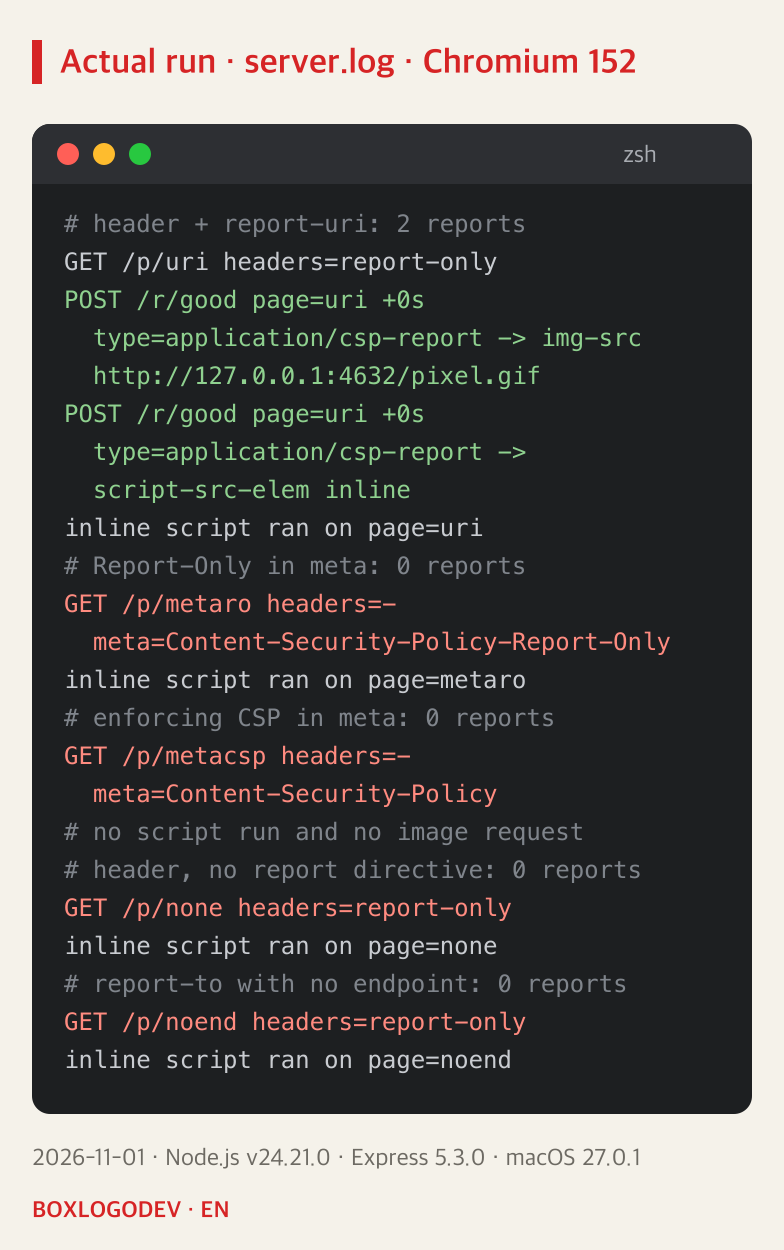
The pictures group selected lines from the server log; the # lines are the author's notes. The first page is the baseline. With report-uri in a response header, two POSTs arrived and the script still ran. That is what Report-Only should look like: it reports and does not block.
Report-Only sent through a meta tag was ignored entirely. The script ran and no report came. The CSP specification and MDN both say this header is not supported in meta, and the browser console showed an error saying the policy was ignored. The page that sent an enforcing CSP through meta needs more care. The script and image really were blocked, yet report-uri was ignored and no report came. The server would not learn something was blocked. Leaving out the report directive, and using a report-to name that was never defined, also gave no reports. MDN says that without a report directive this header has no effect, and Chrome's Reporting API documentation (last updated 2021) lists an undefined name as a common mistake. As shown later, though, no POST came here even with the name defined, so the last line alone does not say why.
Reports that reach the server but never get stored
This case is hard to find. The browser sent it and the server received it, and the lab's receiver raised no error.
const plainJson = express.json();
const reportJson = express.json({type: ['application/json', 'application/csp-report', 'application/reports+json']});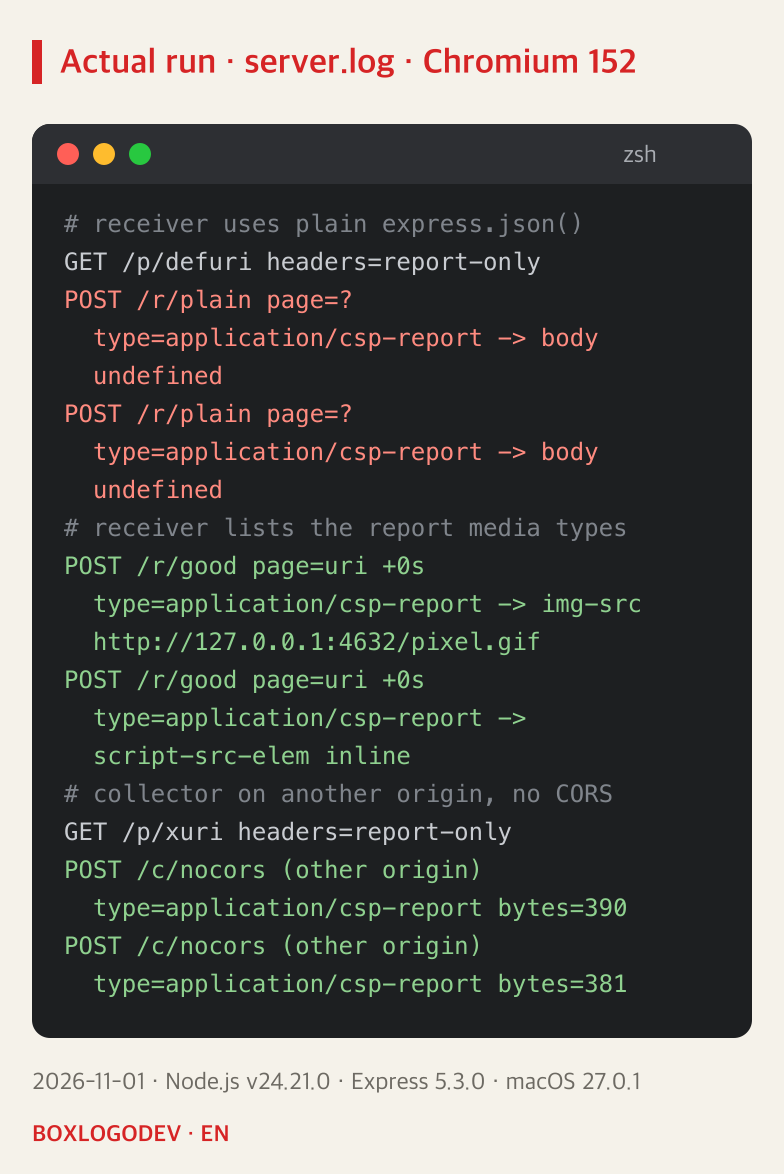
report-uri sends application/csp-report, and express.json(), according to its documentation, reads only application/json by default. body-parser 2.4.0, which Express 5.3.0 uses, leaves req.body undefined when the type does not match. The lab's receiver replied 204 with no error. Code that counted a report only when a body was present would have stayed at zero. Code that reads a body field directly can throw instead, so check the server's error log as well. On Express 4.22.3 (body-parser 1.20.9), a curl POST of the same type left req.body an empty object, so that code read undefined with no error and the count was zero. A receiver that lists the type in type could read the violation in the same format. The two reports also differ in shape. report-uri sends one {"csp-report": {...}} object with hyphenated keys such as blocked-uri, while report-to, by the Reporting API specification, sends an array of reports that each have a type and a body. Code that counts only one shape misses the other. The defaults of other frameworks were not checked, so run the same test there.
The lower lines put the collector on another origin. Without any CORS headers, the report-uri POST still arrived, which agrees with the CSP specification making this request no-cors. The Reporting API specification, by contrast, sends report-to in cors mode, and Chrome's documentation says the collector must support CORS preflight requests. Delivery of that cross-origin report-to could not be observed, for the reason below.
report-to: no POST seen locally
MDN marks report-uri as deprecated and recommends Reporting-Endpoints with report-to, so the same page was tested that way too.
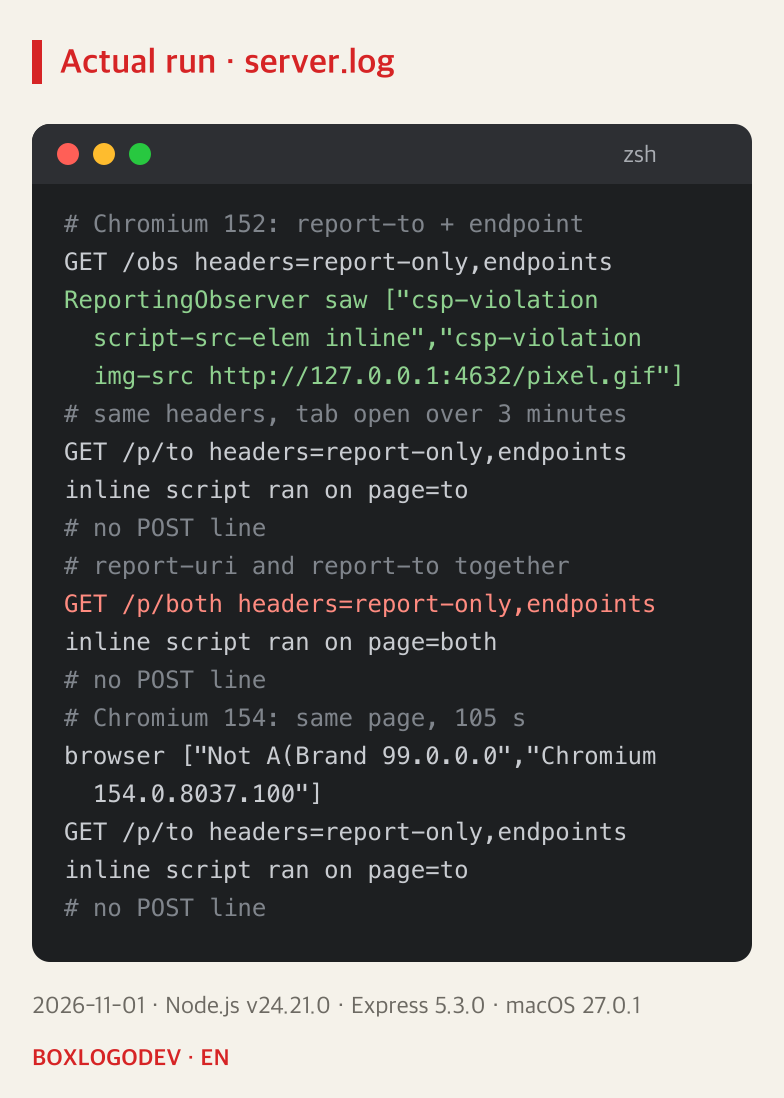
ReportingObserver inside the page received the two violations, so the violations did occur. But no report-to POST reached the server. Chrome's documentation says reports can be delayed by up to about a minute, yet this held with the tab open for over 3 minutes on Chromium 152 and for 105 seconds on Chromium 154. The Chromium source has a condition that would explain this. In 152.0.7977.167 and 154.0.8037.100, render_frame_host_impl.cc registers Reporting-Endpoints only when the document's origin uses a cryptographic scheme such as https, and reporting_header_parser.cc also discards endpoints without one. The specification lets a conforming browser treat localhost as potentially trustworthy, but this Chromium condition does not accept http://localhost. That comes from reading the source; whether a POST arrives on HTTPS was not run.
The red line is a side effect of that. Adding report-to next to a working report-uri meant not one line reached the report-uri receiver either. MDN says report-uri is ignored in browsers that support report-to, and advises declaring both because support is uneven. That advice is not wrong. But for someone checking on local http that reports arrive, adding one directive turns the count to zero. This line is an observation of the local environment; it does not mean reports also stop on production HTTPS.
Even a true zero leaves code that has not run
A CSP violation happens when the browser runs that code. /late in the first group below loads an image from another origin only when the Pay button is pressed. Just opening the page gave no report; the first one came after the click.
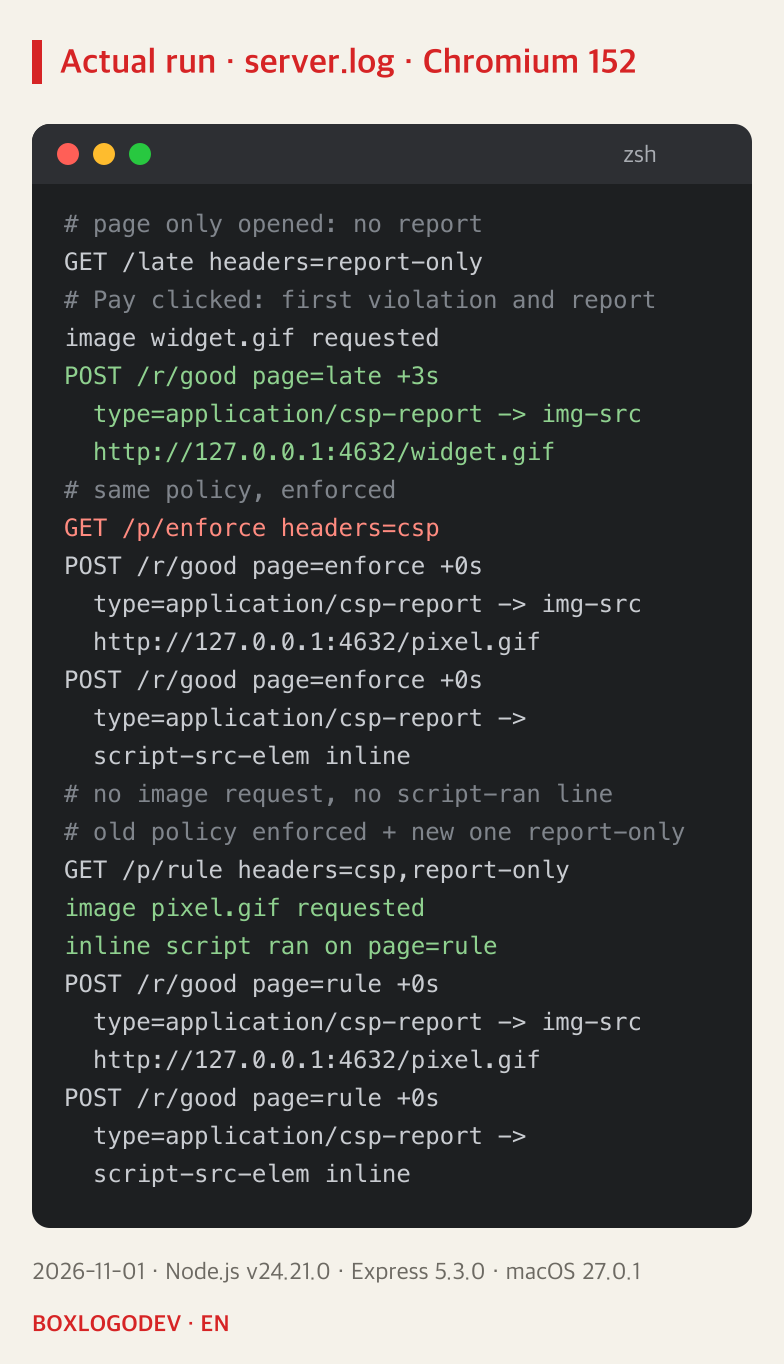
So if you have a rarely used payment or export screen, what matters is whether anyone used it during the period you watched. The middle group is the result of enforcing. With the same policy, the image request and script-ran lines disappeared. If that script had been autosave or form submission, users might not be able to save what they typed. The lab's script only leaves a trace, so a real save feature was not tested.
That is why it is better not to switch all at once. As in the last group, keep the existing policy in Content-Security-Policy and send only the new policy as Report-Only alongside it: the page kept working and the new policy's violation reports came. The lab's existing policy, img-src *; script-src 'unsafe-inline', deliberately allows both violations, which is why the page kept working; it is not a recommended policy. Whatever your existing policy blocks stays blocked this way. When you do move to enforcing, keep the header behind a setting you can reverse right away. That reversible setting is the author's suggestion and was not run.
DEV NOTES
Four checks before trusting zero
An order the author drew from the 2026-11-01 local tests
Is the policy applied?
- Send it as a response header, not in meta
- Check that a report directive is there
Cause one violation on purpose
- See whether that line reaches your storage
- If a request arrives with an empty body, fix the receiver
Look under production conditions
- No report-to POST was seen on local http
- Check on HTTPS (not run in this test)
Run the code that has not run
- A feature that needs a click reported nothing before the click
- Keep a way to roll back after enforcing
The order is the author's judgement, not a procedure from a standard.
If you pick just one step, make it number 2. Put a test page that users do not visit on the same server as production, under the same policy, cause one violation on purpose with a single image from an origin that policy does not allow, and see whether it reaches your storage. If the policy allows that origin, no violation occurs at all. In the lab pixel.gif played that part; this was not run on a production server. While that one does not arrive, a count of zero cannot tell you whether there were violations. Once it does, you know the reporting path worked at that moment in the browser you tested, and a later zero becomes a number worth reading.
Add your perspective.
Share a question, another approach, or something you have tried.
Checking sign-in…
Loading comments…