On a Mac you rename button.js to Button.js. ls shows the new name, but git status shows nothing, and after git add there is still nothing to commit. After reading this note you will be able to check which name git currently remembers with two commands, and get a case-only rename into a commit properly. It also covers one setting that is better left alone.
The examples were run on 2026-10-27, 2026-10-29 and 2026-10-30 on the default APFS volume of macOS 27.0.1 with git 2.54.0 (Apple Git-157) and Node.js v24.21.0. User and system git config were not read, and button.js and the repositories are fictional examples. The git documentation used is the latest edition on git-scm.com as of 2026-10-27, 2.56.0 (2026-09-28); the core.ignoreCase entry is the same in the 2.54.0 edition. Nothing was run on Linux, on Windows or on a case-sensitive APFS volume.
Rename with mv and git stays quiet
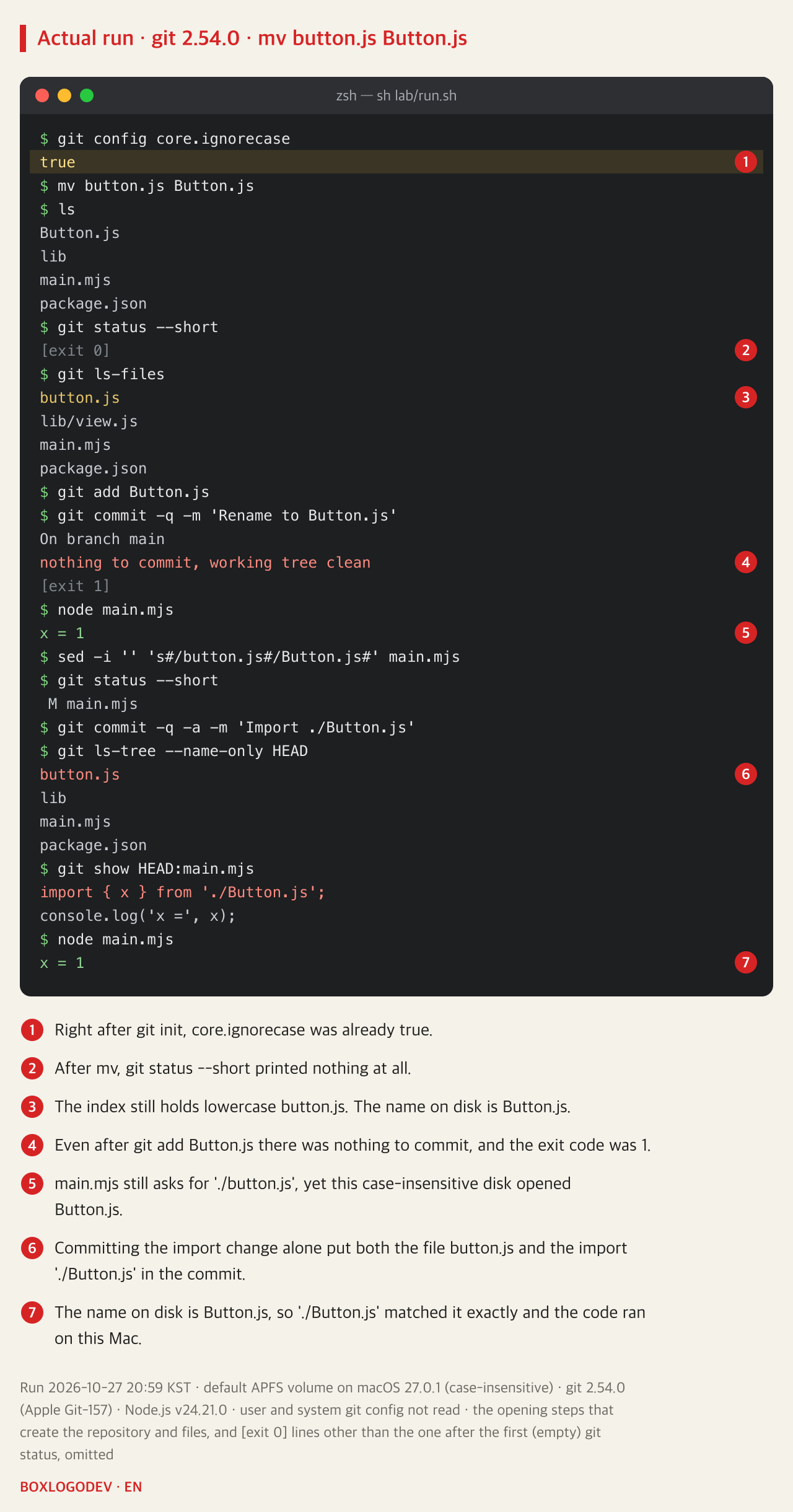
The repository holds one button.js and two files that use it. main.mjs imports './button.js', and lib/view.js imports '../button' without an extension, as projects with a bundler do. lib/view.js is only there to be searched; it was not run. After a first commit in this state, the file was renamed with mv button.js Button.js.
ls showed Button.js, but git status --short finished without printing anything. git ls-files still listed lowercase button.js. After git add Button.js, a commit printed "nothing to commit, working tree clean" with exit code 1. Yet node main.mjs, run with the import still './button.js', printed x = 1. On this disk, asking for './button.js' opens Button.js.
The next step makes things worse. Treating the file as renamed, the experiment changed the import in main.mjs to './Button.js' and committed it. git did see that edit, so the edit went into the commit. As a result the commit holds the file button.js together with code that asks for it as './Button.js'. On this Mac it still ran fine.
git remembers the name in the index
git status reports three things: paths that differ between the last commit (HEAD) and the index, paths that differ between the index and the working folder, and files git neither tracks nor ignores. The index holds the names and contents of the files that go into the next commit. For git to see a rename, the Button.js in the folder would have to be a different file from the button.js in the index.
The setting that changes this judgement is core.ignoreCase. It is an internal variable that turns on several workarounds so git copes with file systems that do not tell upper and lower case apart, such as APFS, HFS+, FAT and NTFS. Its default is false, but git init and git clone look at the file system when they create a repository and set it to true when that fits. In the run, the value was already true right after git init. With true, when the index says button.js and the folder lists Button.js, git treats them as one file and keeps using the name from the index. The content was the same too, so git answered that nothing had changed.
The disk behaves the same way. The volume on this Mac was plain APFS. In macOS Disk Utility, "APFS (Case-sensitive)" is a format you choose separately, and plain APFS is the one for when you do not need that distinction. On default APFS, Button.js and button.js count as the same name, so Node.js found Button.js when asked for './button.js'.
The trouble shows up when another computer receives this commit. Windows file systems also treat FOO.txt and foo.txt as the same file by default, but Linux file systems treat them as different files. When a CI runner or a server on Linux receives this commit, the disk gets button.js, and the import that asks for './Button.js' may not find the file. That scenario was not run. Running fine on a Mac does not mean the names in the commit are right.
git mv renames the file in the index too
The fix is git mv button.js Button.js. git mv renames the file and updates the index, and the change still has to be committed. The git-mv documentation does not cover a rename that changes only the case, so this was checked by running it on 2.54.0. Even though the name on disk was already Button.js, the command finished without an error, and git status --short showed button.js -> Button.js marked R. An R in the first column means a rename is staged in the index. In a new repository, running only git mv without mv also changed the name on disk to Button.js and gave the same R.
Without -f, git mv works this way only when core.ignorecase is true. In a repository where git config core.ignorecase false had been saved, as in the Microsoft guidance further down, git mv stopped with fatal: destination exists and exit code 128, whether or not a plain mv came first. After git config core.ignorecase true set it back, the same command finished with R. Removing the value (git config --unset core.ignorecase) let the default, false, apply and gave the same error. You can see the current value with git config core.ignorecase.
Fix the code that still uses the old name and put that fix in the rename commit. Then there is no commit where the name has changed but the imports have not. The earlier commit that changed only the import stays in the history. In this example the old-name imports were found with git grep -n -E "/button(\.js)?['\"]". The pattern finds lines where a path ends in /button or /button.js followed directly by a quote. It found the '../button' in lib/view.js that had been missed earlier.
Run separately on a file that collects several kinds of import, it found five lines, including paths through folders such as '../components/button' and '@/components/button.js' and also require("./button"), and it skipped './Button.js', './button-group' and a <button> tag. On the same file, git grep -n -F "./button" missed the two paths through folders and wrongly picked './button-group'. If your project uses extensions such as .ts or .jsx, or other aliases, adjust the pattern to fit.
With lib/view.js fixed and committed together, git show --name-status showed the rename as R100. The number after R is how similar the old and new files are, as a percentage; here it is 100 because the content was not changed. The file list in the commit now says Button.js as well.
![git 2.54.0 output. After git mv button.js Button.js, git status --short shows R button.js -> Button.js. git grep -n -E "/button(\.js)?['\"]" finds lib/view.js:1:import { x } from '../button';. After fixing it with sed and git add lib/view.js, status shows R button.js -> Button.js and M lib/view.js. After the commit, git show --name-status shows R100 button.js Button.js and M lib/view.js. git ls-tree --name-only HEAD lists Button.js, lib, main.mjs and package.json. node main.mjs prints x = 1.](/images/en/git-case-only-rename-run-02.png)
Add with core.ignorecase set to false and you get two names
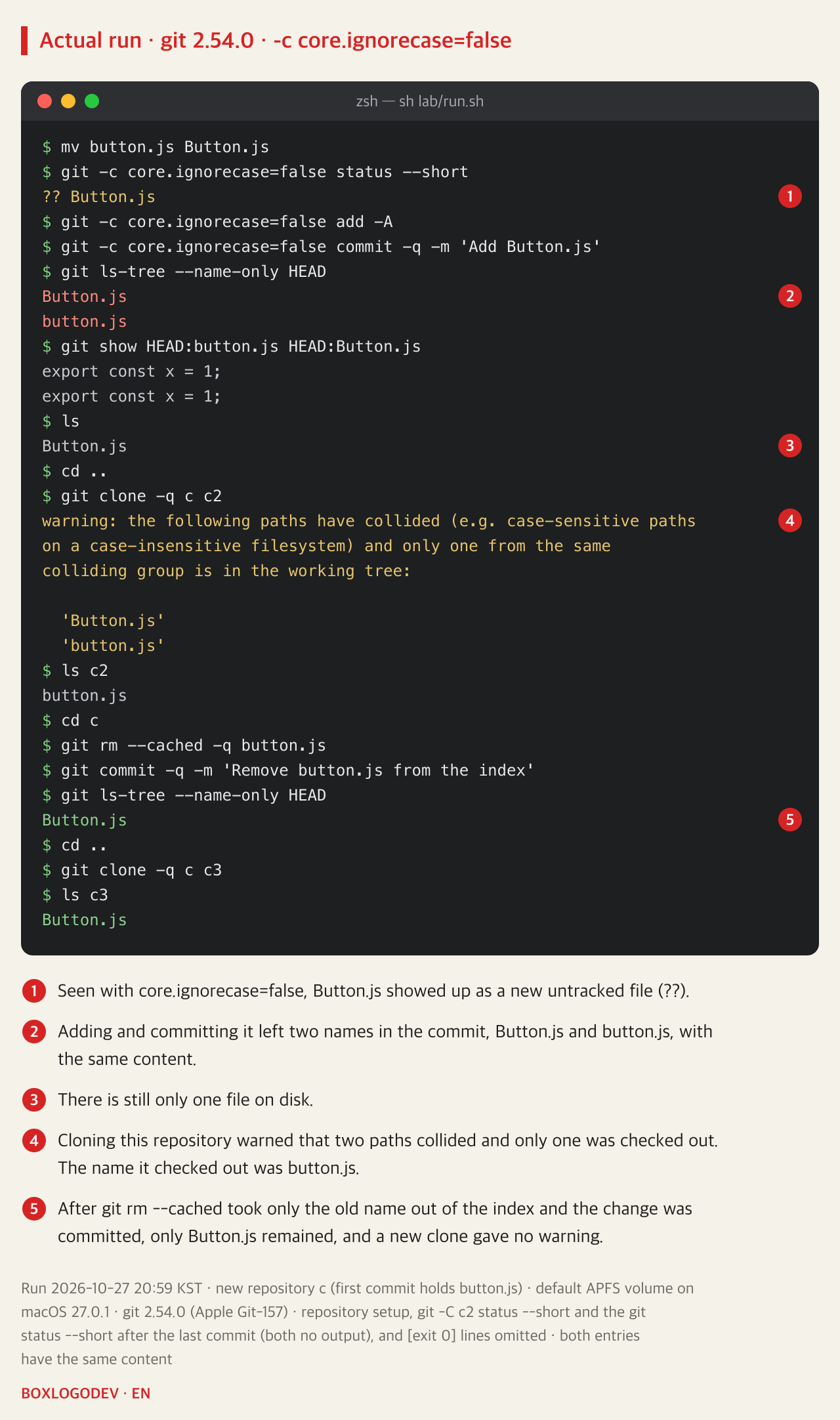
Microsoft's WSL guidance says to use git config core.ignorecase false if you want git to tell upper and lower case apart. In a new repository, without saving the setting, only status, add and commit were run with git -c core.ignorecase=false. A value passed with -c takes precedence over the configuration files for that command. Every other command, including the git rm --cached further down, ran with the value stored in the repository, true.
After mv, status with this setting showed Button.js as a new untracked file (??). Adding it with add -A and committing left two names in the commit, Button.js and button.js. There is only one file on disk. Because the index entry button.js still finds that same file, git appears not to have treated that name as deleted. Cloning this repository on the Mac printed a warning that two paths collided and only one was checked out into the working folder; the name it checked out was button.js.
Changing this value comes with warnings. The git-config documentation says git counts on this value matching your operating system and file system, and that changing it can make git behave in ways you do not expect. Microsoft's guidance likewise says that on a file system that ignores case, a false value can bring confusing errors, conflicts that are not real, and duplicate files.
If both names have already been committed, take only the old name out of the index. If you saved false in the repository config, first set it back with git config core.ignorecase true. git rm --cached button.js removes the path from the index only and leaves the file in the working folder as it is. The note on why a file listed in .gitignore keeps getting committed uses the same command to stop tracking a file. After the commit only Button.js remained in the list, and a fresh clone gave no warning. In a repository with false saved, setting it back to true before these steps also left only Button.js. In this experiment both entries had the same content. A case with different content was not run, so before removing one, compare the two with git show HEAD:button.js and git show HEAD:Button.js.
The order for getting both names in step
DEV NOTES
Getting a case-only rename into the commit
The new name reaches the commit only when the index has it too
Compare the two names
git ls-files- ls shows the name on disk
- git ls-files shows the index name
- If only the case differs, git sees no change
Rename with git mv
git mv button.js Button.js- If core.ignorecase is false, set it to true first
- Works even after a plain mv
- R in status means the index has it
Fix old imports in the same commit
git grep -n -E "/button(\.js)?['\"]"- Finds paths ending in /button or /button.js
- Adjust extensions and aliases to your project
If both names got committed
git rm --cached button.js- After adding with core.ignorecase=false
- Take only the old name out of the index, then commit
button.js is a fictional example. Run with git 2.54.0 on the default APFS volume of macOS 27.0.1 on 2026-10-27 and 2026-10-29. Linux and Windows were not run.
When git says nothing changed, look at ls and git ls-files side by side. If they differ only in case, like Button.js on disk and button.js in the index, git is still remembering the old name. Then, with core.ignorecase set to true, rename in the index with git mv and commit it together with the fixes to code that used the old name.
Add your perspective.
Share a question, another approach, or something you have tried.
Checking sign-in…
Loading comments…