You rebase a feature branch onto main, hit a conflict and run git checkout --ours to keep your change. The commit can then disappear with no error, because in a rebase ours is not your branch. After reading this you can check which side holds which value during a conflict, get a lost commit back, and avoid the case where choosing a whole file undoes other changes.
The examples come from a script, not from a real project. It was run on 2026-11-01 with git 2.54.0 (Apple Git-157) on macOS 27.0.1. Each repository it makes is new, in a temporary folder, with global config ignored. Commit times are fixed, so the hashes are the same on every run of the script; yours may differ. The file and values are a made-up example. Other git versions, other operating systems, GUI tools and git pull --rebase were not run.
The same conflict, upside down
From a base commit, main changes the timeout line to 10 and feature changes it to 60. To try it, start in an empty folder.
git init -b main repo
cd repo
echo 'timeout=30' > config.txt
git add config.txt
git commit -m 'base: timeout 30'
git switch -c feature
echo 'timeout=60' > config.txt
git commit -am 'feature: timeout 60'
git switch main
echo 'timeout=10' > config.txt
git commit -am 'main: timeout 10'
git switch feature
On feature, git merge main put feature's value, 60, on the HEAD side of the conflict markers, and --ours left the file at 60. That matches the name. With the repository recreated, git rebase main put main's 10 on the HEAD side in the same place, and feature's 60 moved to the lower side.
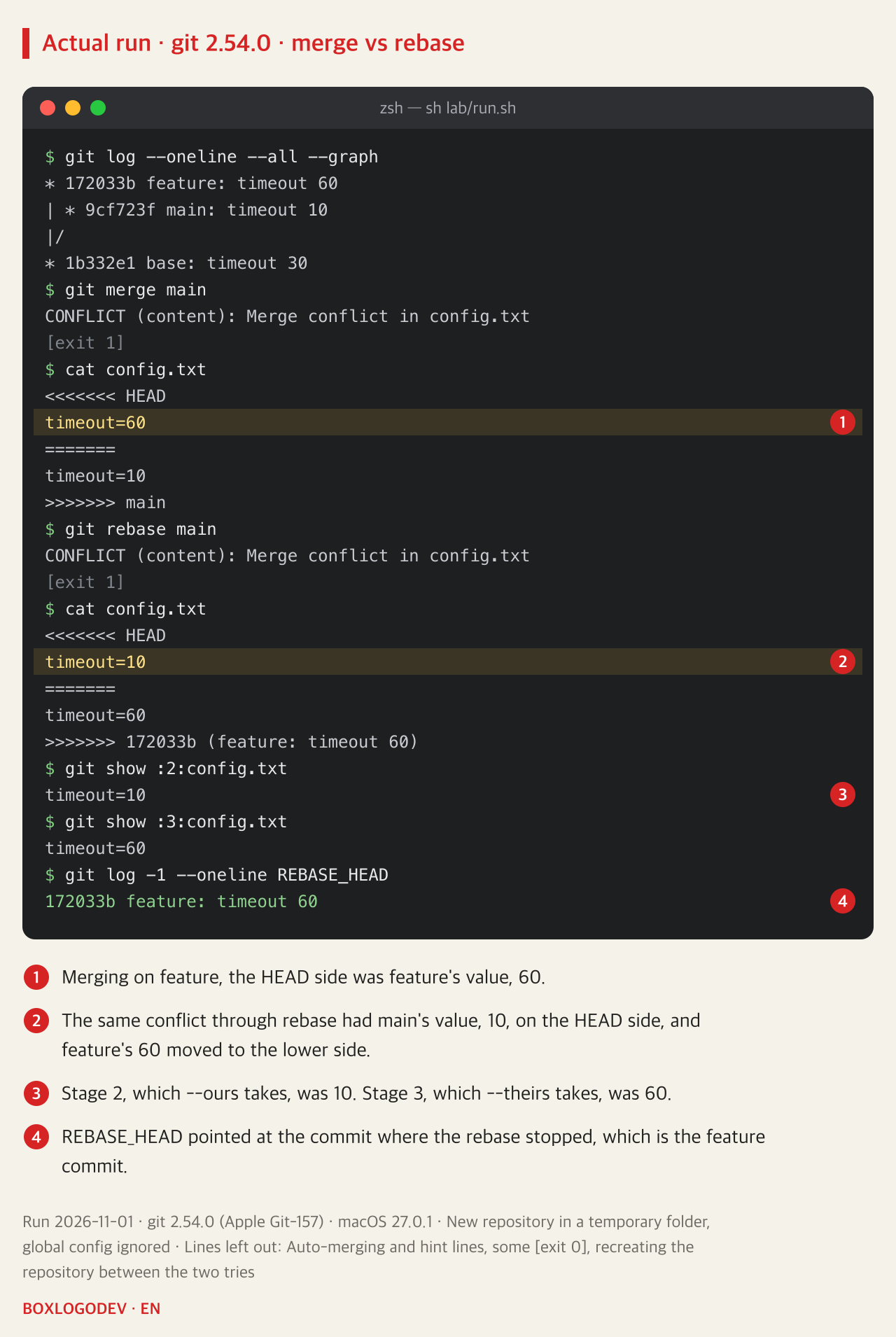
During a conflict you can also check by number. By the git documentation, --ours takes stage 2 and --theirs takes stage 3. These commands showed stage 2 as 10 and stage 3 as 60, and REBASE_HEAD pointed at the feature commit, where the rebase had stopped.
git log -1 --oneline REBASE_HEAD
git show :2:config.txt
git show :3:config.txt
The reason is how a rebase works. The git-rebase documentation says a rebase replays each commit of the working branch on top of the upstream, so during a conflict ours is the so-far rebased series starting with the upstream, and theirs is the working branch. It says outright that the sides are swapped. The git-checkout documentation also says that during a rebase and git pull --rebase, ours and theirs may appear swapped.
DEV NOTES
In a rebase, ours is not your branch
You are on feature and it conflicts with main
git merge main
- HEAD and ours: feature, your branch
- theirs: main
git rebase main
- HEAD and ours: main plus the commits of yours replayed so far
- theirs: the one commit of yours being replayed now (REBASE_HEAD)
What to look at during and after
git log --oneline main..feature- Before choosing: read the conflict markers and REBASE_HEAD
- checkout --ours and --theirs replace the whole file
- Afterwards: check the commit count and read git diff main feature
The meaning of ours and theirs is from the git documentation, and a run on git 2.54.0 (macOS 27.0.1) on 2026-11-01 gave the same result.
Carry on with --ours and the commit can quietly go
From this state, the script chose --ours, the name that sounds as if it keeps feature's value, then ran git add and git rebase --continue. The file became main's 10, and the only output was one line of success. But the feature commit was gone from the history of feature, which was now the same as main's. --continue gave no warning. A clue does exist one step earlier: run right after git add, git status said nothing to commit, working tree clean.
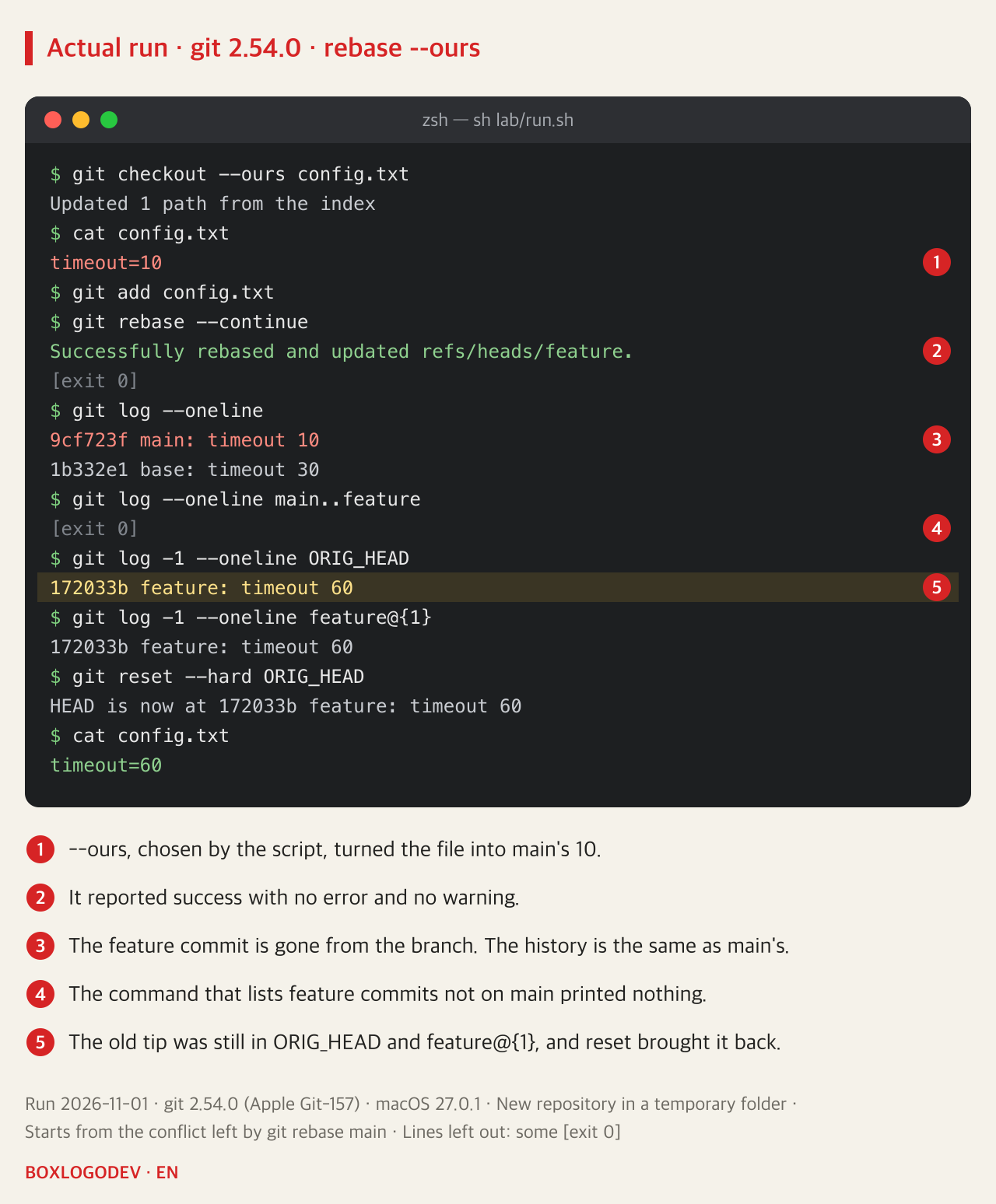
The file now matched HEAD, so no change was left to replay, and that appears to be why the commit was dropped. This explanation is a judgement from the output. The --empty option in the git-rebase documentation says commits that become empty after rebasing are dropped by default, but the reason it gives in parentheses is changes already upstream, and it does not separately mention a commit left empty by resolving a conflict. The script also tried --empty=stop. After the conflict was resolved with --ours and git add and --continue was run, it did not halt on git 2.54.0: the commit went the same way. Combined with -X ours, where no file is picked by hand, the same option did halt, with the message The previous cherry-pick is now empty.
git rebase -X ours main also dropped the commit. The documentation notes the same reversal of ours and theirs for -X. This time a line appeared, starting with dropping 172033b… and ending with patch contents already upstream. main never had timeout=60, so that wording alone is no proof that the same change is already there.
Here is how to check and recover. If the first line prints nothing, no feature commit is left that is not on main.
git log --oneline main..feature
git log -1 --oneline ORIG_HEAD
git log -1 --oneline feature@{1}
git reset --hard ORIG_HEAD
Both ORIG_HEAD and feature@{1} pointed at the old tip, 172033b, and after reset the file was back at 60. The documentation says that if a command such as git reset is used during the rebase, ORIG_HEAD is not guaranteed to point at that commit at the end, and that the old tip can be found in the reflog of the current branch. reset --hard throws away uncommitted changes and may overwrite untracked files, so check the working tree first. It also undoes the whole rebase: in further scripted runs, a commit made after the rebase left the branch, as did a conflict resolved by hand at an earlier stop, and feature@{1} no longer showed the old tip once a new commit had been made. Run it only when both log lines show the old tip, nothing has been committed since and no earlier stop was resolved by hand; otherwise find the commits with git reflog first, where both were still listed in those runs.
--theirs is the right side, but it takes the whole file
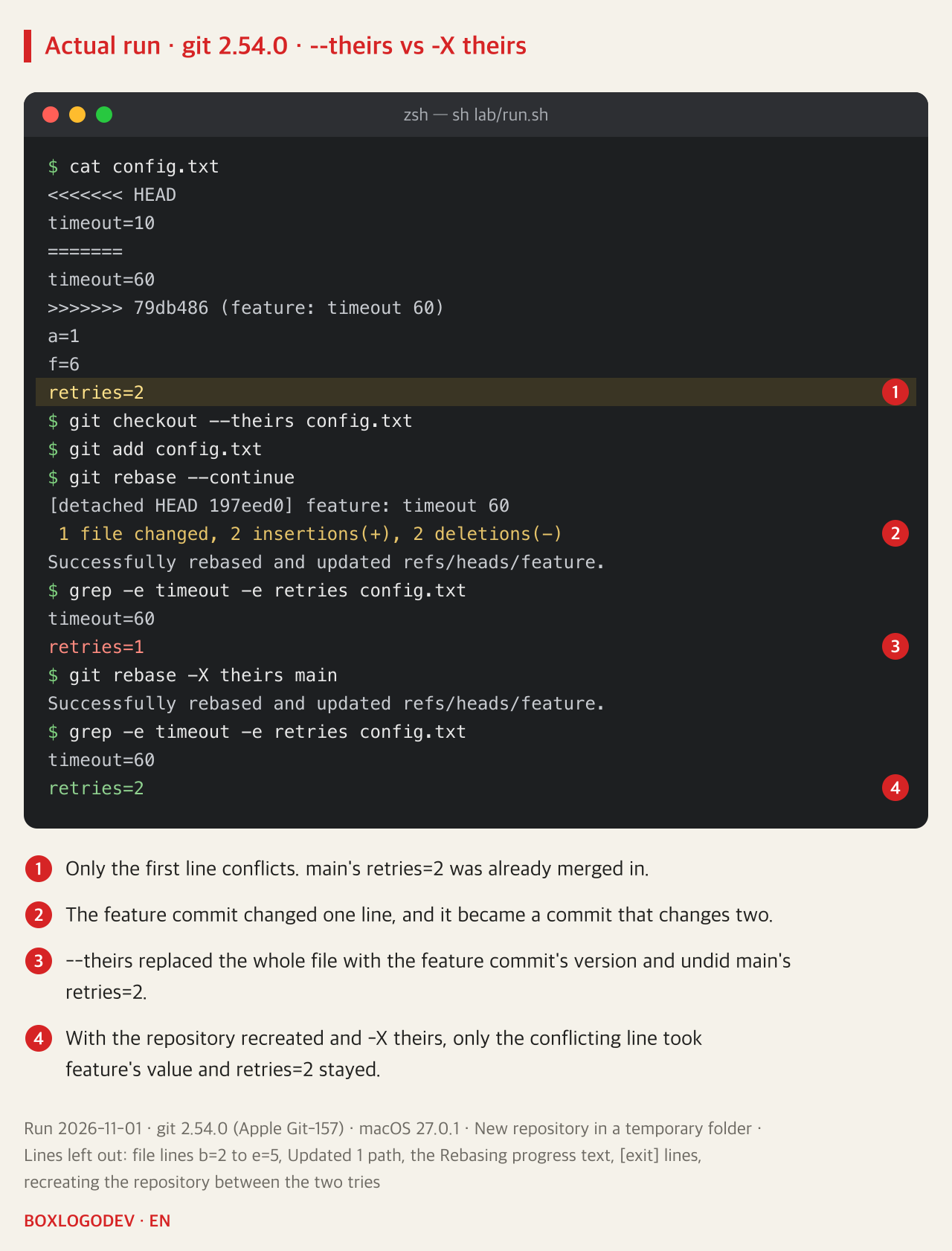
So should you just use --theirs in a rebase? When the conflict was the file's only change, the feature commit stayed, at 60. But it is different if main also changed another line of that file. In this repository main changes a distant line to retries=2 along with timeout=10.
The conflict markers show that only the first line conflicts, and retries=2 was already merged in. Choosing --theirs here replaced the whole file with the feature commit's version, giving retries=1. A one-line commit became a two-line commit that silently undid main's change. The clue in the output of --continue was the line 2 insertions(+), 2 deletions(-).
With the repository recreated in the same state, git rebase -X theirs main left timeout=60 and retries=2. The documentation says the ours option of -X decides only the conflicting hunks that way and keeps the other side's changes that do not conflict, and that theirs is the opposite. For a binary file, it says, the entire contents come from the chosen side. But in these runs -X did not stop and settled each conflicting hunk one way, so you have to look at the result to see which values were thrown away. It will not always run through: in a separate scripted run, where main deleted a file and feature edited it, the modify/delete conflict still stopped under -X theirs.
From the second commit, ours holds your work too
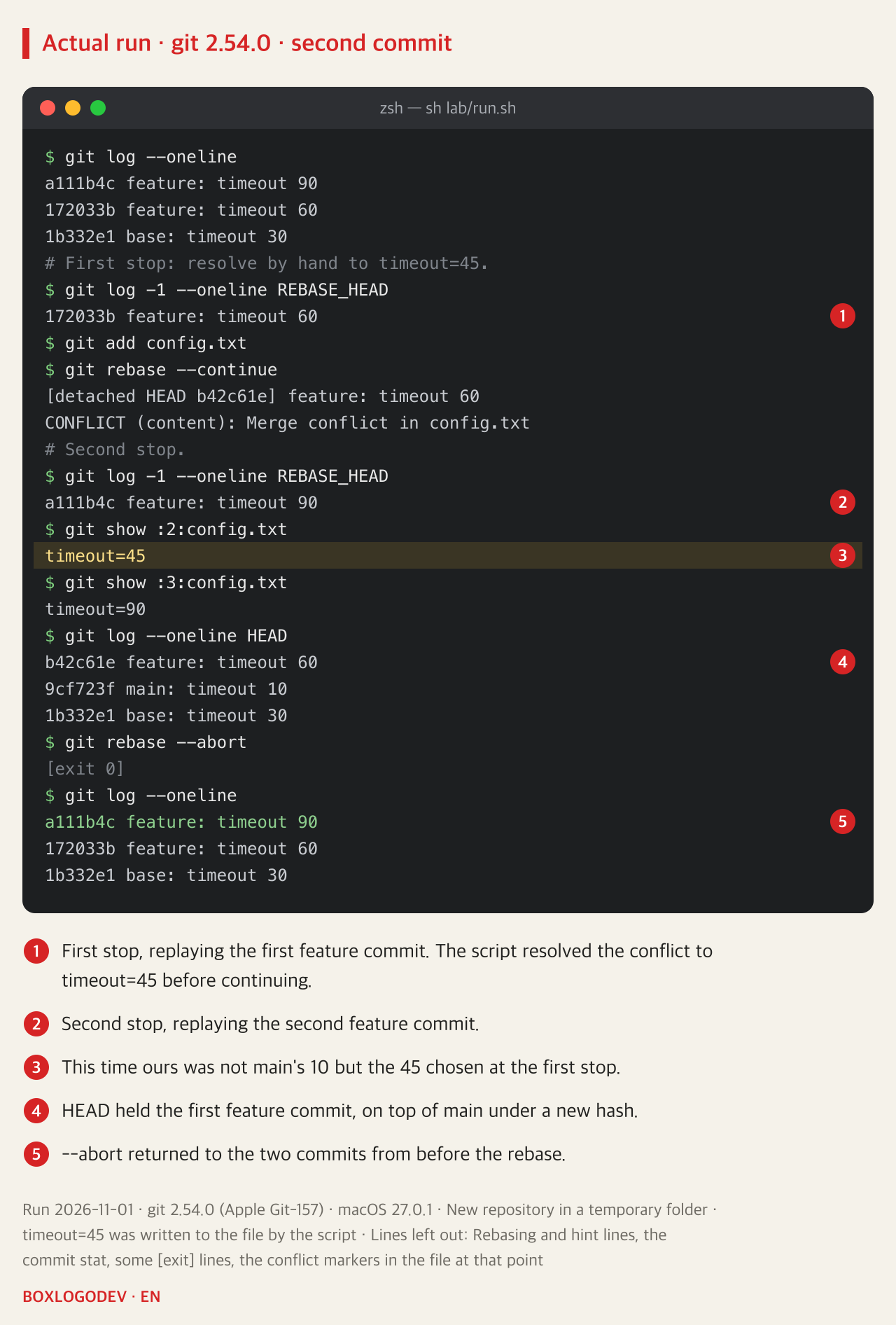
Memorising that ours simply means main is wrong too. Here feature gets one more commit, changing 60 to 90. The script resolved the first stop to 45 and continued, and the rebase stopped again on the second commit, and stage 2 was not main's 10 but 45. HEAD held the first feature commit, on top of main under a new hash, b42c61e.
Running git rebase --abort at this point returned the history and the file to how they were before the start, and the 45 resolution went with them. If you are confused, stopping is also an option.
In a rebase conflict, do not choose by the names --ours and --theirs. Read the values in the conflict markers and REBASE_HEAD, then edit the lines you want to keep. When it finishes, compare the number of commits in git log --oneline main..feature with the number before the start. The count can legitimately drop if the same change is already on main, so what matters is that you can explain each commit that went. An unchanged count proves nothing either: in the --theirs case above it stayed at one while main's change was undone, and in a further run a commit that also added another file stayed at one while its timeout change was lost. So also read git diff main feature and check it against what the branch was meant to change; it showed both losses. This advice is a judgement drawn from these runs and the documentation.
Add your perspective.
Share a question, another approach, or something you have tried.
Checking sign-in…
Loading comments…