In a program that changes a lot of data, worries about memory or locks lead you to put COMMIT WORK inside SELECT ... ENDSELECT, and the program ends in a dump. Switching to OPEN CURSOR WITH HOLD looks like the fix, but COMMIT WORK still closes the cursor. After this note you can tell which commits close a database cursor, find the commits you cannot see in the code, and judge whether a program that commits in pieces can simply be run again after it stops halfway.
The basis is the COMMIT WORK, Database Commit, OPEN CURSOR and SELECT pages in the ABAP Keyword Documentation, release 7.58, compared with release 7.50. The program, table, row counts and amounts below are all invented. Nothing here was run on an SAP system: the documented rules were applied to a fictional example and worked out by hand.
Why it dumps
A SELECT that receives rows one at a time or with PACKAGE SIZE opens a loop, and that loop opens a database cursor internally. Each pass fetches the next row from that cursor. COMMIT WORK, as well as closing the SAP LUW, runs a database commit on all open database connections, and that closes every database cursor. So when ENDSELECT goes back for the next row, the cursor is gone. The 7.58 COMMIT WORK page says this raises an uncatchable exception and also names FETCH as an example, and the 7.50 page names both the SELECT loop and FETCH. For FETCH, though, the pages disagree: the 7.58 FETCH page gives a catchable CX_SY_OPEN_SQL_DB for a cursor that is not open, and the example on the OPEN CURSOR page catches that exception for a FETCH after COMMIT WORK. Either way, catching the exception does not let you keep reading from a closed cursor, so TRY ... CATCH is not the fix.
PACKAGE SIZE is no way around it either. It looks safe because it saves memory, but according to the documentation, using it makes even INTO TABLE a loop closed by ENDSELECT. Committing while the cursor is in use causes the same problem. Reading yourself with FETCH ... PACKAGE SIZE uses a cursor just the same.
Which commits does WITH HOLD work for?
What OPEN CURSOR WITH HOLD protects against is only a database commit run through Native SQL. The 7.58 documentation says that implicit database commits, the commit of COMMIT WORK, and all rollbacks ignore this option, and the 7.50 documentation says the same. So the answer to the question in the title is no. Against COMMIT WORK, WITH HOLD does nothing.
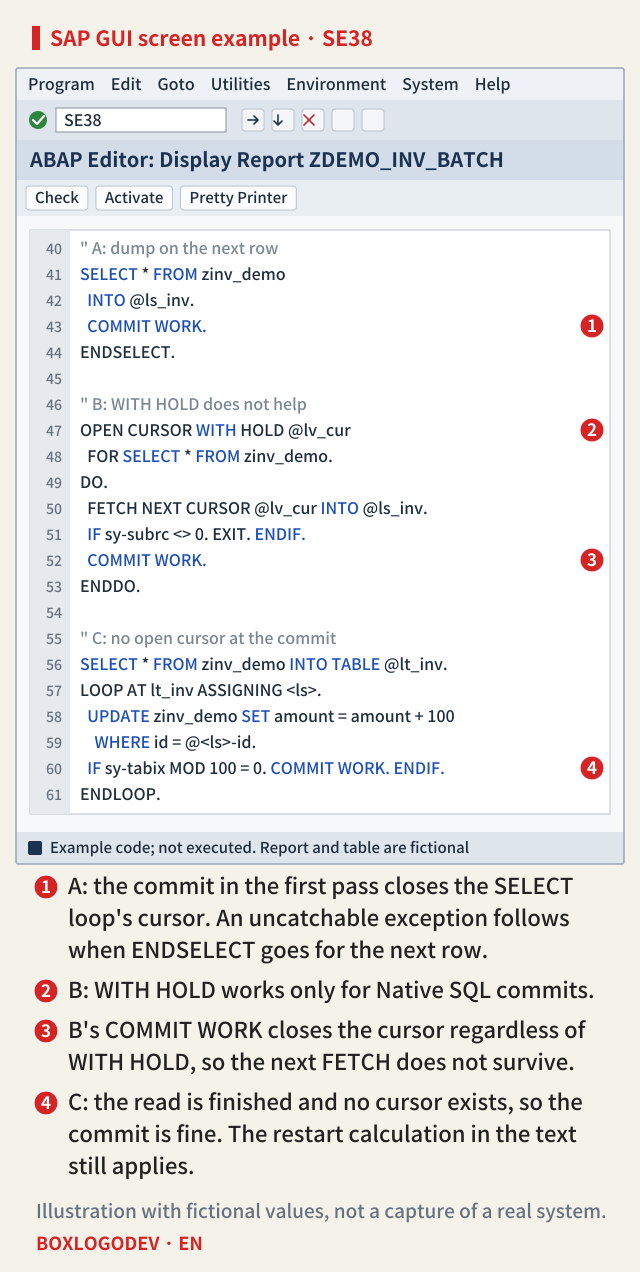
Native SQL commits are different. The 7.58 OPEN CURSOR page says a Native SQL commit can be made explicitly with COMMIT CONNECTION, and its example shows a WITH HOLD cursor carrying on to the next FETCH without an exception after COMMIT CONNECTION default. The function module DB_COMMIT is described on the 7.58 Database Commit page as wrapping the corresponding Native SQL statement, and the 7.50 OPEN CURSOR page gives it as an example of a Native SQL commit. That reads as a WITH HOLD cursor surviving DB_COMMIT too. In 7.58, though, this function commits by default on the connection currently open for EXEC SQL; to commit on the standard connection, pass abap_true to IV_DEFAULT.
SAP NOTES
Which commits close a WITH HOLD cursor
Read the cursor and the SAP LUW separately
COMMIT WORK
- Cursor: closed. WITH HOLD ignored
- SAP LUW: closed. Registered modules run
Implicit commit (RFC, WAIT and so on)
- Cursor: closed. WITH HOLD ignored
- SAP LUW: not closed
Any rollback
- Cursor: closed. WITH HOLD ignored
Native SQL commit (COMMIT CONNECTION, DB_COMMIT)
- Cursor: survives with WITH HOLD
- SAP LUW: not closed. Registered modules do not run
Based on OPEN CURSOR, Database Commit and COMMIT WORK in the ABAP Keyword Documentation 7.58 and 7.50. Not a run.
Both do only a database commit, though. They do not close the SAP LUW, so modules registered with IN UPDATE TASK do not run and SAP locks are not handled at this point either. If you switch to either expecting the registered work to run at the commit, it quietly does not run at this commit. The documentation also warns that writing to a table with an open cursor makes the result set database-dependent and undefined. A program that changes the same table it reads is not safe even if the cursor is still open.
Closed even with no COMMIT WORK
A cursor can close when the code contains no commit, because a database commit happens implicitly at every action that can change the work process. The documentation's examples include the end of a dialog step, synchronous and asynchronous RFC calls, WAIT UP TO, sending error, information and warning messages, and HTTP communication through the ICF. Runtime errors and termination messages trigger an implicit rollback, which also closes the cursor. Inside an update, different rules apply to some of these items.
So you have to look inside the functions called from the SELECT loop. The loop body may contain no commit while a called function uses RFC or WAIT, with the same result. The statement that closed the cursor can then sit far from where the dump shows up, and this note's reading is that the search has to follow the calls downward.
SAP NOTES
How a cursor closes with no commit in the loop
Following the call in fictional code
SELECT loop
- No COMMIT WORK in the body
- Calls the fictional function Z_DEMO_CHECK
Inside the called function
- An RFC, WAIT UP TO, or an error, information or warning message
- The implicit database commit closes the cursor
Back at ENDSELECT
- The cursor is gone when it goes for the next row
- The error can show up away from the statement that closed the cursor
Documented rules applied to fictional code. Not a run.
Committing in pieces makes restart the problem
Avoiding the cursor problem is not the end of it. Suppose the 1,000 rows of the fictional table ZINV_DEMO are first read into an internal table, and a LOOP AT adds KRW 100 to each row's amount with a direct UPDATE and runs COMMIT WORK every 100 rows. There is no open cursor in this structure, so the earlier dump does not occur. But if a runtime error occurs at row 350, the 300 committed rows stay and the changes to rows 301 to 349 disappear in the implicit rollback. Running it again from the start then adds KRW 100 a second time to those 300 rows, making the total too high by 300 rows x KRW 100 = KRW 30,000.
SAP NOTES
Stopped at row 350, then run again
Fictional 1,000 rows, KRW 100 added per row, COMMIT WORK every 100 rows
Rows 1 to 300
- Kept, fixed by 3 commits
- Added: 300 rows x KRW 100 = KRW 30,000
Rows 301 to 349, runtime error at row 350
- The implicit rollback removes the changes to 49 rows
- Row 350 onward was not processed
Run again from the start
- KRW 100 is added again to rows 1 to 300
- The total is too high by KRW 30,000
Documented rules applied by hand to fictional values. Not the result of a run on an SAP system.
Committing in pieces means you cannot undo them together, so decide on the restart method first. You can record a processed mark within the same commit unit and filter on it when reading again, or process in key order and record the last key. Record that key within the same commit unit too. These two are this note's suggestions, not a procedure laid down in SAP's documentation.
This note sets out four structures. First, if there is no reason to split, finish through ENDSELECT and commit once. This assumes the loop does not write to the table it reads. Second, read into an internal table first and commit inside LOOP AT, as in the example above; this is the simplest when memory is enough. Third, if memory is short, read in slices in key order with ORDER BY and UP TO n ROWS, taking each whole slice with INTO TABLE. No loop is opened then, so process and commit afterwards, and read the next slice starting above the last key. Fourth, for direct writes that need no SAP LUW, WITH HOLD with COMMIT CONNECTION default (or DB_COMMIT) can be used, but you must not write to the table being read. WITH HOLD works only for reads on the standard database and cannot be combined with the CONNECTION addition of OPEN CURSOR.
What differs by release
The rule that commits close cursors and the scope of WITH HOLD are written in both 7.50 and 7.58. The hints in 7.52, 7.54, 7.56 and 7.58 add that a Native SQL commit closes a cursor only after its first FETCH; 7.50 does not have this hint. The example of a Native SQL commit on the OPEN CURSOR page differs too: DB_COMMIT in 7.50, COMMIT CONNECTION in 7.52, 7.54, 7.56 and 7.58. The 7.50 OPEN CURSOR and COMMIT CONNECTION pages have no sentence linking COMMIT CONNECTION with WITH HOLD. IV_DEFAULT of DB_COMMIT appears in the documentation from 7.52, and the 7.50 Database Commit page says this function has no parameters. Releases before 7.50 and the ABAP Cloud environment were not checked for this note. The name of the runtime error in the dump does not appear in the pages read, so it is left out here; look for the actual name in ST22.
In short, when you read a loop containing COMMIT WORK, first check whether a SELECT or OPEN CURSOR is open above it, and if not, check whether the code says how already committed rows are skipped after a stop halfway. WITH HOLD is not the first thing to reach for.
Add your perspective.
Share a question, another approach, or something you have tried.
Checking sign-in…
Loading comments…