You created a lock object and called the ENQUEUE_ function, so it is easy to assume nobody can change that row now. Then another program's UPDATE goes through with no error, and later the quantity does not add up. After this note you can tell what ENQUEUE does and does not stop, read from the _SCOPE value when a lock is released, and decide what to look at in the SM12 list and when not to delete an entry.
The basis is SAP Locks in the ABAP Keyword Documentation, release 7.58, the ABAP Platform 2025 FPS02 documentation on the SAP Help Portal, and older SAP Library editions (NetWeaver 7.x and product libraries). The programs, table, lock object, users, order number and quantities below are all invented. Nothing here was run on an SAP system: the documented rules were followed through by hand.
A lock is written to the lock table, not to the database row
Activating a lock object generates function modules that start with ENQUEUE_ and DEQUEUE_. Calling ENQUEUE_ writes one entry to the central lock table, and if a conflicting entry for the same target already exists, the exception FOREIGN_LOCK is raised. That is all it does. SAP's ABAP programming documentation calls this a logical lock and says plainly that the row in the database table is not physically locked.
So the lock works only as an agreement between programs. The documentation explains that every program using the same data has to ask for the lock, and that no mechanism automatically stops a program that ignores the lock table. The description of SAP's locking example says the same: after a lock is set, no other user can set it again, but unless the program first tries ENQUEUE, any user can still read the data with SELECT.
SAP NOTES
What the lock table stops, and what it does not
Three programs working on the same row, Z-70001
Program A: ENQUEUE succeeds
- An entry goes into the lock table
- The database row itself is not marked
Program B: ENQUEUE on the same key
- It receives FOREIGN_LOCK
- The program decides to wait or stop
Program C: UPDATE with no ENQUEUE
- It never looks at the lock table
- Nothing stops it, so the change is saved
Based on the SAP Help lock concept and lock mechanism pages. The programs are fictional and nothing was run.
Database locks are separate. They are physical locks the database sets for change statements such as UPDATE and for SELECT SINGLE FOR UPDATE, and they end at the next database commit or rollback at the latest. As the 7.58 page on database locks describes, a conflicting transaction may wait, but these locks cannot protect a read and a write that span several dialog steps. That long stretch is exactly why ENQUEUE exists.
A fictional case: a withdrawal of 2 pieces disappears
In the fictional table ZORDER_DEMO, order Z-70001 has a quantity of 10 pieces. Program A locks it with the lock object EZ_ORDER_DEMO (lock object names must begin with E), reads 10 pieces and waits while the user enters a withdrawal of 1 piece on the screen. Meanwhile program C, without asking for any lock, reads 10 pieces, takes off 2 and writes 8. Nothing stops it, so it is saved. Then A takes 1 from the 10 it read earlier and writes 9, and the table shows 9 pieces. With both withdrawals the quantity should be 7, so C's 2 pieces are lost.
SAP NOTES
How a withdrawal of 2 pieces disappears
Fictional order Z-70001, starting quantity 10 pieces
A: locks and reads 10 pieces
- It waits while the user enters a withdrawal of 1 piece
- The lock table holds A's entry
C: writes 8 pieces with no lock
- It reads 10 pieces and takes off 2
- The table now shows 8 pieces
A: writes 9 pieces
- It takes 1 from the 10 it read earlier
- The table shows 9 pieces. With both withdrawals it should be 7
Documented rules followed by hand with fictional values. Not the result of a run on an SAP system.
Had C also asked for the same lock, it would have received FOREIGN_LOCK, then read 9 after A finished and written 7. The order of locking first and reading afterwards matters too, because a value read before locking can differ from the value after locking. The documentation's flight booking example keeps everything from checking free seats to the change inside the lock for the same reason; stating the order as a rule is this note's wording.
Two places where setting a lock proves nothing
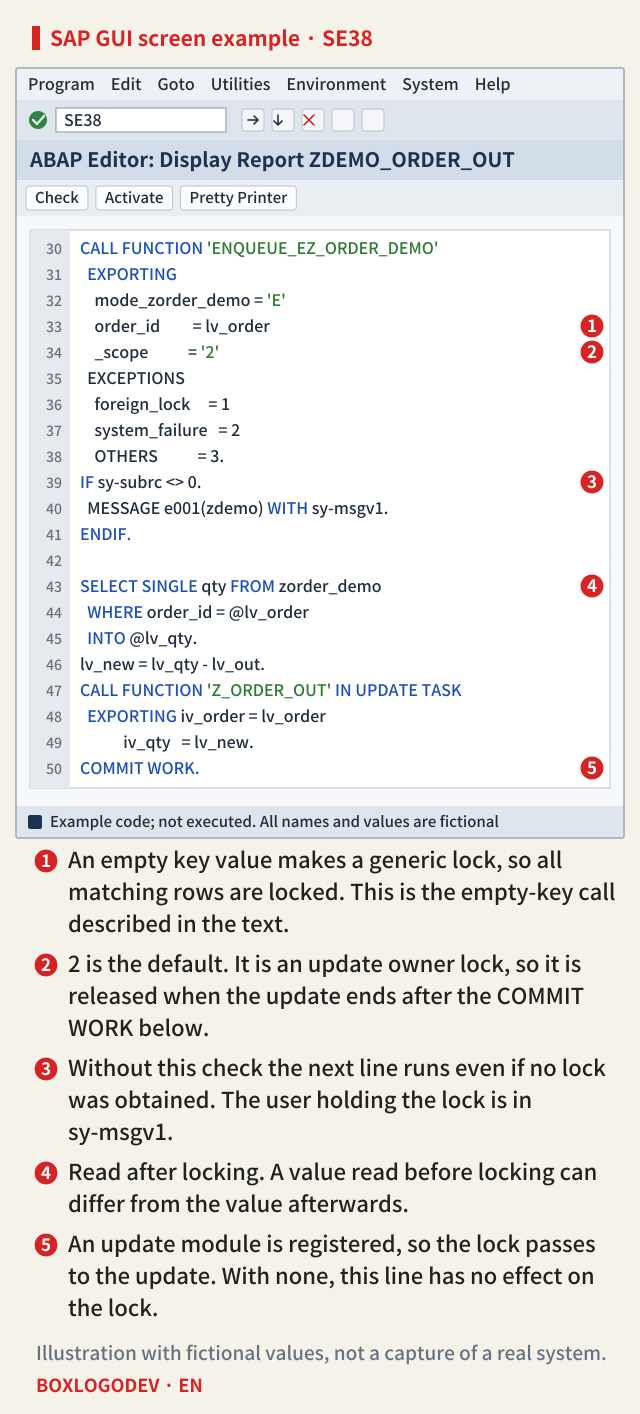
First, code that does not look at sy-subrc after the call. If you receive foreign_lock through EXCEPTIONS and do not check the value, the next line runs without the lock. On a conflict, sy-msgv1 tells you who holds the lock. With X in _WAIT, the call retries for a time set by profile parameters before it raises the exception.
Second, a call with an empty key. A key field given no value makes the lock generic for that field, so all the matching rows are locked. Called with an empty input variable, it locks a wide range instead of one order. To lock the initial value itself, set the X_<field> parameter to X. An @ in a key value acts as a wildcard in the collision check, so the documentation says to replace it with another character before the call.
When it is released: _SCOPE
_SCOPE decides the release point. When omitted, it is 2 for ENQUEUE and 3 for DEQUEUE. Value 1 is a lock of the dialog owner: only DEQUEUE or the end of the transaction releases it, and COMMIT WORK and ROLLBACK WORK do not. Value 2 is a lock of the update owner: after CALL FUNCTION ... IN UPDATE TASK and COMMIT WORK it passes to the update and is released when that processing ends, so it can outlive the program. Value 3 belongs to both, and it goes away when the last owner releases it.
Value 2 is the easy one to miss. The documentation says that with no update module registered, COMMIT WORK has no effect on this lock. A program that runs a direct UPDATE and only COMMIT WORK still holds the lock after the commit, until DEQUEUE or the end of the program. The 7.58 Keyword Documentation points the same way for commit: it ties release by COMMIT WORK to a registered update module. On ROLLBACK WORK the pages differ: 7.58 sets the same condition, while the _SCOPE page says it can release the lock before the lock passes to the update and names no such condition. For DEQUEUE, _SCOPE must be at least the value used for ENQUEUE, and the lock mode must match. Release is asynchronous by default, so unless _SYNCHRON is X, the entry can still be in the lock table right afterwards.
SAP NOTES
When each _SCOPE value releases the lock
On the normal path. Default 2 for ENQUEUE, 3 for DEQUEUE
_SCOPE = 1: dialog owner
- Released by DEQUEUE or the end of the transaction
- Not released by COMMIT WORK or ROLLBACK WORK
_SCOPE = 2: update owner
- With IN UPDATE TASK + COMMIT WORK, released when the update ends
- It can outlive the program
- With no module registered, COMMIT WORK has no effect
_SCOPE = 3: both owners
- Gone when the last owner releases it
- After the update, the dialog side remains
Based on the ABAP Platform 2025 FPS02 _SCOPE page, the 7.31 lock function page and ABAP 7.58 SAP Locks.
Reading SM12, and what errors and restarts leave behind
The lock table is viewed in SM12. According to the 7.31 Help it shows user, time, mode, table, lock argument and the dialog and update cumulation counters, and the time column needs care. It is not when the lock was set but when the LUW that created it started, so an old time does not by itself mean an abandoned lock. Entries highlighted in colour are locks that have passed to the update and have the backup flag set. The highlight tells you this, not the update counter: SAP's example of cumulating locks, which lists counter values rather than an SM12 screen, gives a _SCOPE 2 lock an update counter of 1 from the first request.
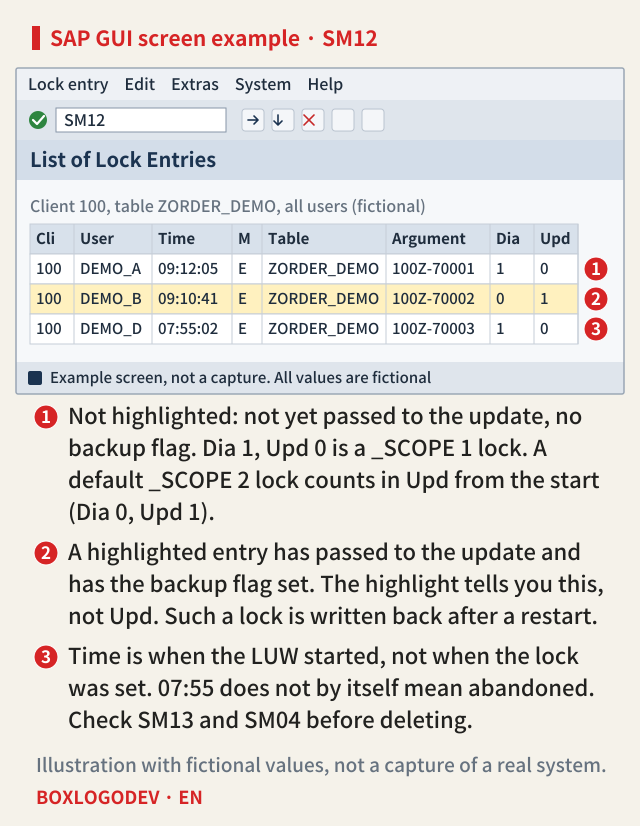
The documentation treats the paths off the normal one separately. After a short dump the locks are normally released, but occasionally one stays and has to be removed by hand. After a failure of the dispatcher, the operating system or the network, invalid entries can also remain and block access after a restart. What survives a restart is what was saved to the backup file, meaning locks passed to the update with COMMIT WORK. When an enqueue server without replication restarts, unsaved locks are lost; with the replication service they are not, according to the 7.31 Help FAQ. So lock entries right after a restart can be perfectly normal.
Deleting is the last resort. The ABAP Platform 2025 FPS02 documentation says that in general you should not delete locks directly and explains that an unreleased lock is usually a symptom of another problem. First look in SM13 for the user's unprocessed updates (status init or auto), and in SM04 for a session that ended abnormally. The documentation warns that deleting an active user's lock can lose entered data or cause inconsistencies. In terms of the fictional case, deleting A's lock lets through even the programs that ask for the lock properly, and the same quantity difference can appear.
What differs by release
The 7.58 Keyword Documentation and the 7.31 Help name SM12 as the administration transaction, and the ABAP Platform 2025 FPS02 documentation describes SMENQ. The column names in the SMENQ documentation differ a little, such as Lock Timestamp, Dialog Counter and Update Counter, with additional Application Component and Context Owner columns, and it says Standalone Enqueue Server 2 provides the locking function. How SM12 behaves on your own release could not be confirmed from the documentation alone. Locking in the ABAP Cloud environment is not covered in this note.
In short, when you review locking in Z programs, start by looking for programs that use the same table and never call ENQUEUE_, before you look at the program that locks. That order follows from the documentation's condition that a lock works only when everyone asks for it, and one such program is all it takes to produce the quantity difference in the fictional case.
Add your perspective.
Share a question, another approach, or something you have tried.
Checking sign-in…
Loading comments…