After a move to S/4HANA, a Material Ledger indicator in the material master can suggest that actual costing is running too. But what became mandatory is the Material Ledger; actual costing, which calculates actual prices at period end, is still optional. After this note you will be able to find where to check whether a material's price variances are recalculated at period end, follow the variance in numbers, and say what changes when you choose revaluation at closing.
The basis is the SAP Help Portal documentation for SAP S/4HANA 2025 FPS02 (on-premise) and a public SAP Learning course. The material, plant and amounts are invented. Nothing here was run on an SAP system; the documents' arithmetic is applied to fictional numbers by hand.
What is mandatory and what is optional
The installation page says briefly that S/4HANA makes the Material Ledger mandatory and leaves actual costing optional. SAP Learning also explains that the Material Ledger is on by default while actual costing has to be activated. The confusion has a likely source: the menus and Customizing paths still sit under one name, Actual Costing/Material Ledger (that explanation is this note's guess).
According to Help, from S/4HANA 1610 the Material Ledger component of ERP was divided into two applications. The new Material Ledger (CO-PC-ML) manages stock at standard and moving average prices and handles multiple currencies and valuations. Actual costing (CO-PC-ACT) is a separate component with no technical link to the Material Ledger and with its own storage, although it uses the same currencies and valuations.
Where to see whether it is running
There are two layers of switches. One is on the plant side: Activate Actual Costing under Actual Costing/Material Ledger in Customizing. If stock is valued at company code level, the valuation area counts as active once one plant in that company code is activated. The other is on the material side: price control and the price determination indicator in the Accounting 1 view of the material master, or in app F2680. Periodic actual costing requires actual costing to be active, price determination 3 and price control S. Even in an activated plant a material can use transaction-based 2, so an active plant does not make every material subject to it. These two layers are only prerequisites; the calculation happens when a costing run is performed for the period.
SAP NOTES
To see whether it is running
Check in order, starting at 1
Material Ledger indicator
- Mandatory in S/4HANA, so it tells you nothing
Plant: Activate Actual Costing
- Activated in Customizing
Material: price determination 3, price control S
- With 2 it is transaction-based, so not in scope
Period: a CKMLCP run
- Nothing is calculated until a run is performed for the period
Summarized from SAP Help Portal, S/4HANA 2025 FPS02 on-premise, 'Periodic Actual Costing' and its process flow.
The combinations work like this. With 2 and S, stock is valuated at standard price and the moving average price is there for information only. With 2 and V, stock is valuated at moving average price. With 3 and S, stock is valuated provisionally at standard price and period end produces a periodic unit price. 3 with V cannot serve as the current period's valuation price.
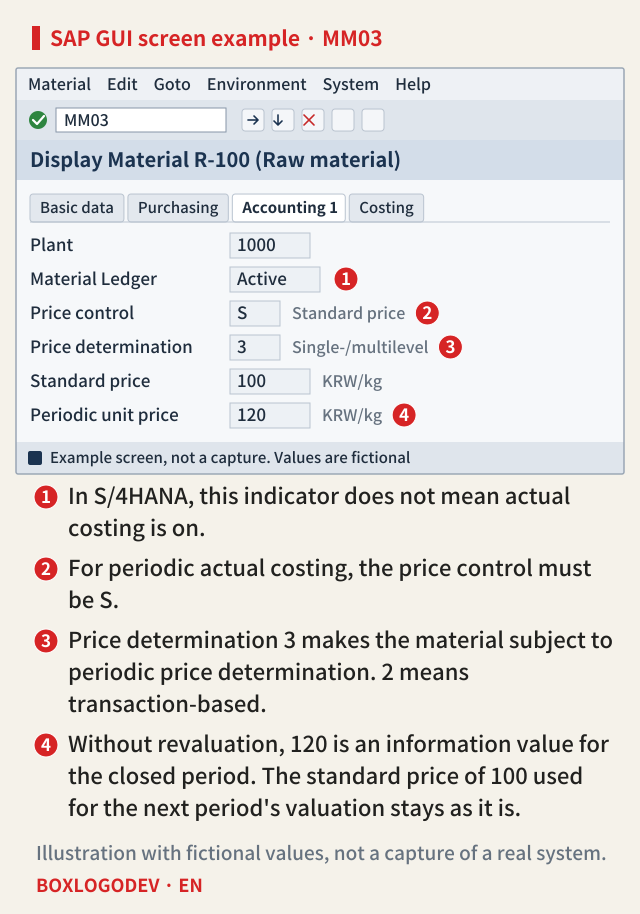
Following the numbers
Here is a fictional case. Raw material R-100 has a standard price of KRW 100 per kg and no opening stock. In October, 100 kg is received at KRW 120 per kg, and the invoice is for the same amount. KRW 10,000 goes to the stock account and the KRW 2,000 difference to the price difference account. Production uses 40 kg, which takes KRW 4,000 out of stock, so the ending stock of 60 kg is KRW 6,000.
Without actual costing, that is the end of it. KRW 2,000 stays on the price difference account and stock is KRW 6,000. Help names this as a weakness of the standard price: differences collected this way cannot later be assigned back to individual materials.
With actual costing, the calculation happens in the Settlement step of the period-end run. Dividing the cumulative value by the quantity gives (10,000 + 2,000) ÷ 100 kg = KRW 120 per kg, the periodic unit price. The variance is split by quantity: KRW 800 to the 40 kg consumed and KRW 1,200 to the 60 kg of ending stock. Help's cocoa example uses the same method, and it says the variances are updated only in the Material Ledger at this step, with no G/L posting. That sits awkwardly with the 'no technical link' above. The documents do word it both ways, and SAP Learning also calls the Material Ledger the basis of actual costing. Which storage the values are written to could not be confirmed from these sources.
SAP NOTES
Where does the KRW 2,000 variance go?
Fictional raw material R-100. Standard KRW 100/kg, receipt 100 kg, consumption 40 kg
Receipt: 100 kg at KRW 120/kg
- Stock account KRW 10,000 (standard 100/kg)
- Price difference account KRW 2,000
Without actual costing
- KRW 2,000 stays on the price difference account
- Ending stock of 60 kg is KRW 6,000
With actual costing: settlement
- (10,000 + 2,000) ÷ 100 kg = KRW 120/kg
- Consumption 40 kg gets KRW 800, ending 60 kg gets KRW 1,200
Invented values, assuming no opening stock and an invoice equal to the purchase order. The arithmetic follows Help's Example of Price Determination. Not the result of a system run.
The G/L changes at Post Closing
The normal flow is to create the run, then selection, sequence determination, preparation, settlement, allowing closing entries and Post Closing. You create the run in the Edit Actual Costing Runs app (CKMLCP). Documents appear only when Post Closing is run. In the Help example, the raw material's consumption share moves to the price difference account of the next-level product, so the KRW 800 in the fictional case can be read as going to the product that received the 40 kg. That assumes the order was delivered in the period: when work in process is included in actual costing, the documents assign consumption on undelivered orders to it. For consumption on a cost center, the documents mention a separate option to revalue the consumption account and the CO object.
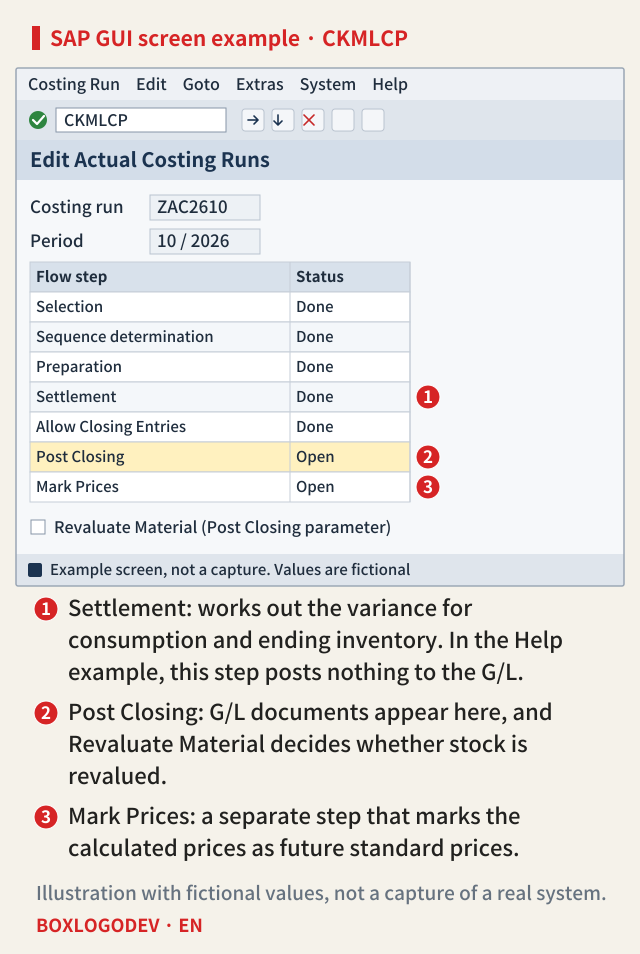
The KRW 1,200 for ending stock depends on the Revaluate Material indicator. Without it, the amount goes to an accrual account (transaction key LKW), stock stays at KRW 6,000 and price control stays S for that period. With it, the amount goes to the stock account (BSX), ending stock for that period becomes 60 kg × KRW 120 = KRW 7,200, and price control becomes V for that period only. Either way, the KRW 1,200 is reversed at the start of the next period, and the KRW 800 for consumption is not reversed. As a result, at the end of that period R-100's KRW 2,000 variance is offset by closing entries of 800 + 1,200 = KRW 2,000. In the Help example's table, the variance from goods receipt stays as a debit in the column for transaction key PRD and the closing entries are credits in the column for key PRY, so the PRD column alone does not show a lower balance. The KRW 800 does not disappear; as read above, it moves to the product's price difference account. The offset of the next period's reversal is also R-100's PRY, so the KRW 1,200 reappears there at that point.
SAP NOTES
Post Closing: what Revaluate Material decides
Where the KRW 1,200 for ending stock goes. Amounts in KRW
No revaluation
- 1,200 goes to the accrual account (key LKW)
- Ending stock stays at 6,000
- Price control stays S for that period
Revaluation
- 1,200 goes to the stock account (key BSX)
- Ending stock becomes 7,200 (60 kg × 120)
- Price control becomes V for that period only
In both cases
- The 1,200 is reversed at the start of the next period
- The 800 for consumption is not reversed
SAP Help Portal, S/4HANA 2025 FPS02 on-premise rules applied to invented values. Not the result of a system run.
One more point is easy to misread. Revaluation does not change the valuation price of the current period. According to the documents, the run only calculates the actual price of the previous period, and the standard price of KRW 100 stays as it is. To use KRW 120 as the next period's standard price, you have to mark it in the Mark Prices step and release it separately.
Exceptions and release differences
Reversal has conditions. Reversing closing entries applies to postings for the previous period, and the last closing entry is what gets reversed. Activating actual costing later has its own catch. If you activate it after setting valuation areas to productive with CKMSTART, you have to run FCML4H_STARTUP to generate the content of the new data structures. It is not needed if you activated before that or migrated from SAP Business Suite, and it can run in test mode first. The preparation for the Material Ledger's productive start cannot itself be reversed, and the documents warn that currencies, valuations and ledgers cannot be changed later either.
With universal parallel accounting, the flow in this note changes as well. According to Help, ledger-specific runs (Ledger Runs) replace periodic runs, runs created before the migration have to be closed and can then only be displayed, and their closing entries cannot be reversed. The flow in this note follows the 2025 FPS02 on-premise documents without parallel accounting. The public cloud edition was not checked, and message numbers do not appear in these sources, so none are given here.
In S/4HANA, whether the Material Ledger is on is a settled question. The questions worth asking are whether actual costing is active in that plant, whether that material is 3 and S, whether a CKMLCP run for that period has reached settlement, and whether revaluation is chosen at Post Closing.
Add your perspective.
Share a question, another approach, or something you have tried.
Checking sign-in…
Loading comments…