An invoice falling due this week is not in the F110 proposal, and it is not in the exception list either. It is tempting to conclude the system missed it, but being in neither list is itself a clue. After reading this note you can sort a missing invoice into four main branches (excluded by the parameters, its turn has not come, blocked, payment method failed) and pick the list or log for each.
The main sources are the SAP Help Portal documentation for SAP S/4HANA 2025 FPS02 and the public SAP Learning course "Configuring Additional Settings in Financial Accounting in SAP S/4HANA". Where a public SAP knowledge base article (KBA) adds to them, the paragraph gives its number and environment. The company code, vendors, invoices, dates and grace days are all invented. Nothing here was run on an SAP system: the documented rules are applied to a fictional example. Error numbers do not appear in these sources, so they are not given.
Do not expect everything in the exception list
The opening lines of the Help page describe the exception list broadly, as showing blocked items and all open items the program did not propose. The specifics listed right below it are three: blocked items, special G/L transactions depending on system settings, and items that could not be settled although due. SAP Learning describes it as showing FI documents that match the payment parameters but cannot be paid.
Reading the two together, it is safer to assume that items outside the parameters, or whose turn has not come, are hard to find in this list. The documents do not state this outright and it could not be checked on a system, so it is this note's reading.
Fictional example: five invoices
Company code 1000 schedules a payment run on November 16, 2026. The posting date is also November 16, Documents entered up to is November 13, the next posting date is November 23, T is the only payment method, and the grace period for payables set for the company code is assumed to be 3 days. Payment terms are assumed to be net only, with no cash discount.
- A: due Nov 17, vendor 100200
- B: due Nov 20, vendor 100200
- C: due Nov 12, vendor 100200, payment block R
- D: due Nov 13, vendor 100300, master record method T but no bank details
- E: due Nov 10, vendor 100200, posting date Nov 13, entered on Nov 14
Branch one: the parameters already excluded it
The first thing to read is the range you entered. An item has to fit the company code, the account restriction and the conditions on the Free selection tab, and special G/L transactions count only if their codes are in the company code settings. The field to check here is Documents entered up to (Docs entered up to on some screens). The Help documentation says the criterion is the creation date rather than the posting date, and open items entered after that date are not processed.
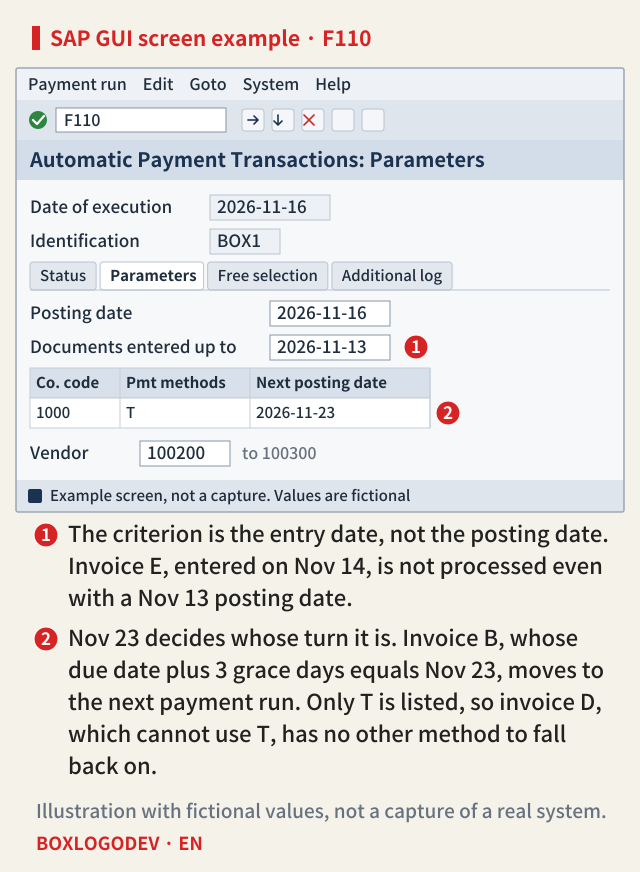
So invoice E has the earliest due date and a November 13 posting date, but it was entered a day late and is not processed. SAP Learning says this field defaults to the run date, so check it first if someone moved it back on purpose or copied and edited the parameters of an earlier run.
The Help documentation also has a Due date field. It says an item must be due by that date to be considered, and that if the field is empty the posting date counts. Read on its own, that would drop invoice A, due November 17. But the public SAP knowledge base article 2859675, written for S/4HANA Cloud Public Edition, gives the same fallback for a field called Customer Items Due By and tests vendor invoices against the next payment date instead. The public preview of KBA 3002413 on F110 also ties that field to customer invoices. So this note treats the two as one field and does not apply it to the vendor invoices here. That they are one field is this note's reading and was not checked on a system.
Branch two: its turn has not come
The Help documentation says the program pays as late as it can without losing cash discount. What sets the turn is the next run date. A vendor item is selected if, with grace days taken into account, it would be overdue at the next run or earns more discount if paid now, and the rest moves to the next run or later. Worked through SAP's example, a due date plus grace falling up to the day before the next run means this payment run, and falling on the next run date means the next one.
SAP NOTES
This payment run or the next?
Run on Nov 16, next posting date Nov 23, assumed grace period 3 days
The rule
- Net due date plus grace days before the next posting date: this payment run
- On or after the next posting date: not this payment run (next run or later)
Invoice A: due Nov 17
- Nov 17 + 3 days = Nov 20
- Before Nov 23: it joins this proposal
Invoice B: due Nov 20
- Nov 20 + 3 days = Nov 23
- Same as the next posting date: it moves to the next payment run
- With no grace period it stays Nov 20 and joins this proposal
The selection example from SAP Help Portal, S/4HANA 2025 FPS02, applied to fictional dates. Net-only payment terms are assumed.
Invoice A: Nov 17 + 3 days = Nov 20, so it joins this proposal. Invoice B: Nov 20 + 3 days = Nov 23, the same as the next posting date, so it moves to the next payment run. This is exactly the case of an invoice due this week that is absent from the proposal. For the same reason, a wrong next posting date (Next p/date on some screens) pulls items forward or pushes them back. Cash discount can change the result, and so can the minimum discount rate and the discount strategy. An invoice-related credit memo falls due together with its invoice. Customer items follow a different rule and are paid in the earliest run falling on or after the first discount term's due date.
Branch three: it is blocked
Invoice C carries payment block R and appears in the exception list. The reason is shown as an error number and error text. R is the mark left by invoice verification, so here the release may have to happen in MRBR rather than F110. SAP Learning says an invoice verification block can be configured to be removable only in that process, and that the type of block decides whether editing the proposal can remove it. A block in the vendor master stops every invoice from that vendor.
Branch four: no payment method was found
Invoice D: Nov 13 + 3 days = Nov 16, so its turn has come. But a payment method has to be specified on the item or in the master record, and the master record must hold what that method needs. The program checks the methods allowed for the payment run one by one in the order entered, and if all fail, the item cannot be settled. SAP Learning says items for which no usable method or bank details can be found go to the exception list.
SAP NOTES
Where the five invoices went
Two of them are hard to find in either list
A: proposal list
- Due date plus grace is before the next posting date
B: outside both lists, waiting for the next run
- Due date plus grace equals the next posting date
- Not unpayable; its turn has not come
C: exception list
- It carries payment block R
D: exception list
- Due, but no usable payment method
- The bank details that method T needs are missing from the master record
E: outside both lists, not processed
- Posting date Nov 13, but entered on Nov 14
- Entered after Documents entered up to, Nov 13
Fictional example. Each outcome applies the documented rules. That B and E stay out of the exception list is this note's reading. Not the result of a run.
The checks also cover foreign payments, foreign currency, bank selection and minimum and maximum amounts. The maximum amount holds a trap: the Help documentation says that without a maximum the method cannot be used at all. That amount range does not apply when the method is specified directly on the item. Add the rule that an item's method takes precedence over the master record's, and you can explain why invoices from the same vendor can get different results.
Which log to read
After creating a proposal, the Help documentation sends you to the proposal log first. If it shows a configuration error, no payment is possible, and you must correct the error, delete the proposal and create a new one. The exception list comes from Edit > Proposal > Exception list, which opens a window for program RFZALI10. SAP Learning adds that exceptions also show in the proposal list. Some cases fall outside the four branches. The public SAP knowledge base article 2859675, written for S/4HANA Cloud Public Edition, says items are not selected when the supplier is already in another proposal, and that the proposal log reports it. Items already cleared are not selected either.
If there is still no answer, use the additional log. On the Additional log tab, choose among Due date check, Payment method selection in all cases, Payment method selection if not successful and Payment document items, and enter vendor or customer numbers. SAP Learning also points to the additional log for finding out why an item cannot be paid. The Help documentation warns, though, that it makes the log longer and processing slower, and says to define it only in exceptional situations or for testing.
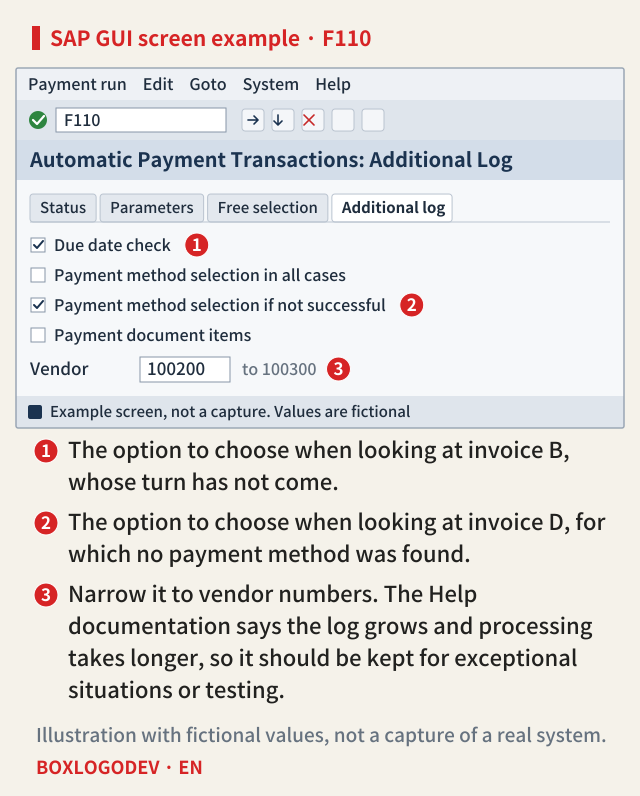
These criteria are set while entering the parameters. Whether they apply to a proposal that already exists is not stated, so this note's reading is that they have to go in when the proposal is created again. The Fiori apps Manage Automatic Payments (F0770) and Revise Payment Proposals (F0771) cover the same work, and the latter shows the exceptions log. Differences from releases before S/4HANA were not compared.
What you change in the proposal stays in the proposal
While editing a proposal you can change the payment method, house bank, block indicator and cash discount. But the Help documentation says these changes affect only the proposal and the source documents are not changed. Blocking an item moves it to the exceptions group and reduces the payment, and changes take effect only when saved. Only block indicators set up as editable can be changed in a proposal. This can be read to mean that an item blocked in this proposal comes up for review again in the next payment run, because its document is unchanged, so to keep it blocked you have to work on the document or the master record.
When an invoice is missing, ask in this order: did it match the parameters, had its turn come, is it blocked, was a payment method found? This note's judgement is that the exception list alone cannot fully answer the first two, so check those with the Parameters tab, the document's entry date and the additional log. If the four give no answer, check whether the vendor is already in another proposal and whether the item is already cleared.
SAP NOTES
Four questions for a missing invoice
Ask them in this order
Did it match the parameters?
- Company code, account restriction, free selection, Documents entered up to
- Look at: Parameters tab, the document's entry date
Had its turn come?
- Due date, grace period, cash discount, Next posting date
- Look at: Due date check in the additional log
Is it blocked?
- Payment block on the document or master record
- Look at: the error text in the exception list
Was a payment method found?
- Master data, minimum and maximum amount, currency, bank
- Look at: exception list, Payment method selection in the additional log
Not a procedure from SAP. This note's order, built from SAP Help Portal, S/4HANA 2025 FPS02, and SAP Learning.
Add your perspective.
Share a question, another approach, or something you have tried.
Checking sign-in…
Loading comments…