You put an order number on a document and assume you can settle that order at period end. If it is a statistical order, settlement is not allowed at all. The cost may look as if it sits on the order, but it really sits on another object. After this note you will be able to read one posting line and say which object holds the cost, add up cost center and order reports without double counting, and tell what can move at period end.
The basis is the SAP Help Portal documentation for SAP S/4HANA 2025 FPS02 and a public SAP Learning course. The cost centers, orders, accounts and amounts are invented. Nothing here was posted on an SAP system; the rules are applied to a fictional document by hand.
True objects and statistical objects
The Help documents split CO objects in two. True objects, such as cost centers (for costs), true orders, true projects, networks and profitability segments, hold the cost and can be senders or receivers. Statistical internal orders, statistical projects and profit centers are statistical objects. They cannot pass costs on to other objects and record values for information only. An indicator on the order master decides which kind an order is.
The core rule is that every line posted to a cost element account needs a true object. A line on an account that is not a cost element, such as the offsetting credit in the example below, falls outside this rule. Up to three statistical objects can be added on top of the true object. A cost center is the exception that can appear alongside another true object, and in that case the other object really holds the cost while the cost center drops to statistical. So a cost center written on a line does not prove that it holds the cost.
SAP NOTES
One cost element line, one true object
The rest are recorded for information only
Cost center + statistical order
- True: cost center
- Statistical: order, profit center
Cost center + true order
- True: order
- Statistical: cost center, profit center
A line on a non-cost-element account
- Outside the true-object rule
- Such as offsetting account 113000 in the fictional document below
Summarized from SAP Help Portal, S/4HANA 2025 FPS02, 'Account Assignment of Controlling Objects'.
Two lines that look the same
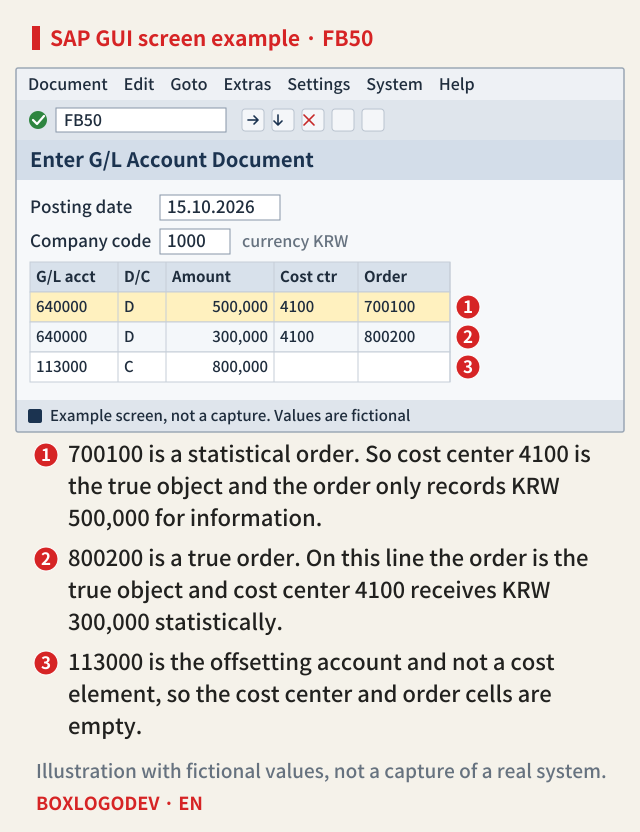
Here is a fictional case. In October 2026, two lines are posted to expense account 640000. The first has KRW 500,000 with cost center 4100 and statistical order 700100. The second has KRW 300,000 with cost center 4100 and true order 800200. The offsetting credit of KRW 800,000 goes to balance sheet account 113000, which is not a cost element. Cost center 4100 is assigned to profit center P100, and order 800200 is also given profit center P100.
On the first line, the cost center is the true object and the order and profit center are statistical. On the second, the order is the true object and the cost center and profit center are statistical. This has the same structure as the two cases the Help documents show with USD 100. On the entry screen, the two lines differ only in amount and order number.
Four reports add up to three times the expense
Now place the values report by report, in KRW. Cost center 4100 has true 500,000 and statistical 300,000, which makes 800,000. Statistical order 700100 has statistical 500,000, true order 800200 has true 300,000, and profit center P100 has statistical 800,000. Adding the four reports as they stand gives 800,000 + 500,000 + 300,000 + 800,000 = KRW 2,400,000, three times the KRW 800,000 expense. Only the true amounts match the document: 500,000 + 300,000 = KRW 800,000.
SAP NOTES
Expense KRW 800,000, reports total KRW 2,400,000
The two fictional lines by report. Amounts in KRW
Cost center 4100
- True 500,000 + statistical 300,000 = 800,000
Statistical order 700100
- Statistical 500,000
True order 800200
- True 300,000
Profit center P100
- Statistical 800,000
Add only the true amounts
- 500,000 + 300,000 = 800,000
- This equals the expense on the document
Invented values, with the documented rules applied by hand. Not the result of a system run.
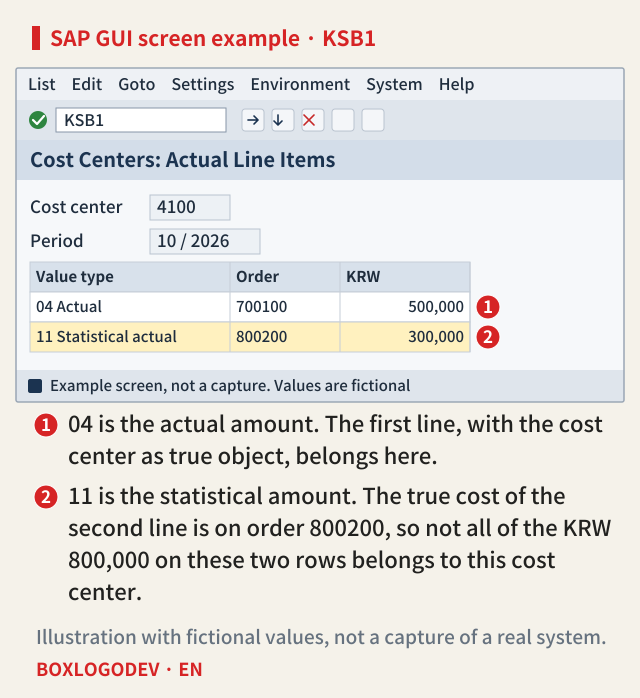
In line item reports, the value type makes the difference. The Help documents list 04 Actual and 11 Statistical actual as the standard value types of the actual line item report. If both are selected in the cost center line item report (KSB1), a total can include statistical amounts, so read the value type column as well. Which line falls under which type is this note's reading of the rules above, and the columns and totals on screen depend on the layout.
What moves at period end
On the normal path, the KRW 300,000 on true order 800200 can be settled to another object under its settlement rule. Individual settlement runs in app F4568 or KO88, and collective settlement in KO8GH or a job template in app F3767. According to SAP Learning, the costs incurred on the order stay visible after settlement.
The KRW 500,000 on statistical order 700100 is different. The Asset Accounting side of Help says an order or WBS element marked statistical cannot be settled and serves planning and budget monitoring. The CO side says costs on statistical objects cannot be passed on to other objects, and the documentation for the settlement rule app (Manage Settlement Rules, F5695) lists statistical orders among the cases whose rules cannot be edited. This KRW 500,000 sits on the cost center, so if it moves, it moves by assessment or distribution from the cost center.
The reverse case exists too. If cost center 4100 is allocated in Manage Allocations with the Posted Amounts rule, the balance comes from real postings and statistical records are left out. The document's example is a posting whose original object is a WBS element. It does not name orders directly, but this note reads them as statistical postings under the same sentence. On that reading, the balance to allocate is KRW 500,000 even though the report shows KRW 800,000. No equivalent wording turned up for classic KSU5 and KSV5, although this does not conflict with the general rule on statistical objects above.
SAP NOTES
What moves at period end
What can move from the same fictional document. Amounts in KRW
True order 800200: 300,000
- Can be settled under its settlement rule
- Individually in KO88 or app F4568
Statistical order 700100: 500,000
- The order cannot be settled as a sender
- The true cost is on the cost center
Allocating cost center 4100
- With Posted Amounts, the true 500,000 is the balance
- The statistical 300,000 is left out
This note's reading, applying the S/4HANA 2025 FPS02 rules to invented values. Not the result of a system run.
SAP Learning also says a settlement can post statistically to a cost center, a statistical order or a statistical WBS element alongside the true receivers. Receiving a statistical value in a settlement is not the same as being settled as a sender. Whether the statistical indicator can be changed on an order that already has postings could not be confirmed in public documents, so this note gives no procedure for it.
Profit centers and combinations that are not allowed
Cost centers and profit centers are easy to treat as the same layer, but the posting rules separate them. According to Help, you can post to a profit center only in addition to a true object, so costs and revenues reach it only statistically, and the profit center is derived from the true object. A profit center you enter must match the one assigned to that object. These are account assignment rules for postings, though. Manage Allocations has a separate Profit Centers context for non-operating and balance sheet accounts, so this does not mean profit centers can never allocate between themselves.
The documents also rule out a few combinations. You cannot enter statistical objects with no true object, put an order and a statistical order on one line, or name the same object as both true and statistical. Revenue posted with a cost center reaches it only statistically, and with margin analysis you cannot post revenue to only a cost center or profit center. Message numbers do not appear in these sources, so none are given here. The rules follow the 2025 FPS02 documents, and whether earlier releases behave the same was not checked release by release.
An order number on a document does not by itself tell you that the order holds the cost. Before you build a settlement list at period end, check the statistical indicator on the order master, and when you add up cost center and order line item reports, add only the value type 04 lines.
Add your perspective.
Share a question, another approach, or something you have tried.
Checking sign-in…
Loading comments…