Most ABAP maintenance on the FI side is small: add a column, change a condition, find the cause of a dump. Yet even a small change drags the same routine along every time: open SE80, pick a transport request, find the source, activate, test. For one month I handed that routine to Claude Code Desktop. This note sets my setup side by side with the documentation of vibing-steampunk (v2.61.0, October 9, 2026), the open-source bridge that connects SAP ADT over MCP, and shows which flags and tools blocked what and what was delegated. All screens are reconstructed, and system IDs, accounts, transport numbers and program names are hidden.
First decide what it must not do
There was one condition: no incidents in production. So from the start I decided "what to block" before "what to allow".
The setup has three parts. Claude Code Desktop is both the chat window and the worker; the global instructions (CLAUDE.md), command files, hooks and memory live there. The bridge is vibing-steampunk (vsp), written in Go. Its docs call it an "ADT ↔ MCP Bridge" and say it works on any system with ADT enabled, 7.50 upwards. It uses the same APIs Eclipse ADT uses, so nothing has to be installed on the SAP side, and tools such as GetSource, EditSource, SyntaxCheck, RunUnitTests, RunATCCheck and RunQuery are exposed over MCP. The hyperfocused mode the docs recommend folds these into a single SAP(action, target, params) tool.
Each SAP system got its own bridge registration with different rights. vsp's safety controls are flags. --allowed-packages limits writable packages by wildcard, --read-only refuses write operations, and --expect pins SID.CLIENT so the bridge refuses to work anywhere else. Creating and releasing transport requests stays blocked unless --enable-transports is set.
SAP NOTES
Each system is registered with different rights
System IDs and accounts are hidden; flag names follow the vibing-steampunk v2.61.0 docs
Development
--allowed-packages "Z*,Y*,$*"- Registered at user scope
- Read, write, activate, unit test
- Writes only in Z*, Y*, $* packages
Quality
--read-only- User scope, read-only
- Read and test only
- Where imported changes are verified
Production
--read-only + rule: no tests- Project scope only, read-only
- Lookups for root-cause work
- No tests either
--read-only does not stop ordinary unit test runs (the docs refuse only runs that include dangerous or critical tests), so the production ban lives as a separate command-file rule.
Production is used only to look at data and source during root-cause work. One caveat: --read-only does not stop every execution. According to the v2.59.0 change notes, read-only mode refuses unit test runs only when they include dangerous or critical tests, and "ordinary runs still work". So the rule "no tests in production" is written separately in the command file.
The development loop: /sap-dev
The routine is bundled into one command file. Typing /sap-dev <object> <change> runs these steps.
- Preflight:
GetSystemInfoconfirms the development system and client. If they differ, the run stops at once. vsp's--expectcan enforce the same check in the bridge itself. - Baseline: the full source before the change is saved locally, as the reference for the later diff.
- Transport: pick from the modifiable requests. If there are several, ask a person; if there are none, stop. Creating requests is deliberately blocked.
- ATC baseline: the ATC result before the change is saved, so findings that were already there do not fail the gate.
- Edit:
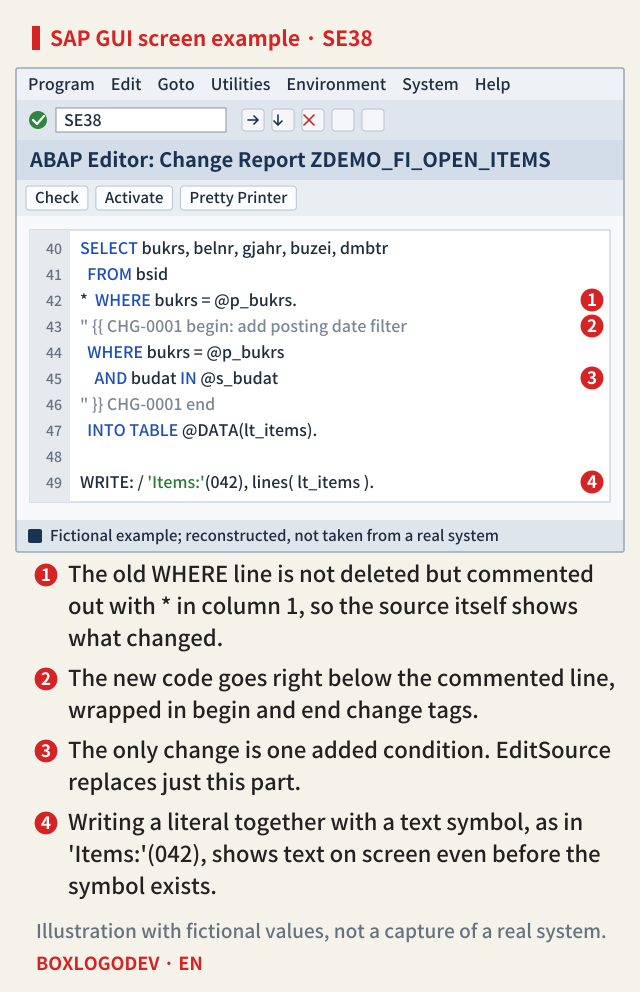
EditSourcereplaces only the part to change. Old lines are not deleted but commented out with*in column 1, and the new code with a change tag goes right below. - Verify: check for inactive objects → ABAP Unit → ATC delta → fetch the server source again and diff.
- Human checkpoint: the run stops here. A person releases the request and imports it into the quality system.
SAP NOTES
What one /sap-dev run does
/sap-dev <object> <change> · inside the development system only
1 Preflight
GetSystemInfo- Check system and client
- Stop at once if they differ
2–4 Prepare
GetSource · RunATCCheck- Save the full source before the change
- Pick a modifiable request (creation blocked)
- Save the ATC result before the change
5 Edit
EditSource- Replace only the changed part
- Comment old lines with * in column 1
- New code and change tag below
6 Verify
RunUnitTests · RunATCCheck · GetSource- Check inactive objects
- ABAP Unit · ATC delta
- Fetch the server source again and diff
7 Human checkpoint
STOP- The run stops here
- A person releases and imports
Tool names are those in the vibing-steampunk docs. Creating or releasing requests stays blocked without --enable-transports.
Step 7 is the point. Inside the development system the agent moves on its own, but it never crosses a system boundary. The commenting style in step 5 keeps the existing convention of leaving a visible change history in the source.
The verification gate: /sap-qa
After the import, /sap-qa <object> qas runs the same gate in the quality system. This command uses only the bridge registered with --read-only, so it has no write rights. Each step reports one line, PASS / FAIL / WARN, and the verdict rules are fixed in the command file.
- A unit test result of
classes == []is not a pass but a fail (no tests). - In ATC, only new P1 findings fail. New P2 findings go to a person.
- Items this setup does not automate, such as running a report from its selection screen or checking the spool, are never reported as "automated" but listed as work for a person.
The biggest lesson: the quiet green
What I learned most in that month is that a tool reporting success does not mean it succeeded. These are cases I confirmed myself.
- Activate returned
success: trueeven for an object that does not exist. - When several includes of the same main program are inactive, the server returns a list of objects to activate together, and the bridge read it as an empty reply. The result said
success: true, yet nothing had been activated. - When
EditSourcefails, the failure does not arrive as an MCP error but as a normal reply containingsuccess: false. The typical case is another person's transport request holding the object. - Running
SyntaxCheckon an include URL always reported "no errors", even for broken source. Only a check through the main program URL actually checks. - Once, when a new object was created, its test class had a syntax error, yet creation and activation were reported as "successful".
SAP NOTES
Re-check success: true another way
The 'quiet greens' met in one month, and the check added for each
Activation
→ GetInactiveObjects- success: true even for a missing object
- Several inactive includes → empty reply
- Nothing was actually activated
Save
→ GetSource + diff- Failure does not arrive as an MCP error
- success: false inside a normal reply
- Typical when another request holds it
Syntax check and tests
→ main program · class+method alerts- Checking an include URL always says no errors
- Check through the main program URL
- classes == [] is a fail (no tests)
Some of these may be fixed in later bridge versions. Run the same checks on the version you use.
So I set one rule: do not trust a success flag; confirm the result another way. Activation is confirmed with the list of inactive objects, saving by fetching the server source again and diffing, and tests by looking at both class-level and method-level alerts. vsp releases often (v2.59.1, v2.60.0 and v2.61.0 in early October alone), so some of these may already be fixed. The checks stay anyway. Each time I hit one of these traps, it became a rule in the command file and in memory, and the next Claude session does not fall into it again.
Where hands are still needed, and where the docs have moved
When I first set this up, I treated quite a few jobs as impossible over the bridge and left them to people. Checked against the current docs, the bridge can already do some of them, and most of what remains is closed on purpose.
- Text pool (selection texts, text symbols): the docs describe reading and writing them over ADT with
vsp textsand the MCPi18noperations (texts_get/texts_set). A write is shown as a plan first, and lock, write, unlock and activation happen in one call. The docs also warn that activating the program does not activate the texts. I keep the habit of writing a literal together with a text symbol, as in'Label'(042), so text appears on screen even before the symbol exists. On a version with this feature, creating symbols can move into /sap-dev too. - Debugger and RFC: the docs say the debugger runs on SAP's own ADT resources, the same ones Eclipse uses, with nothing installed on the server. The WebSocket handler (ZADT_VSP) once needed is no longer required for debugging or calling function modules. Running reports and calling RFC, however, are remote code execution paths, so this setup leaves them off. Under
--read-only,RunReportand RFCcallare refused as well. Functional checks are done with ABAP Unit integration tests andRunQueryaggregate comparisons instead. - Screens (dynpros) and GUI status: a
CALL SCREENto a screen that does not exist passes the syntax check and activation. It only fails at run time. So any change that needs a screen is noted in the handover document as "cannot run until the screen is created". - Transport release and import: vsp has transport features opened by
--enable-transports, but these were a person's job from the start and stay off.
Three layers of guardrails, and memory
In short there are three layers. First, the global instructions (CLAUDE.md): no dangerous command runs without explicit approval, and the target is checked before any file is overwritten. Second, hard rules in the command file: write only to Z*/Y*/$* packages in the development system (the bridge enforces the same range with --allowed-packages), never force-release someone else's lock, and never summarize a failure as a pass. Third, a hook: a script screens out destructive shell commands before they run.
The last rule, "report partial success as partial success", mattered more than I expected. Agents tend to summarize results favorably, and in SAP a report of "mostly done" turns into a production incident after the import.
Claude Code's file-based memory keeps measured facts, one per entry: bridge traps, the client setup of each system, the business rules of particular programs, decisions and the reasons for them. One note says, for example, "if the quality system returns zero rows, first suspect that no client was specified". I once missed exactly that and wrongly concluded there was no data. As such notes piled up, the same mistakes became rarer.
After one month
What works well: root-cause investigation (tracing source, querying tables, checking dumps), repeated small changes with verification, before-and-after comparison, and summarizing what a transport request contains. The investigation stage got faster than anything else. What is still a person's job: business judgement, transport imports, screen work, and tests that run real transactions.
What mattered most was not giving the agent more rights but making it report failure as failure. The bridge can do more with every release, but what gets switched on is decided by our own rules, not by the docs. The agent takes the repetitive work inside the development system, and people make the decisions that cross the boundary. Drawing that line clearly is what made it safe to hand over so much.
Add your perspective.
Share a question, another approach, or something you have tried.
Checking sign-in…
Loading comments…