You create a destination in SM59, press Connection Test, and it finishes without complaint. Yet when a program calls a function module through the same destination, it stops with a logon error or an authorization error. The gap makes sense once you know how SM59 splits its tests. After reading this, you will be able to tell what each of the three tests checks, which check is added only by a real call, and which user in which system needs which S_RFC values. The example uses a fictional ABAP connection Z_ERP_DEMO (connection type 3), a target-system user RFC_DEMO and a function group Z_DEMO_API. The reference is the ABAP Platform 2025 FPS02 documentation.
SM59 splits testing into three functions
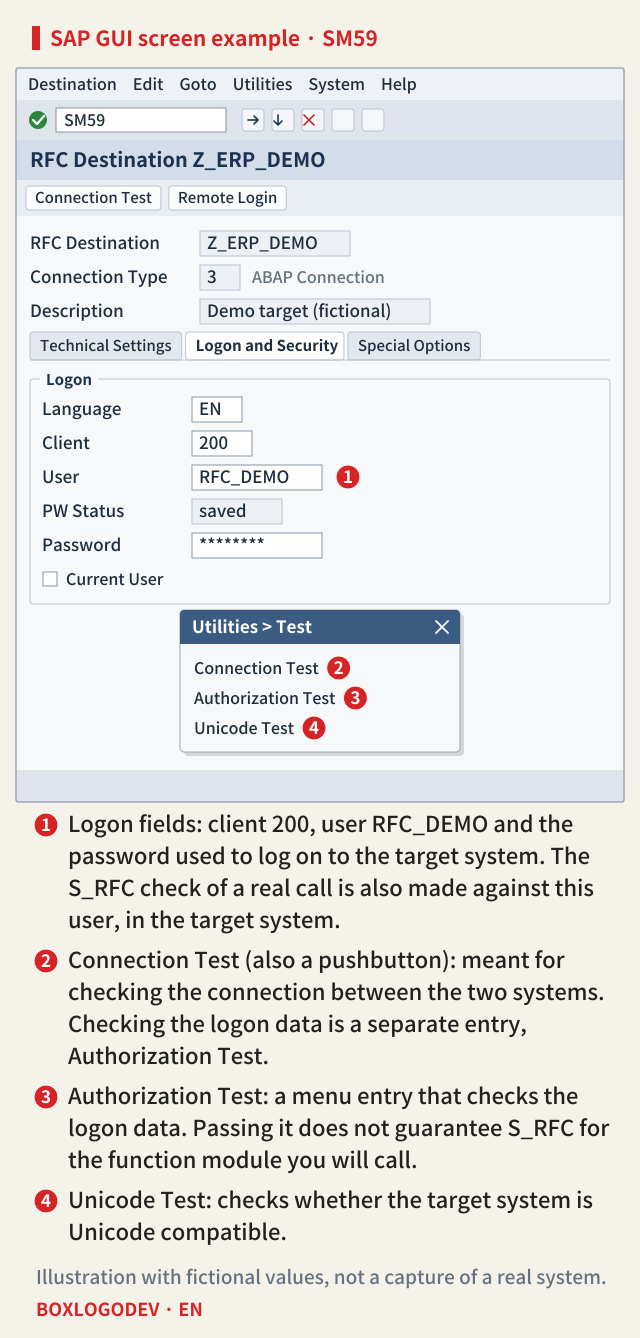
Open a destination in SM59 and go to Utilities > Test, and you find three functions: Connection Test, Authorization Test and Unicode Test. Of these, Connection Test is also a pushbutton on the application toolbar, so it is usually the first thing people press. Authorization Test checks the logon data, and Unicode Test checks the target system for Unicode compatibility.
The public help does not list item by item what Connection Test checks. The procedure for creating an ALE destination for Central User Administration (CUA) also keeps the two apart: Test Connection for whether the two systems can reach each other over the network, and Test Authorization for the system user's authorization. Checking the logon data is a separate entry, Authorization Test. So read a passed Connection Test as "the two systems can connect" and nothing more, and check the logon separately.
Authorization Test is the one that looks at logon data
On a type 3 destination, the Logon and Security tab holds the values used to log on to the target system: language, client, user, password, and a status field that shows whether a password has been saved. The same tab has Current User, which logs on with the name of the user who is currently logged on, plus the trust relationship, the logon screen option and security settings such as SNC. In the example, Z_ERP_DEMO logs on to client 200 as RFC_DEMO with a saved password (callout 1 in the figure).
Authorization Test is the entry in the Utilities > Test menu that checks this logon data. A wrong client number, a user name that does not exist in the target system or a password that has changed can be caught here before a real call. When a real call stops with a logon error, run this test first rather than pressing Connection Test again.
A passed Authorization Test is not the end either. The procedure for the CUA destination points out that this test covers no more than the system user, its password and a basic authorization, and does not check whether every authorization the CUA needs is there. For other destinations too, there is no basis for reading a passed test as covering the authorizations for the function module you will call. That check happens during the real call.
SAP NOTES
Three layers; S_RFC for the function shows in the real call
Fictional destination Z_ERP_DEMO (type 3) · user RFC_DEMO · function group Z_DEMO_API
Network connection
- Does the connection between the systems work?
- Button: Connection Test
- If it fails: target host and technical settings
Logon
- Client 200 · user RFC_DEMO · password
- Menu: Utilities > Test > Authorization Test (logon data)
- If it fails: values on the Logon and Security tab
Call authorization, S_RFC
- The target system checks S_RFC for RFC_DEMO
- Function group Z_DEMO_API first, then the function module name
- Where it shows up: the real RFC call
Passing the three tests does not guarantee 3. If the calling destination has an authorization value, an S_ICF check also runs on the caller side. Names and values are fictional; this is not output from an SAP system.
In a real call, the target system checks S_RFC
When a function module is called over RFC from another system, the called system runs a check against the authorization object S_RFC. The user being checked is the user defined in the destination, in the example RFC_DEMO in the target system. It is not the user who ran the program on the calling side. Current User is meant to be used together with a trust relationship to the target system (trusted RFC), so this note does not cover it. If Current User is chosen without a trust relationship, the call can be stopped at logon.
The check uses the name of the function group the function module belongs to first; if that fails, it checks the function module name. S_RFC has three fields: RFC_TYPE is either FUGR for a function group or FUNC for a function module, RFC_NAME is the name, and ACTVT is 16 (execute). Grant the function group Z_DEMO_API as FUGR and RFC_DEMO can call every function module in that group; grant only Z_DEMO_GET_ORDERS as FUNC and it can call that one function module. The check runs once, the first time the function module is executed in that RFC session.
The group of the business function module is not always enough. When two SAP systems exchange tRFC or qRFC calls, S_RFC must also contain the function groups ERFC and ARFC, which handle the technical side of the communication, and RFC calls in external (non-SAP) systems additionally need SYST. If the same function works as a synchronous call but is blocked when sent as tRFC, look at ARFC and ERFC first. When a call sent as tRFC fails, the list in SM58 (the transactional RFC monitor) on the calling side shows its LUW ID with the error message taken from the target system.
S_RFC only allows the function module to be called over RFC. If the function module contains its own business authorization checks, RFC_DEMO has to pass those as well.
How the check is made is set on the called application server, through its profile parameter auth/rfc_authority_check. For what each value changes, read the parameter description in RZ11 on the target system.
SAP NOTES
S_RFC values for RFC_DEMO in the target system
Fictional function group Z_DEMO_API · fictional function module Z_DEMO_GET_ORDERS
Whole function group
FUGR · Z_DEMO_API · 16- RFC_TYPE = FUGR
- RFC_NAME = Z_DEMO_API
- ACTVT = 16 (execute)
- Every function module in the group can be called
One function module only
- RFC_TYPE = FUNC
- RFC_NAME = Z_DEMO_GET_ORDERS
- ACTVT = 16 (execute)
- Checked by name when the group check fails
Extra groups by call type
- tRFC and qRFC between SAP systems: FUGR ARFC, ERFC
- RFC calls in external non-SAP systems: FUGR SYST as well
The check runs once, the first time the function module is executed in that RFC session. It is configured with the profile parameter auth/rfc_authority_check. Names and values are fictional.
Working out which layer stopped the call
A call through the destination passes three layers. The first is the connection between the two systems, the second is the logon with client, user and password, and the third is S_RFC in the target system. The first two can be tried in advance with the tests under Utilities > Test, but the third shows up only in a real call, once the function module to be called is known.
- If Connection Test fails, look at the target system values on the Technical Settings tab and at the connection between the two systems before logon or authorizations.
- If Connection Test passes and Authorization Test fails, compare the client, user and password on the Logon and Security tab with the user in the target system. If the logon values are right and it still fails, the cause may lie in the basic authorization the test also looks at, so check RFC_DEMO's authorizations in the target system as well. The public help does not say which authorization that is.
- If both tests pass and only the real call is blocked with an authorization error, check in the target system whether RFC_DEMO's S_RFC contains the function group, or the name, of the function module being called. For tRFC and qRFC, check ARFC and ERFC as well.
Sometimes there is one more check. If a value is entered in the Authorization for Destination field on the Logon and Security tab, the calling side checks at runtime whether the calling user has that value in the authorization object S_ICF. That check applies to the user in the calling system, so changing RFC_DEMO's authorizations in the target system will not clear it.
What this note leaves out
This note is based on a type 3 destination that logs on with a user and password. Trusted RFC and Current User, SNC, the callback whitelist and bgRFC log on or check differently and are not covered. The three entries in the test menu are as in ABAP Platform 2025 FPS02, and an older edition of the same help page lists them the same way. The menu bar and tab names in the screen figure are drawn for illustration and may differ from the real screen, and nothing in this note was run on an SAP system.
A passed Connection Test only tells you that the systems can connect. If the real call stops with a logon error, check the logon data with Authorization Test first; if it stops with an authorization error, start by checking, in the target system, whether the destination user's S_RFC contains the function group of the function module being called.
Add your perspective.
Share a question, another approach, or something you have tried.
Checking sign-in…
Loading comments…