Once an audit date is set, it is tempting to finish the preparation by switching on a few filters in the dynamic configuration of RSAU_CONFIG. They take effect on every application server at once, with no restart. But if a routine restart falls inside the audit period, whether the same filters still record afterwards depends on where the filters were kept. After reading this note you will be able to tell what happens to dynamic filters, static profiles and the audit configuration's parameters after a restart, and to plan how to read the log across a restart yourself before the audit begins.
The profile name ZBOX_AUDIT, client 100, the servers and the restart time in the examples are all fictional. No real system was opened or reconfigured for this note. The behaviour follows three versions of the Security Audit Log documentation on the SAP Help Portal: NetWeaver 7.40 SPS31, 7.50 SPS29 and ABAP Platform 2025 FPS02. Where the versions differ, the text says so on the spot.
Dynamic filters take effect at once, and a restart removes them
By default the Security Audit Log records the events that match an active filter. A filter is made of a client, a user or user group, audit classes (dialog logon, RFC logon, transaction start, user master change and others) and the priority of the events. The filter information sits in a control block in the application server's shared memory. The 2025 documentation describes one exception (the 7.40 and 7.50 documentation has no such section). Permanently active events are recorded whenever recording is on, regardless of the filter settings. Their list is hard-coded in the kernel, so the configuration cannot change it; the related SAP Note is 2838838 (login required).
Filters live in one of two places: the dynamic configuration or a static profile. A dynamic filter is defined in the Dynamic Configuration folder of RSAU_CONFIG, and Filter for recording active is selected for each filter the audit should use. The system distributes the change to all active application servers, and it takes effect immediately. While they are on, dynamic filters override the filter settings of static profiles. In the 7.40 version, the filters are defined on the Dynamic Configuration tab of SM19 and distributed to all servers with Configuration › Activate Audit.
The catch is how long they last. Dynamic filters stay active until they are switched off or the system restarts, and on each server they exist only until that server is shut down. A server that starts after the dynamic filters were activated uses the filters of the active static profiles. So if the audit filters were kept only in the dynamic configuration, they are gone after the restart. Put the two behaviours together and restarting a single server is enough to split the system. The restarted server records by the static profile's filters, while servers that have not been shut down keep recording by the dynamic filters. SAP recommends the filters of static profiles for permanent audit logs, and the 2025 version's example of a dynamic filter is one that is switched on while a remote support user works and switched off when the user is done.
SAP NOTES
Switch on a dynamic filter, then restart one server
Fictional system · servers A and B · active static profile ZBOX_AUDIT · Static security audit active on
Switch on a dynamic filter
Dynamic Configuration- Distributed to all active servers (A, B)
- Effective at once, no restart
- Overrides static profile filters while on
Restart only server A
- A's dynamic filters end when A shuts down
- B keeps them until B shuts down
Server A after the restart
ZBOX_AUDIT- Uses the filters of active static profiles
- A filter kept only in the dynamic configuration is gone
- A and B now record by different filters
After a full system restart every server starts with the filters of the active static profile. The 2025 documentation also describes permanently active events, recorded regardless of filters. Server and profile names are fictional.
What survives a restart is an activated static profile
A static profile stores a set of audit filters in the database. Once the profile is activated, the system reads it when it starts, and every instance uses the same filters to choose which events to record.
In the 7.50 version, you pick a profile in the Static Configuration folder of RSAU_CONFIG or make a new one with Create Profile, then add filters with Create Filter from the profile's context menu. Select Filter for recording active for each filter the audit should use, save, and activate the profile with Activate from the context menu. The number of filters a profile can hold is set by Number of Filters per Profile under Parameters (range 2 to 90 in the 7.50 version).
The point is that activation alone does not finish the job. In the 7.40 and 7.50 versions, the last step of the procedure is to restart the application server; in the 2025 version you can instead right-click the profile and choose Apply to dynamic configuration. Once the profile is activated and the whole system is restarted, or in 2025 the profile is applied to the dynamic configuration, actions that match the active filters are recorded.
For a static profile to be used, Static security audit active under Parameters must also be on. This setting switches on the use of static profiles, and with it off, dynamic filters can still record. That is why, while dynamic filters are recording well, nothing shows that this setting is off. In the 7.40 version it is Security Audit Active on the Kernel Parameters tab of SM19, and the profile parameter is rsau/enable.
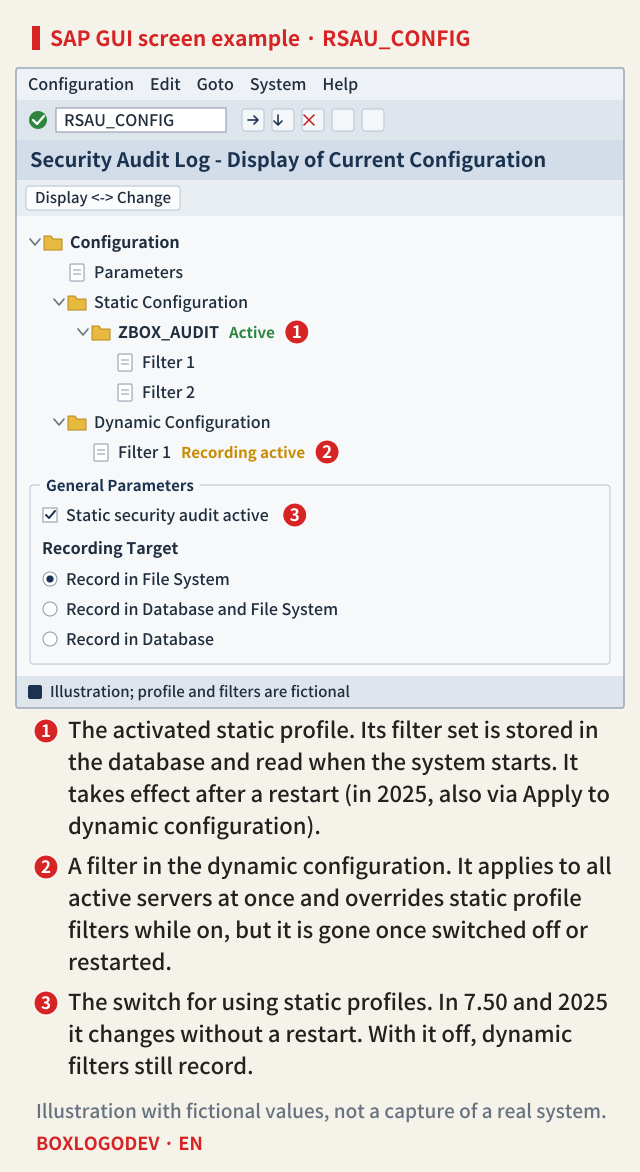
In the screen example, marker 1 is the activated static profile ZBOX_AUDIT, marker 2 is a filter in the dynamic configuration and marker 3 is Static security audit active. If an audit filter exists only at marker 2 and not under marker 1, nothing is recorded by that filter after a restart.
Some parameters need a restart and some do not
Apart from the filters, there are parameters such as the recording target and the size of the audit files. In the 7.50 and 2025 versions they are set in the Parameters folder of RSAU_CONFIG, and three of them change without a restart: Static security audit active, Recording Target and Maximum Size of All Audit Files. Some of the others do need a restart, and the 2025 screen shows a warning icon next to them. The 7.40 version says the whole preparation procedure needs a restart and gives no such list of exceptions.
The same values can also be kept as profile parameters in the instance profile. Once a parameter has been set in the audit configuration, however, the system ignores the value in the instance profile. The exceptions are DIR_AUDIT and FN_AUDIT, which set the directory and the file name of the audit files; they are changed with RZ11 in the 7.40 version and with RZ10 in the 7.50 version. So on a system where the audit configuration holds a value, changing only the instance profile parameter (for example rsau/enable from the 7.40 table) and restarting still leaves the audit configuration's value in use.
It also helps to know where the first records go when the system is restarted together with its database. In the 7.50 and 2025 versions, events from before the database instance has started are saved in the file system. That is why the file system parameters must be set even when Recording Target is Record in Database.
SAP NOTES
Where each setting is kept and when it takes effect
RSAU_CONFIG in the 7.50 and 2025 versions · 7.40 differences below
Dynamic filter
Dynamic Configuration- Applies to all active servers at once
- Lasts until switched off or restarted
- Overrides static profile filters while on
Static profile
Static Configuration- Filter set stored in the database
- Once activated, read when the system starts
- Restart after activating; 2025 can also apply it to the dynamic configuration
- Used only with Static security audit active on
Parameters in the audit configuration
Parameters- No restart: Static security audit active, Recording Target, Maximum Size of All Audit Files
- Some of the others need a restart
- The 2025 screen marks them with a warning icon
Parameters in the instance profile
- Ignored once the audit configuration sets a value
- Exceptions: DIR_AUDIT, FN_AUDIT (audit file directory and file name)
- These two: RZ11 in 7.40, RZ10 in 7.50
The 7.40 version uses the Dynamic Configuration and Kernel Parameters tabs of SM19 and names no parameters that change without a restart. There, the switch for static profiles is Security Audit Active (rsau/enable).
Before the audit, go through one restart and check
If a restart may fall inside the audit period, put the audit filters into a static profile, activate it and keep Static security audit active switched on. You can apply the profile with a full system restart or, in the 2025 version, with Apply to dynamic configuration, but do the check after one planned restart has passed, before the audit.
The log is read in RSAU_READ_LOG (Selection of Audit Events from the Audit Files). Set the period (From Date/Time, To Date/Time) so that it spans the restart time. With Instance Name left empty, all servers are read; choosing <LOCAL> reads only the server you are logged on to. Leave it empty, because perhaps only one server was restarted. With Selection Type you can pick a profile and filter you have defined and narrow the result to their conditions. Audit files and the table are both selected as the data source by default; keep it that way so that events saved only in the file system before the database started are not missed.
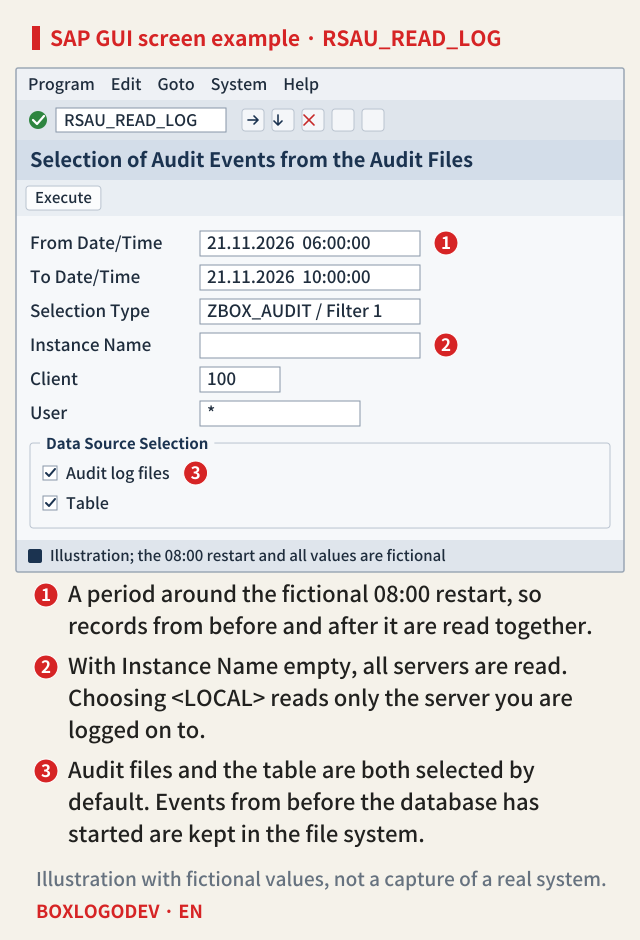
In the screen example, marker 1 is the period across the restart, marker 2 the empty Instance Name and marker 3 the two data sources. What to check is whether, on each server where an action matching the static profile's filters took place after the restart, that action was recorded. On a server where no such action took place, seeing no events does not mean the filters are missing. If all you see are events recorded regardless of filters, such as the permanently active events, that is no evidence that the filters are alive.
In the 7.40 version, check Security Audit Active on the Kernel Parameters tab of SM19, and read the log in SM20 (Analysis of Security Audit Log) with all servers selected in the server list on the left. In the 2025 version, as in the 7.50 version, the configuration is done in RSAU_CONFIG and the log is read in RSAU_READ_LOG. Some 2025 help pages refer to these same screens, with the same titles, as SM19 and SM20, the 7.40 transaction names. They also describe SM20_ADM, which shows user and terminal names pseudonymized with a hash. The Security Audit Log contains personal data, so check the data protection rules that apply as well.
The last step of audit preparation is not switching filters on but reading the log to see that the same filters still record after one restart. Use dynamic filters as a stopgap in the meantime, and keep the rules the whole audit period needs in a static profile.
Add your perspective.
Share a question, another approach, or something you have tried.
Checking sign-in…
Loading comments…