Unlike --force, git push --force-with-lease is the force-push option meant to avoid overwriting commits that reached the remote without your knowledge. Used without an expected value, though, it does not compare the remote branch with the last commit someone actually looked at. It compares it with the local remote-tracking branch (origin/main). If a git fetch moves origin/main just before the push, a teammate's commit is overwritten as if --force had been used. Below are real runs with git 2.54.0 against a throwaway remote and two clones, changing only the way of pushing. By the end you can pick the push command that keeps a teammate's commit safe in your own setup.
The setup: one remote, two clones, one rewritten commit
A bare repository origin.git and its two clones sit on one Mac, run with git 2.54.0 (Apple Git-157) on macOS 27.0.1. The one that force-pushes is called me, the teammate's is mate. "My main" in the figures and output means the main branch of the me clone.
me pushed base (bdeea2d) and my work (9d6506f), and the teammate pushed teammate fix (6459d12) on top. Meanwhile me ran git commit --amend on the already pushed 9d6506f to add a forgotten test file, which produced 98ccc0c. My main has now diverged from the remote main, so it cannot go up without a forced push.
At this point the three refs stand like this: the remote main is the teammate's 6459d12, my origin/main is still 9d6506f, where the last push from me left it (no fetch since), and my main is 98ccc0c. Every case rebuilt this setup from scratch. Global and system git config were ignored so personal settings could not interfere, and commit times were fixed so the commit IDs are the same in every case.
Four ways of pushing, run one after another
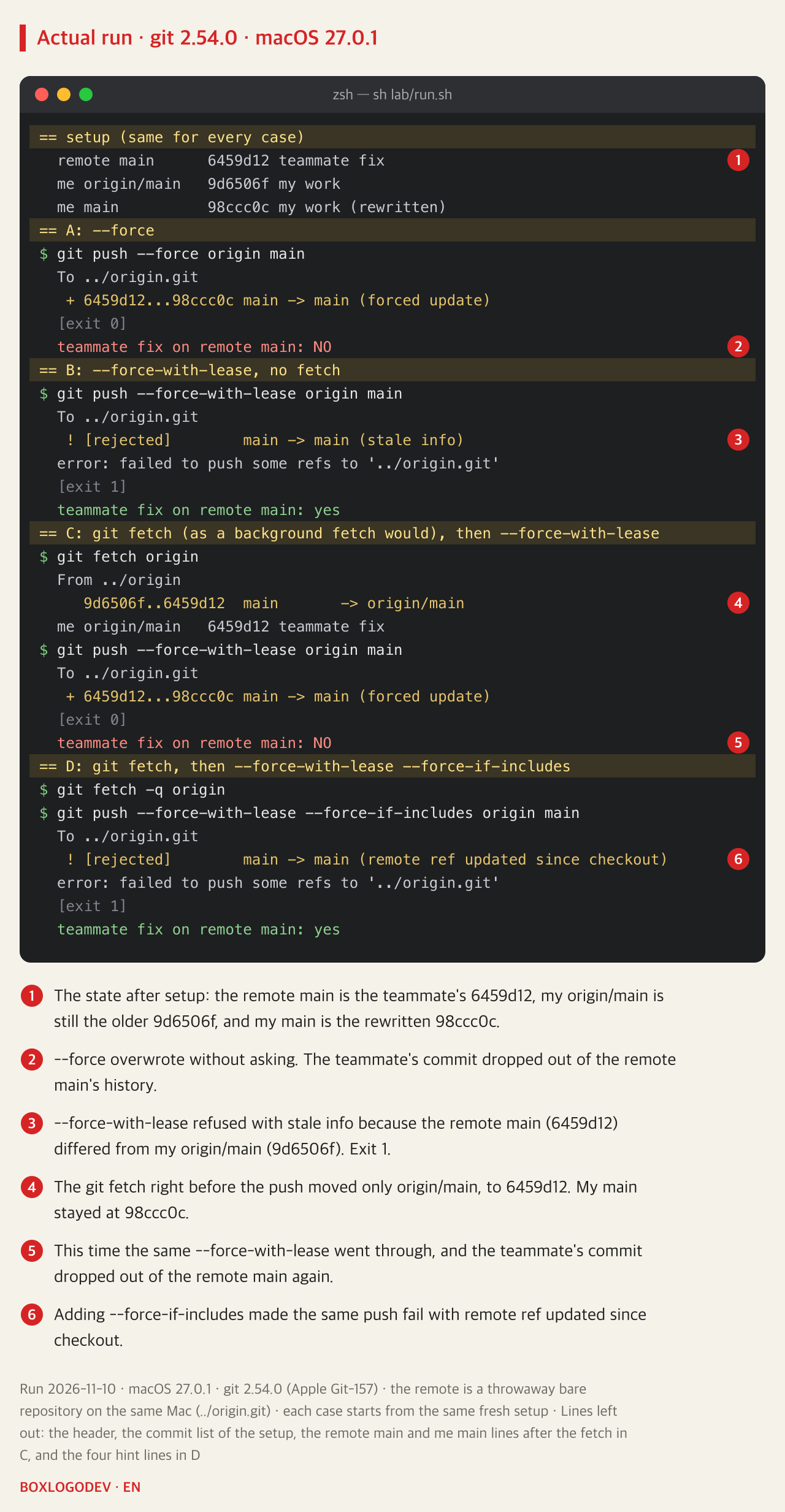
A. --force checked nothing and made a forced update. 6459d12 dropped out of the remote main's history.
B. --force-with-lease without a fetch was refused with ! [rejected] main -> main (stale info) and exit code 1, because the remote main (6459d12) differed from my origin/main (9d6506f).
C. With one git fetch origin run right before it, the same --force-with-lease went through as a forced update this time, and 6459d12 dropped out of the remote main again. Nobody opened the teammate's commit or merged it into my branch. My branch stayed put; of the three refs, only origin/main moved.
D. The same fetch, then --force-with-lease --force-if-includes, was refused with (remote ref updated since checkout). The teammate's commit stayed on the remote.
Why one fetch removes the protection
Without an expected value, --force-with-lease overwrites a remote ref only if its current value equals the remote-tracking branch. Git keeps no separate record of what a person has seen, so it uses origin/main in its place. But git fetch leaves my branch alone and moves only the remote-tracking branch (here origin/main) to the remote value. Right after a fetch the remote and origin/main are equal, so the lease treats the teammate's commit as already seen and lets the push through.
The git-push documentation warns about exactly this. It says the protection is "trivially defeated" when a background process updates refs, and gives a cron job running git fetch origin and an editor fetching in the background as examples. This experiment did not turn on an editor's automatic fetch; a manual git fetch right before the push stands in for it.
DEV NOTES
The lease compares the remote with my origin/main
Where the three refs point right before each push (IDs from a real run)
Setup: the teammate pushed first
- Remote main → 6459d12 teammate fix
- My origin/main → 9d6506f my work
- My main → 98ccc0c my work (rewritten)
- The teammate built on top of 9d6506f
B: --force-with-lease, no fetch
6459d12 != 9d6506f- Remote 6459d12 differs from origin/main 9d6506f
- The lease is broken: refused, stale info
- The teammate's commit stays on the remote main
C: git fetch, then --force-with-lease
6459d12 == 6459d12- The fetch moves only origin/main, to 6459d12
- My main is still 98ccc0c
- Remote and origin/main match, so the lease check passes
- Forced update: the teammate's commit leaves the remote main
D: after the fetch, add --force-if-includes
--force-if-includes- Reflog of my main: 98ccc0c, 9d6506f, bdeea2d
- None of these entries reaches 6459d12
- Refused: remote ref updated since checkout
- The teammate's commit stays on the remote main
Values from real runs with git 2.54.0 (Apple Git-157) on macOS 27.0.1 on 2026-11-09, run again on 2026-11-10 with the same values. Each case rebuilt the same setup with fixed commit times, so the IDs match. The reflog in D was printed with git reflog main on 2026-11-10 from a rebuilt copy of the same setup. A manual git fetch stands in for a background fetch.
--force-if-includes asks one more question: can the tip of the remote-tracking branch (here 6459d12) be reached from one of the entries in the local branch's reflog? Running the same steps as D again and printing git reflog main just before the push showed only three entries, 98ccc0c, 9d6506f and bdeea2d, and none of them reaches 6459d12. That means a fetched commit was never integrated, so git refused the push.
The option works only together with --force-with-lease without an expected value; given without a lease, or with a lease that names its expected value, it is a no-op. In a separate run, G1, --force --force-if-includes made a forced update with no check at all and removed the teammate's commit.
Three ways to keep the teammate's commit
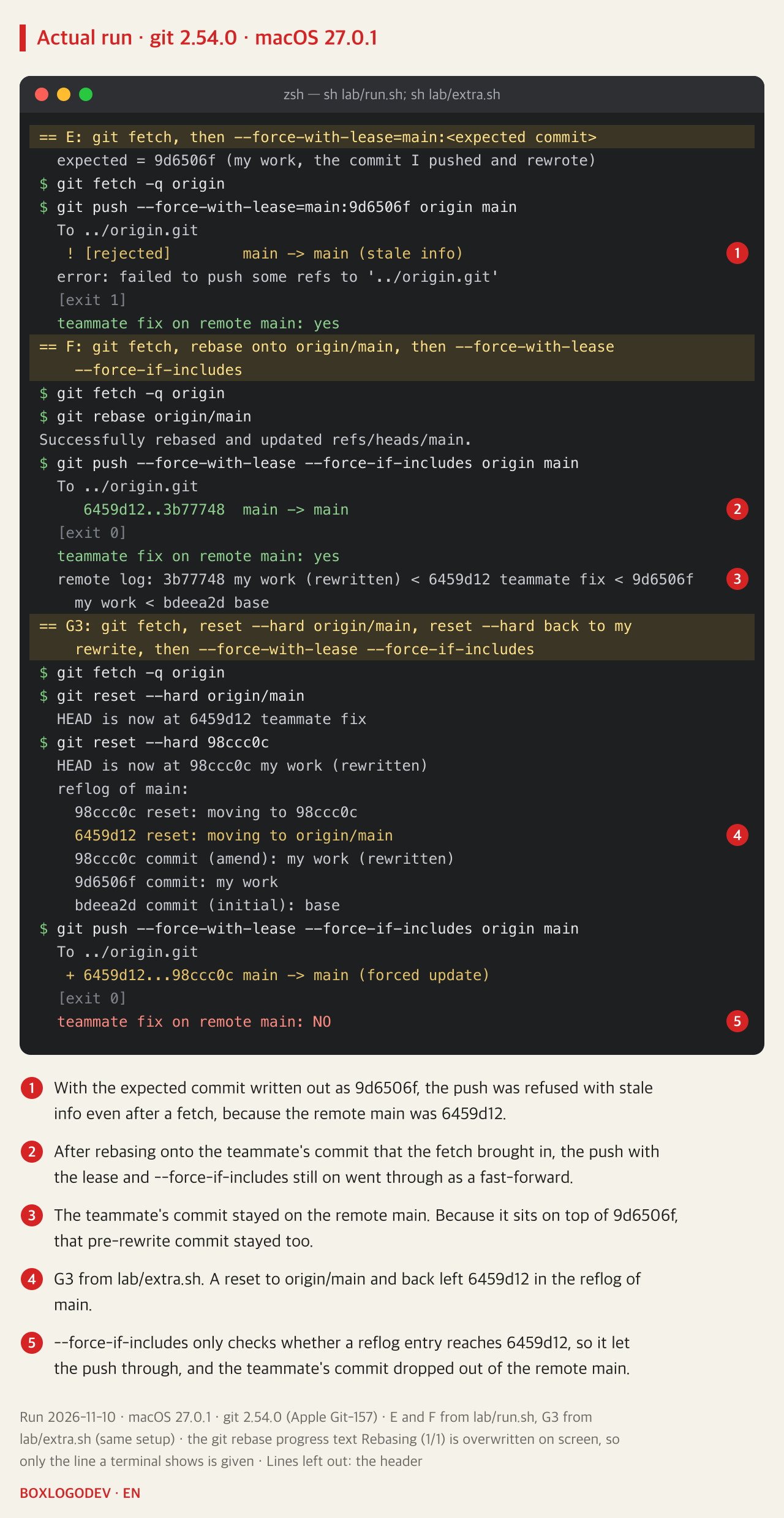
Write the expected commit out. --force-with-lease=main:9d6506f means: overwrite only if the remote main is 9d6506f, wherever origin/main points now. In E the push was refused with stale info even after a fetch, because the remote main was 6459d12. The expected value is the commit the pushing side last knew the remote main to have; here, 9d6506f, which the me clone had pushed and then rewrote with amend. It can also be marked before rewriting with git tag before-amend main, which tags that commit (9d6506f), and used as --force-with-lease=main:before-amend (the tag form was not run here). Every form other than the one with an explicit expected value is still experimental in git 2.54.0 and may change.
Integrate the fetched commit first. After the fetch, git log --oneline main..origin/main listed two lines: 6459d12 teammate fix and the pre-rewrite 9d6506f my work. In F, after git rebase origin/main replayed my commit on top of 6459d12, the push with both safeguards still on went through as a fast-forward, 6459d12..3b77748. The teammate's commit stayed. Because it sits on top of 9d6506f, the pre-rewrite 9d6506f stayed in the history too, and the replayed 3b77748 added only the forgotten test.txt.
Taking 9d6506f out of the history as well means rewriting the teammate's commit that sits on top of it. In a separate run, git rebase --onto 98ccc0c 9d6506f origin/main kept the teammate's fix.txt change but changed the commit ID from 6459d12 to 7a17afd, and left the result on a detached HEAD, not on main. After git switch -C main moved main there, the push with both safeguards was refused with remote ref updated since checkout, because no entry in the reflog of main reaches 6459d12. With the expected value written out, --force-with-lease=main:6459d12, it went through as a forced update, but 6459d12 dropped out of the remote main and 7a17afd took its place. After a fetch, the teammate's clone showed [ahead 2, behind 2], so the teammate has to re-sync their clone too.
Change the default in config. In G2, with git config push.useForceIfIncludes true, plain --force-with-lease in the same order as C was refused with remote ref updated since checkout, just like D. Both --force-if-includes and push.useForceIfIncludes arrived in Git 2.30.0 (the runs here used 2.54.0). Older git knows neither and may ignore the config without an error (older git was not run here), so check git --version first.
The remaining blind spot: --force-if-includes also only reads the reflog
What --force-if-includes checks is not whether my branch contains the teammate's commit now, but whether some reflog entry reaches it. In an extra run, G3, after the fetch, git reset --hard origin/main moved to the teammate's commit once, and git reset --hard 98ccc0c moved straight back. My main did not contain the teammate's commit, but 6459d12 was left in the reflog, so the push went through as a forced update and the teammate's commit dropped out of the remote main. Integrating a fetched commit and then dropping it in an interactive rebase looks like the same pattern, but that case was not run.
Where does the overwritten commit remain?
After A, the remote main's history was only 98ccc0c and bdeea2d; the 6459d12 commit object was still inside origin.git (git cat-file -t printed commit), but no ref reached it. A bare repository keeps no reflog by default, and origin.git had no reflog folder at all. In this experiment the only place that still had 6459d12 on a branch was the teammate's clone. Recovery features of hosting services such as GitHub were not checked.
What to add to a forced push, and what to do when it is refused
Where an editor or another tool can fetch in the background, add --force-with-lease --force-if-includes to every forced push. When the push is refused, run git fetch origin, look at the fetched commits with git log main..origin/main, rebase onto them and push again. Skip the fetch and, as in B, origin/main stays at its old value and the teammate's commit does not show up in that list. If the list also shows your own commit from before the rewrite, it stays in the history again, as 9d6506f did in F, because the teammate's commit sits on top of it. Dropping it means rewriting the teammate's commit too, so agree on that with the teammate first.
If the amend changed a file you had already pushed, the rebase can conflict with your own pre-rewrite commit (the amend in these runs only added a new file, so F had no conflict). Keep the rewritten side for your own lines, but keep any lines the teammate changed in that file. While the rebase is stopped, run git log --oneline main..origin/main -- <file>: if it lists a teammate's commit besides your own pre-rewrite commit, the teammate changed that file. In a separate run where the amend rewrote a line of the already pushed my.txt and the teammate added a line to the same file, the HEAD side of the conflict held the old line and the teammate's line together; keeping only the rewritten side dropped the teammate's line, and the push with both safeguards still went through as a fast-forward.
Add your perspective.
Share a question, another approach, or something you have tried.
Checking sign-in…
Loading comments…