Suppose an order screen is blocked this morning by another user's lock, and the lock list shows an entry from three hours ago. It is old, so can you delete it? Deleting on age alone can throw away input in progress or leave data inconsistent. After reading this note you can tell from a few columns of the lock table whose lock it is, and choose where to look before you delete anything.
This note is based on the SAP Help Portal documentation for ABAP Platform 2025 FPS02 (October 2026) and public SAP Learning courses. The users, tables, lock arguments and times below are all invented, and nothing here was run on an SAP system.
The transaction name depends on the SAP_BASIS release. SAP Learning courses say to use SM12 on SAP_BASIS 7.52 and below and SMENQ on 7.53 and above, and that on 7.55 and above SM12 and SMENQ lead to the same transaction. The Help Portal fits that pattern. The ABAP Platform 1709 SP13 documentation describes this function as SM12, the same topic in each release checked from 1809 to 2025 is titled SMENQ, and the update status table in 2025 FPS02 still mentions SM12. This note was not checked on a real screen, so see which screen opens on your system. The column names below follow the SMENQ documentation.
Old does not mean abandoned
Lock Timestamp in the lock table is not the moment the lock was set but the time the transaction that created it started. So an old value can still belong to a screen left open for a long time or a long-running process that is using the lock now. That part is this note's own reading.
On the normal path, when a lock ends depends on its owner. A dialog owner's lock is released by DEQUEUE or the end of the transaction, not by COMMIT WORK. An update owner's lock passes to the update and is released when the update is complete. You have to see which case it is before you can call it too old.
SAP NOTES
When a lock is released normally
The end point depends on who owns the lock
Dialog owner (_SCOPE 1)
- Released by DEQUEUE or the end of the transaction
- COMMIT WORK does not release it
Update owner (_SCOPE 2)
- IN UPDATE TASK plus COMMIT WORK passes it to the update
- Released when the update is complete
Both owners (_SCOPE 3)
- Released once both owners have let go
- The dialog side may remain after the update
Durable lock (Context Owner)
- Bound to a draft across sessions
- Only for specific SAP apps and frameworks
Summarized by this note from _SCOPE Parameters and Durable Locks in the SAP Help Portal, ABAP Platform 2025 FPS02.
The SAP documentation takes a clear position. It warns against reaching for the delete function first, because locks that are not released are almost always a symptom of another problem, and they go away by themselves once that problem is fixed. It names the two most frequent causes: problems in update processing and SAP GUI ending abnormally.
Two columns to read first
The columns that separate the causes are the backup flag and Context Owner. X in the backup flag means the lock is saved in the backup file, and an empty field means the lock is still with its dialog owner and has not been saved. The documentation describes that file for systems without Enqueue Replicator 2, and SAP Learning says the flag is set once a lock has passed to the update. A value in Context Owner means a durable lock. Here are the four rows of this fictional table.
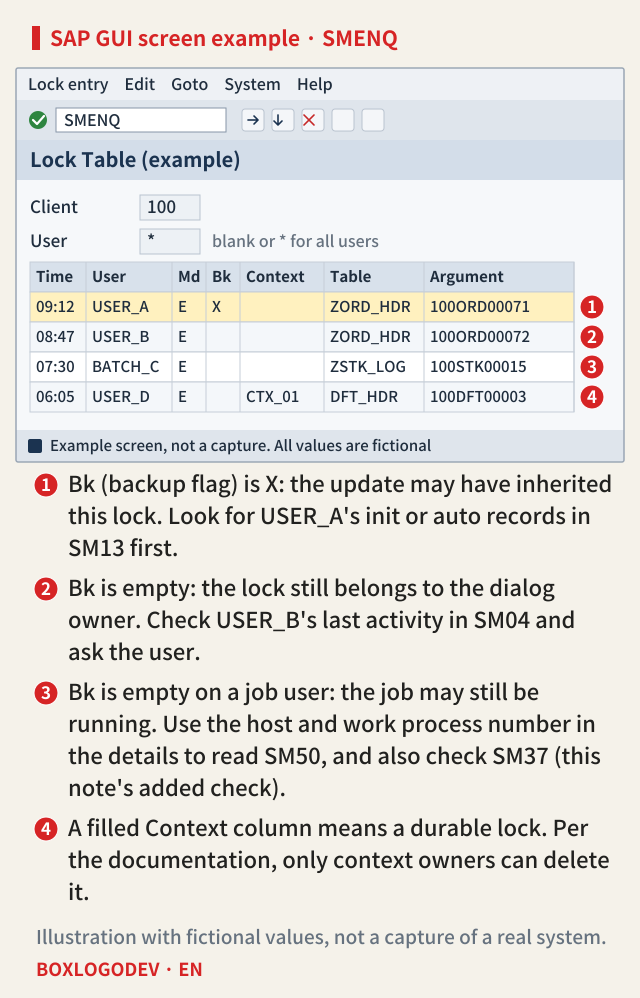
Row 1: backup flag X, so start in SM13
With X, as on row 1, the lock may be held by an update. The documentation says locks held by the U1 part of an update are highlighted in the list and also have this flag set. An update owner's lock stays until the update finishes or terminates abnormally, so unprocessed records can block other people's work. There are three things to do here. Double-click the row to see the details, find that user's unprocessed records (init, auto) in SM13, and in SM51 select the update server and choose Processes to see whether the update work processes are active. If there are unprocessed records but no activity, the documentation says to try restarting the update server.
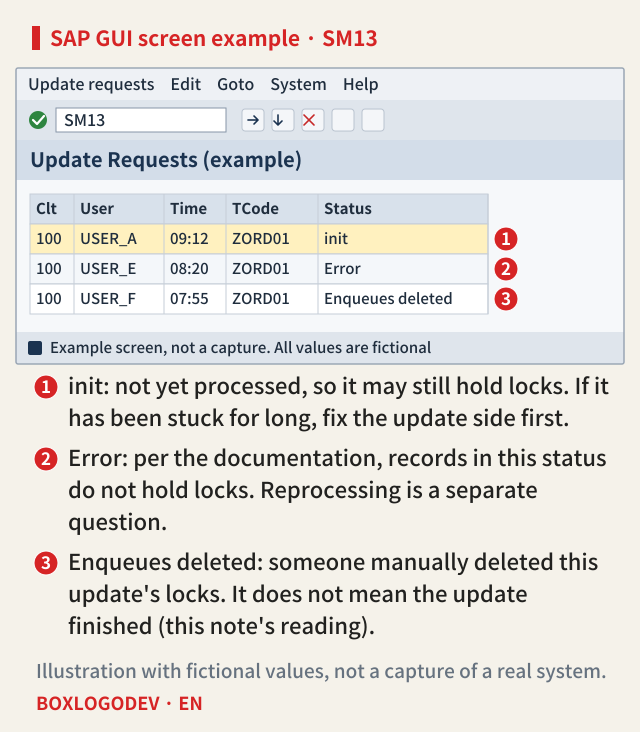
A record in status Error, like marker 2 in this picture, does not hold locks, because an update that stops early gives its locks back on its own. If a lock is blocking you, that means you need to keep looking for init or auto records. It does not mean the Error record can be ignored. Unless it is processed again, that change is never recorded in the database.
If you delete a lock marked X, that update record shows the status Enqueues deleted, as at marker 3 in this picture. The documentation explains this only as a sign that someone deleted the locks by hand, so this note does not read it as a sign that the update finished. Be careful with restarts as a fix too. Saved locks come back into the table when the system or the enqueue server starts again. Without Enqueue Replicator 2, what a restart loses is the locks that were not saved.
Row 2: empty flag, so check the person in SM04
Row 2 is a dialog owner's lock. The cases the documentation gives are a PC switched off without logging off, or SAP GUI ending abnormally, so that the system still treats the user as logged on. Find the instance named in the details through SM51, and use SM04 to read the user's last activity. A long idle time can also mean the person just stepped away, so ask them first if you can.
Once you know the GUI ended abnormally, the documented action is logging the user off, not deleting the lock. Logging off releases the lock and loses the work in progress. Logging on again does not bring the lock back, so that work has to be done again from the start.
Row 3: a job user, so see whether it is still running
This section is not in the documentation's list of causes. It is a check this note draws from the warning text, which says to delete only when you are sure no active process such as a user session or an update is affected. For a lock that looks like a job user's, as on row 3, read the host and work process number in the details, then check in SM50 on that server whether the process is still working. That number shows where the lock was created, and the process may be doing other work by now, so do not settle it from SM50 alone. The documented lock table columns do not show the user type, so also search SM37 by that user. The documented user field in SM37 is the user who scheduled the job, so if nothing turns up, enter * as the user and look through the Active jobs.
Why is deleting a running process's lock risky? The lock table is in the enqueue server's memory, and locks are not set in the database. The documentation says a deleted lock is released and can be requested again, and SAP Learning explains that manual deletion only removes the entry from the lock table, which in theory lets several users change the same data at once. That the running program does not stop either is this note's own reading. That is where the data inconsistency the documentation warns about can arise.
Row 4: Context Owner filled, so a durable lock
The durable lock on row 4 holds data across several steps, such as in a draft, and lasts across ABAP sessions. It is used only by specific SAP applications and frameworks, and the documentation says only context owners can delete it. So it is safer not to expect that logging the user off will release it, as on row 2. This note's reading is that you should first look at finishing or discarding the draft in the application that owns it. The documentation consulted does not say what happens if you try to delete this row in the lock table.
If you still have to delete
The documented path is to put the cursor on the row and choose Lock entry → Delete, or Lock entry → Delete all for everything. A warning about the risks appears first, then a dialog box for the deletion. SAP Learning sets a narrower condition: delete this way only if the lock owner is no longer logged on but still owns the lock. Edit → Suppress warning turns the warning off for that transaction, but this note advises leaving it on and deleting one row at a time. Writing down the user, table, argument and time you deleted helps when you compare data later.
SAP NOTES
What each action leaves behind
Look past the lock to the work and the data
User log-off (SM04)
- Releases the locks and loses the work in progress
- Logging on again does not bring them back
Deleting one row
- Removes only that entry. A running program keeps going (this note's reading)
- Several users could then change the same data
Restarting the update server
- Starts processing requests in status init automatically
- Those records then show auto(sys)
Restarting the enqueue server
- Saved locks (X) come back into the table
- Without a replicator, unsaved locks are lost
Summarized by this note from the SAP Help Portal (ABAP Platform 2025 FPS02) and SAP Learning. Not run on an SAP system.
If huge numbers of locks have overflowed the table, the cause comes before any deletion. The documentation gives three possible causes: a table configured too small, an application setting a large number of locks, and a hanging update passing many locks to the update work process. Server Administration → Overflows shows which owners and arguments held the most locks, and Top Usage lists owners with over 20 locks at once.
When one lock is blocking you today, read the backup flag and Context Owner before the time. X points to SM13, an empty flag to SM04 for a person or to SM50 and SM37 for a job, and a Context Owner to the application. Delete that one row only if the lock is still there after those checks and you are sure no active process is affected.
Add your perspective.
Share a question, another approach, or something you have tried.
Checking sign-in…
Loading comments…