A user reports an authorization error, you ask them to run SU53, and you add the value it shows to the role. Then the user says they are blocked again. After reading this note you can tell which case that "again" is, and choose between looking at SU53 further and moving to a trace.
This note draws on 'Managing Users, Roles and Authorizations' in the SAP Help Portal for ABAP Platform 2025 FPS02 (October 2026), the Fiori troubleshooting topic for SAP S/4HANA 2025 FPS02, the ABAP Keyword Documentation, release 7.58, and the SAP Learning authorization course lesson Troubleshooting Authorization Checks. The program ZFI_R100, authorization objects starting with ZFI_, the users and the values are all invented, and nothing here was run on an SAP system. Screens, menus and the number of failures SU53 keeps may differ on older releases.
SU53 shows failures, not the whole run
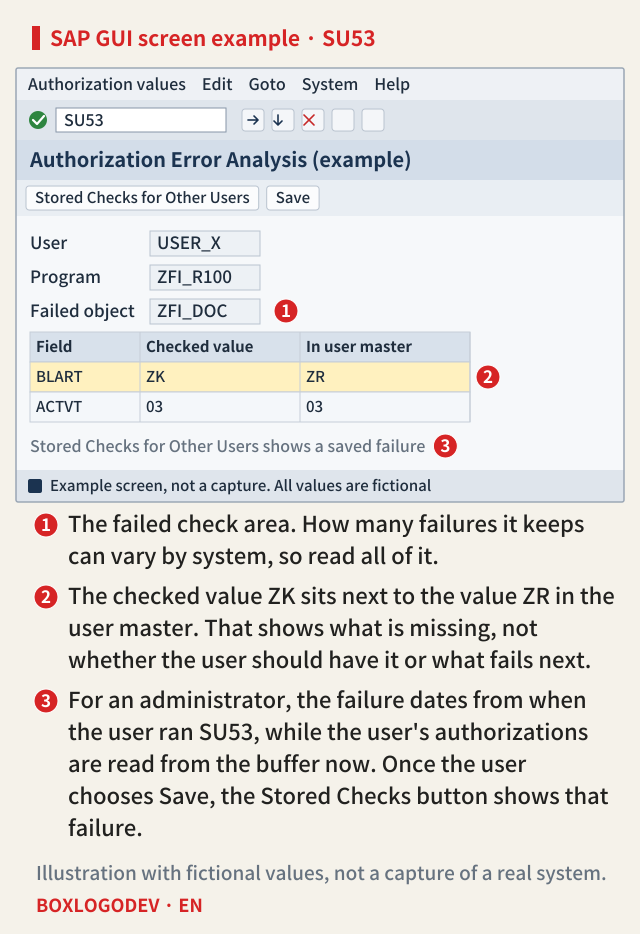
The normal path is simple. When an authorization error appears, the user enters /nSU53 in the command field and can see the result from any of their sessions. SAP sources differ on what it shows. The Help Portal topic says it shows the most recent failed check, what the user is authorized for, and any failed HR check. The SAP Learning authorization course (no release stated) says the upper area lists up to 100 failed checks per user, from the last three hours at most, and possibly fewer when many users are failing many checks. The failures sit in a ring buffer in the application server's shared memory. The standard size is 100 checks per work process, and auth/su53_buffer_entries changes that number. Check on your own system how many you see. You can compare the checked value with the value in the user master, but this is not a record of the run that includes the checks that passed.
When an administrator views another user's result, there are two points in time. The failure dates from when the user started SU53, while the user's authorization data is read from the user buffer at the moment the administrator looks. So if you reopen it after changing the role, you can get a mismatched screen where the value is already there and the check still shows as failed. It is better to have the user reproduce the problem and run SU53 again. The documentation says that once the user has started SU53 and chosen Save, you can see that failure with the Stored Checks for Other Users button.
Four ways to be blocked again
First, the value may not have reached the user yet. According to the documentation, a generated profile enters the user master only after the user master comparison, and users who were logged on during generation must log on again to get the current authorizations. Checking those steps one by one gives the order in the picture below.
SAP NOTES
From a changed role to the user
Miss a step and the new value may not reach the user
Change the values in PFCG
- Red or yellow on the Authorizations tab means the profile is not current
Generate the profile
- You can also just save and generate later in bulk with SUPC
Compare user master records
- The profile enters the user master after the comparison. PFUD or the role's User tab
User logs on again
- Users logged on during generation must log on again for current authorizations
Confirm with SU56
- See what is in the user buffer
This note's single line drawn from the SAP Help Portal, ABAP Platform 2025 FPS02. Not run on an SAP system.
Second, the run may have moved on to the next check. In a program that stops at the first failure, the next check runs only after the first value is added, and SU53 now shows that check. For the user it is the same "blocked again". That is this note's reading of the documentation.
Third, there may be several failures and you fixed only one. A program that carries on after a failure can leave several in a single run. Add only the value behind the error and the others remain, and on a system where SU53 shows just the last failure the earlier ones would not be visible at all. That is this note's reading, and the fictional example below is this case.
Fourth, the value may have changed. An authorization check judges the value tested in that run. If it failed yesterday on company code 1000, you added 1000, and today the user runs it for 2000, it fails again on the same object with a different value.
A trace shows the sequence
The system trace in ST01 records each authorization object tested, with its fields and values. STAUTHTRACE works the same way but evaluates only authorization checks. The documented procedure is to set Trace Only for User if needed, choose Activate Trace, exercise the program as completely as you can in another session on that same application server, choose Deactivate Trace and read the result with Evaluate. Filter Duplicate Entries shows checks with the same object, fields and values only once, and Callpoints finds where in the program the check happens.
Take the fictional program ZFI_R100 to be a report that skips a line when a cost center check fails and carries on, then raises an error if the final document type check fails. The trace holds 5 checks, of which 2 fail (3 and 5). Check 5 raised the error, so if you add only ZK the error goes away but the lines for cost center 4711 are still missing. On a system where SU53 keeps several failures, 4711 can be found in the list too, so do not stop at the first entry you see. The trace adds the 3 checks that passed and shows them in sequence.
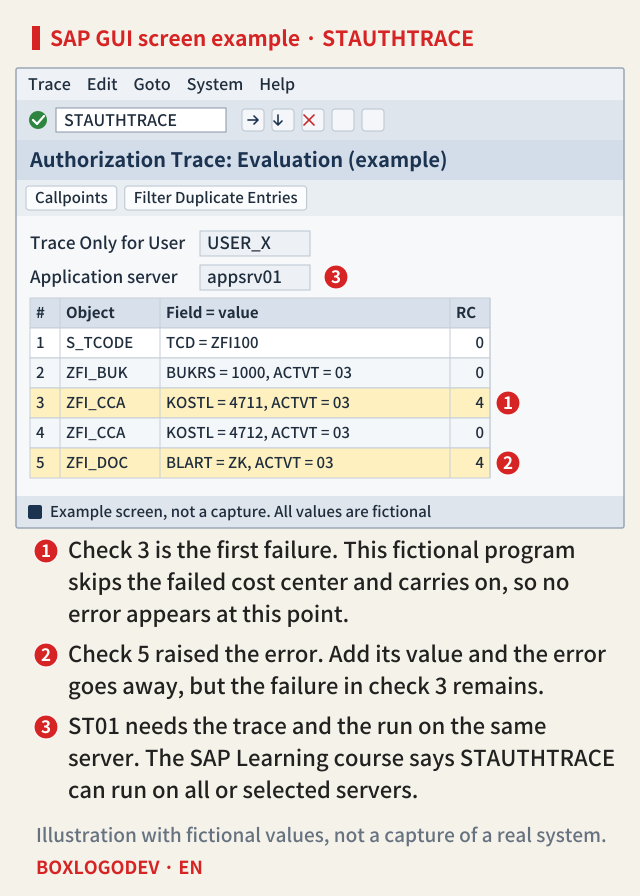
RC follows the AUTHORITY-CHECK table in the ABAP Keyword Documentation. 0 means success or no check performed, 4 means authorizations for the object exist but not for the values tested (this also covers wrongly specified fields), and 12 means the user master holds no authorization for that object at all. By that table, 0 also covers "no check", which is worth remembering when you read the result.
Traces have conditions too. The Help Portal describes ST01 and STAUTHTRACE as short-term traces collected per client on the current application server. So if you switch one on only on that server, this note takes it that a run on another server will not appear in the list. ST01 needs the trace and the run on the same server. According to the SAP Learning authorization course, STAUTHTRACE can be started and stopped on all servers or on selected ones, and the result gains a column with the server name. If a program stops at the first failure, the checks after it never ran, so they should not be in the trace either. If you cannot reproduce the problem right now, there is STUSERTRACE, a long-term trace that stores each check once per user, by client, in the database, with the first time stamp and the result. Check on your system what it takes to switch it on.
An empty SU53 can still mean an authorization issue
The Fiori troubleshooting topic for S/4HANA 2025 FPS02 says to check SU53 first when an app shows no data or too little data, and adds that no violation does not end the matter. An app that passes authorization objects to SADL generates SQL that leaves out data the user may not see, so the SQL is always valid, SU53 catches nothing and the app raises no error. Authorizations modeled in DCLs on CDS views behave similarly: it says traces show only positive results even when missing authorizations reduce the data returned. For such cases you can use SACM to check a user's authorizations for a CDS view. The SAP Learning course says that if a user was stopped and SU53 reports every check as successful, the cause is not authorization. These apps show too little data instead of stopping the user, so do not close the question on that sentence alone.
SAP NOTES
Which tool to open first, by symptom
SU53 is a starting point, not the whole picture
An authorization error just appeared
- SU53, from any of the user's sessions
- Failed checks only. Read the whole list
Added it, nothing changed
- PFCG status, comparison, new logon
- Check the buffer with SU56
Blocked by a new object each time
- STAUTHTRACE or ST01
- Check the server scope, then run it fully
No error, just too little data
- Start with SU53. Empty does not end it
- For apps on CDS views, check access with SACM
SAP Help Portal, ABAP Platform 2025 FPS02 and S/4HANA 2025 FPS02, and the SAP Learning authorization course. The grouping is this note's own, not a procedure defined by SAP.
Next time you hear "blocked again", ask two things before adding another value. Has the new role reached that user's buffer, and does the failure now in SU53 match last time in both object and value? If both match, look at the role side. If only the value differs, first decide whether the user should have that value. If the object differs, read the whole SU53 list and then go to the trace. And if there is no error but just too little data, remember that an empty SU53 can still mean an authorization issue.
Add your perspective.
Share a question, another approach, or something you have tried.
Checking sign-in…
Loading comments…