If you set setTimeout(fn, 0) first and a Promise after it, and the Promise prints first, nothing is broken. Zero does not mean run now, and the two callbacks wait in different queues. After this note you can explain that order, see for yourself why a long loop that awaits values already available holds up timers and the screen, and head off the duplicates and losses that arrive once you add a yield.
The examples were run on 2026-11-01 on macOS 27.0.1 with Node.js 24.21.0, Bun 1.3.14 and Chromium 154.0.8037.100. Chromium ran in two setups, a tab driven by a test tool and a window of the same build with a new empty profile driven over the DevTools Protocol, and Safari and Firefox were not run. The rules were checked in the HTML Living Standard, on MDN and in the Node.js v24 documentation. The queue values a, b, c and d are examples.
Zero means the next turn, not now
console.log('1 sync start');
setTimeout(() => console.log('5 timeout 0'), 0);
Promise.resolve().then(() => console.log('3 promise'));
queueMicrotask(() => console.log('4 queueMicrotask'));
console.log('2 sync end');
With this file run on Node.js and Bun, and the same file loaded in a Chromium page, all three printed in the order of the numbers at the start of the lines. The timer that was set first came last. MDN explains that even with a delay of 0 the callback goes on a queue and runs only after the current code finishes. A Promise's then callback and queueMicrotask, though, go to a different queue, the microtask queue. The HTML Standard's event loop runs one task and then performs a microtask checkpoint. When the running script finishes this queue is emptied first, so the Promise overtakes the timer.
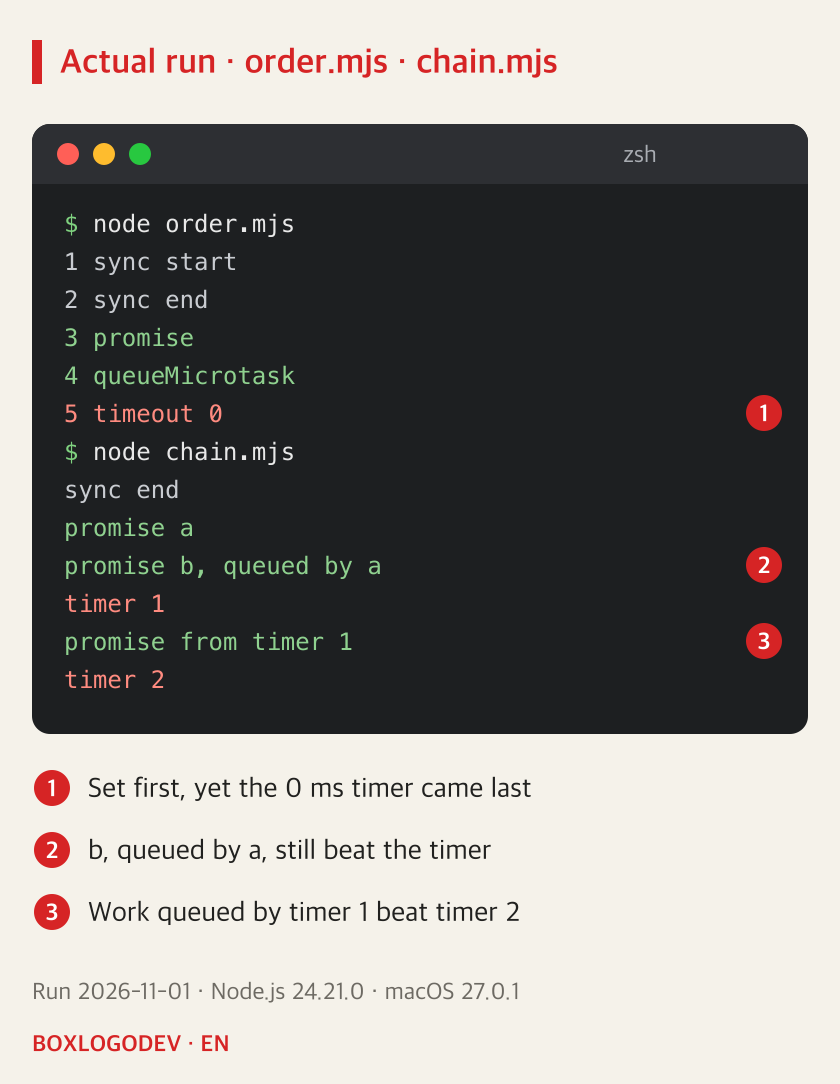
chain.mjs shows two more sides of that rule. promise b, created while promise a was running, still ran before the timer. MDN says the same. The Promise queued by timer 1 ran before timer 2. This output matched on Node.js and Bun, and chain.mjs was not run in Chromium.
DEV NOTES
One task, then every microtask
A browser event loop, drawn short
One task
setTimeout(fn, 0)- A script, a timer callback, a click handler
- One at a time, run to its end
Every microtask
Promise.resolve().then(fn)- then, queueMicrotask, code after await
- Drains what arrives while draining, too
Where it may draw
- The browser draws if it sees a need
- Then on to one more task
The author's shortened drawing of the HTML Standard's event loop. The real loop has more steps, and Node.js has different ones.
A loop that only awaits values already there keeps timers from running
This order causes real trouble in long loops. loop.mjs awaits on every pass of a 3,000,000-pass loop, with a 10 ms heartbeat and one 0 ms timer set beside it.
const beat = setInterval(() => ticks++, 10);
setTimeout(() => { timerDuringLoop = true; }, 0);
const t0 = performance.now();
for (let i = 0; i < N; i++) {
  x += i % 7;
  await step(i);
}
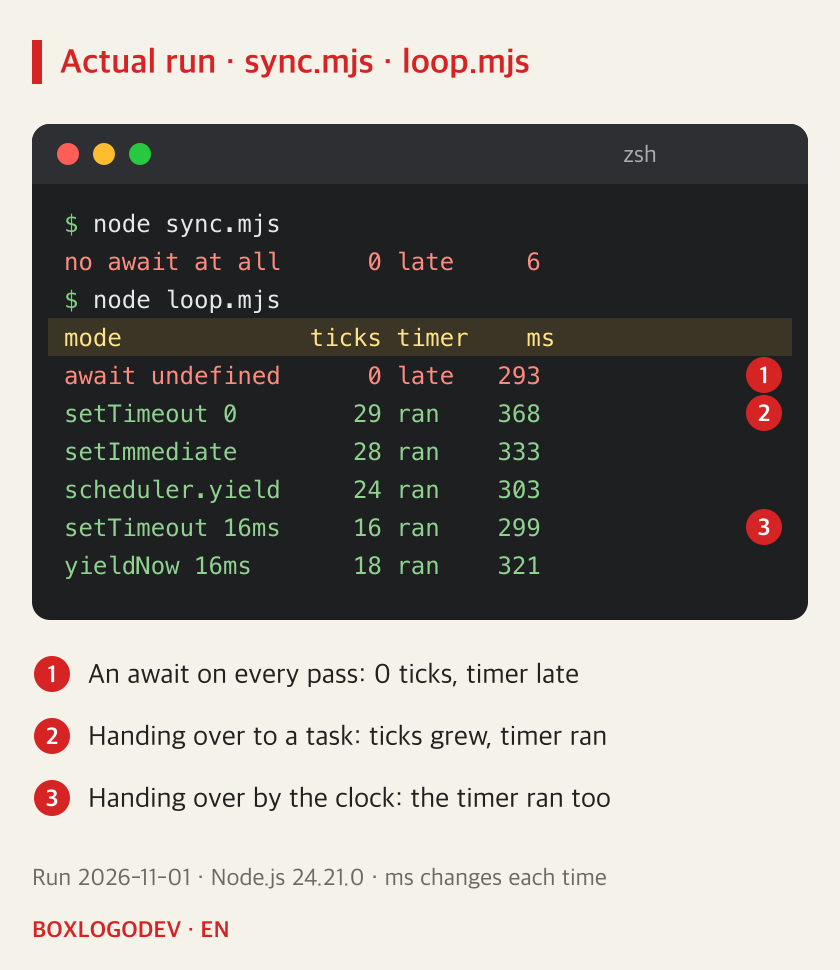
With step returning only undefined, the heartbeat fired 0 times in 293 ms and the timer could not run until the loop ended. That is the same result as sync.mjs, which has no await at all. According to MDN's await page, even when the value is not a promise, the code after it continues in a new microtask. The next pass then continues inside the same queue, so the queue does not empty and no room appears for the next task. That last link is the author's reading; the numbers are the output. MDN warns of the risk of the event loop processing microtasks endlessly. An await on something that really finishes later, such as a network call or a timer, is different. The setTimeout lines in the table below are that kind of await, and the heartbeat ran during them.
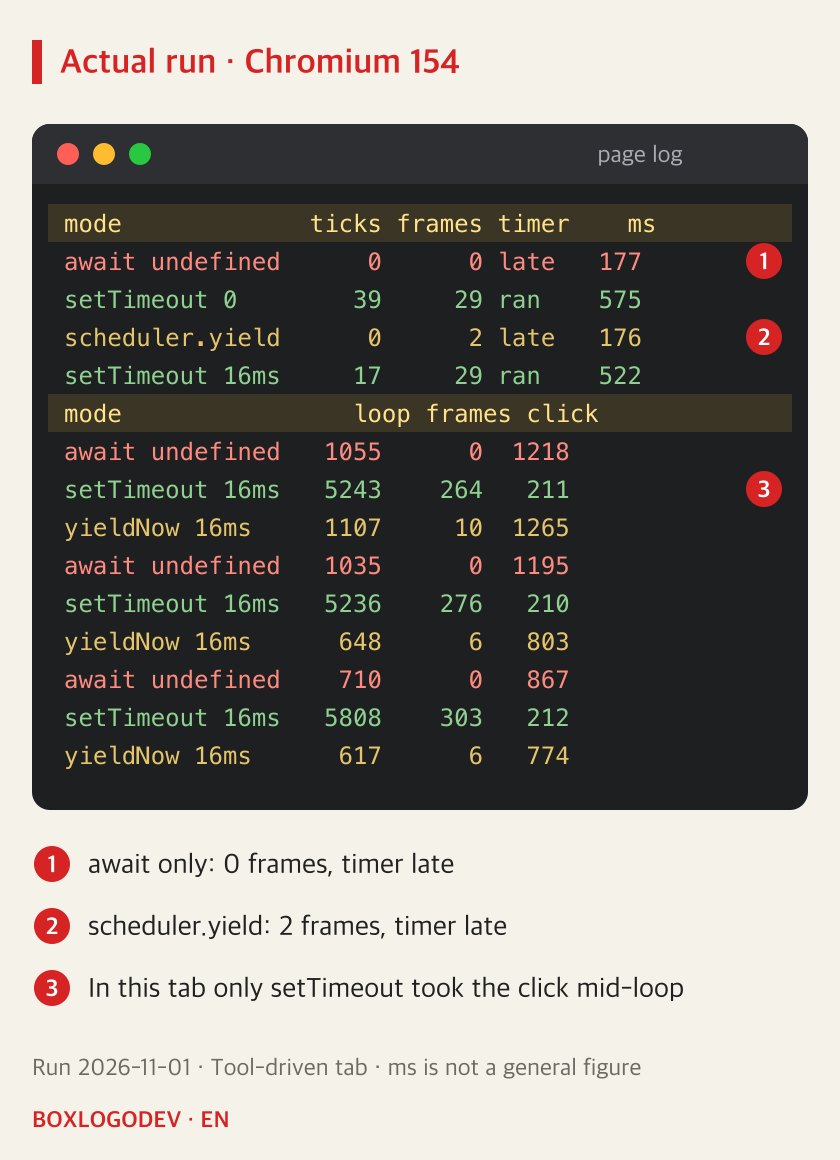
In Chromium too, the await undefined line showed 0 heartbeats and 0 screen frames on all three rounds, with the timer late (frames were counted through requestAnimationFrame calls). So text such as 'Saving', changed before the loop starts, would get no frame to appear in during this stretch. No text change was run; this is inferred from the frame count.
Handing over to a task lets other work run
The fix is to stop the loop at intervals and continue in a later task. Versions that hand over every 100,000 passes were run alongside versions that hand over only once 16 ms have passed. The interval values are ones picked for the example.
const pause = () => new Promise(r => setTimeout(r, 0));
const yieldNow = () => globalThis.scheduler?.yield
  ? scheduler.yield()
  : new Promise(r => setTimeout(r, 0));
function budget(letGo) {
  let last = performance.now();
  return i => {
    if (i % 1000 !== 0 || performance.now() - last < 16) return undefined;
    return letGo().then(() => { last = performance.now(); });
  };
}
On Node.js, as in the table above, every way of handing over grew the heartbeat count and let the timer run, and the time, measured once, was 299 to 368 ms, a little above 293 ms. The table's scheduler.yield line comes from node:timers/promises, which is Experimental in its documentation and the same as setImmediate. The global globalThis.scheduler does not exist on Node.js 24.21.0 or Bun 1.3.14, so yieldNow took the setTimeout path there.
Chromium differed. Starting with the tool-driven tab, setTimeout kept both the heartbeat and the frames going, and in a 30,000,000-pass click test it handled a mouse click, sent about 150 ms after the start, at 210 to 212 ms. In exchange the whole loop grew to 5.2 to 5.8 seconds, against 0.7 to 1.1 seconds with only await. In this tab the gaps between nested setTimeout(0) calls were 4 to 103 ms, and many were far above the 4 ms minimum for nesting in the HTML Standard. In the new-profile window these gaps were 5 ms or less, and the same loop took 671 to 701 ms against 484 to 530 ms with only await. So the seconds above belong to that tab, and why that tab was slow was not confirmed.
scheduler.yield() was fast, but the timer was late on all three rounds, there were 2 frames in the first table and 6 to 10 in the click test, which handed over every 16 ms, and in this tab the click was handled after the loop ended. In the new-profile window the timer was again late on all three rounds, but the click was handled mid-loop on all three (at 241 to 273 ms of a 526 to 543 ms loop). MDN explains that its continuation goes to the front of the queue among work of the same priority and says it lets pending work such as user input be handled if needed. So do not read the tab result as scheduler.yield ignoring input. Both sets of clicks came from tools, and a click by hand was not tried. Support also differs. MDN's compatibility data (read 2026-11-01) lists Chrome 129 and Firefox 142 and shows no support in Safari, so a feature check is needed. The setTimeout branch of yieldNow ran only on Node.js and Bun, not in Safari.
Yielding can break something new
Check one thing before adding a yield. Code with no yield point had nothing cutting in halfway, but now a second click and new input can come in through the gap. race.mjs handles a made-up outbox like this.
async function yielded(s) {
  for (const item of [...s.queue]) { s.sent.push(item); await pause(); }
  s.queue.length = 0;
}
async function takeFirst(s) {
  while (s.queue.length) { s.sent.push(s.queue.shift()); await pause(); }
}
The scene is the same each time. Save is called twice in a row, and a moment later the user adds d. The code with no yield sent abc once each and left d in the queue. yielded sent them twice as aabbcc, and its last line, s.queue.length = 0, wiped d too, which was never sent. Stopping a second start while one is running removed only the duplicates, and d still vanished. So adding a yield to code like this can make a user's input disappear with no warning. takeFirst, which takes each item as it sends, sent abcd once each.
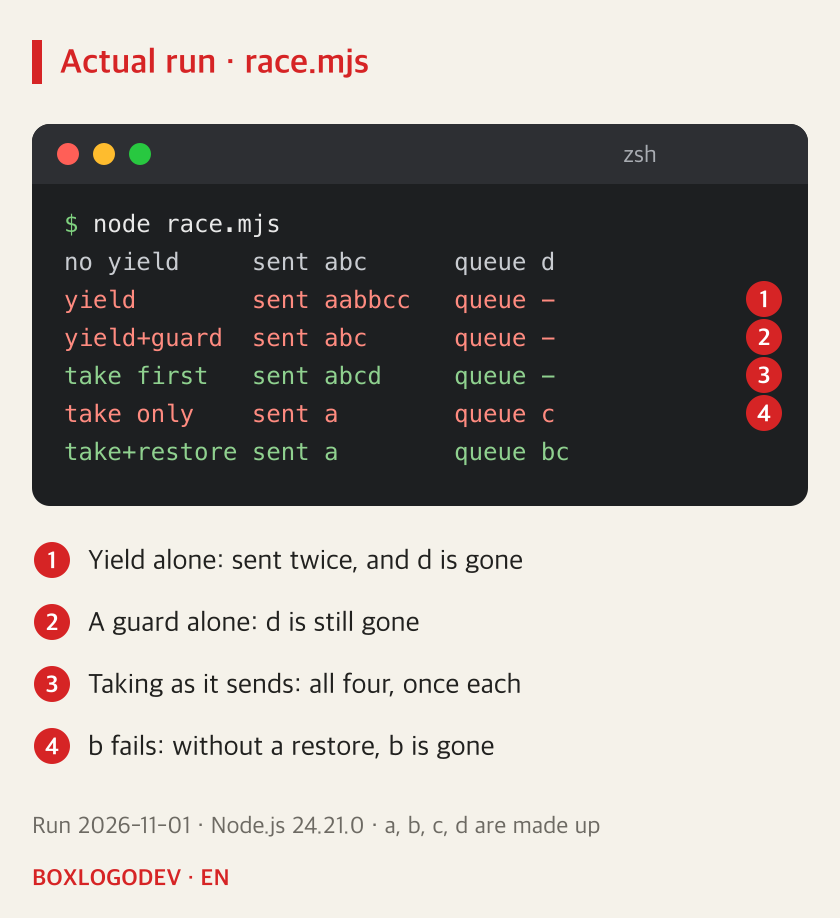
takeFirst has a trap as well. When sending b threw, b had already left the queue and remained nowhere. The version that puts it back with s.queue.unshift(item) in a catch ended with sent a and queue bc, and the same code in the scene with two calls and d sent abcd once each. This script runs only in memory. It does not cover a restored item being sent again and duplicated, as when a server received it and only the response failed. jitter.mjs, also only in memory, makes the send asynchronous with a timer and gives each item a different made-up delay. The same scene with no guard ran two loops at once and the items arrived as bcad. With the earlier guard around takeFirst they arrived as abcd. If an earlier save must not overwrite a later one, keep the guard as well.
Node.js has more queues
process.nextTick is yet another queue. Two files with the same contents (checked with cmp) gave different orders depending on their extension. The Node.js documentation explains that ESM already runs in the middle of processing the microtask queue, and recommends queueMicrotask unless you have a specific need. On Bun 1.3.14 nextTick came first in tick.mjs too, so this order can vary by runtime.
$ node tick.cjs
nextTick
queueMicrotask
promise
$ node tick.mjs
queueMicrotask
promise
nextTick
The order of setTimeout(fn, 0) and setImmediate set from the main module is not guaranteed either. As the documentation says, it is non-deterministic: in 200 runs of imm.cjs, immediate came first 185 times and timeout 15 times. These counts can change from run to run. Inside an I/O callback, as the documentation describes, immediate came first all 200 times.
If a timer or the screen stalls during a long loop, look for whether there is a point that hands over to a task, not for how many awaits there are. And before adding that point, look for any line after the yield that clears or overwrites data. This order of checks is the author's own, drawn from the runs above.
Add your perspective.
Share a question, another approach, or something you have tried.
Checking sign-in…
Loading comments…