In the fictional company code 1000, office supplies of 2,000,000 KRW were posted with FI document 1900000123. The cost center entered was 4100, but 1,500,000 KRW of it turns out to belong to 4200. Open the document in FB02 and the cost center field is grey, so you cannot touch it. Does that leave only one way out: reverse the document and post it again from scratch? Not if the cost center is the only thing that is wrong. With CO's Repost Line Items (KB61) you keep the original document and move just the amount to another cost center. After reading this, you can pick one of the two fixes based on what is actually wrong, and you will know how to split the amount in KB61 and where a later reversal of the original document gets stuck.
The rules here follow the SAP S/4HANA 2025 FPS02 (on-premise) documentation on the SAP Help Portal. The document numbers, accounts, cost centers and amounts are all invented, and nothing here was run on an SAP system.
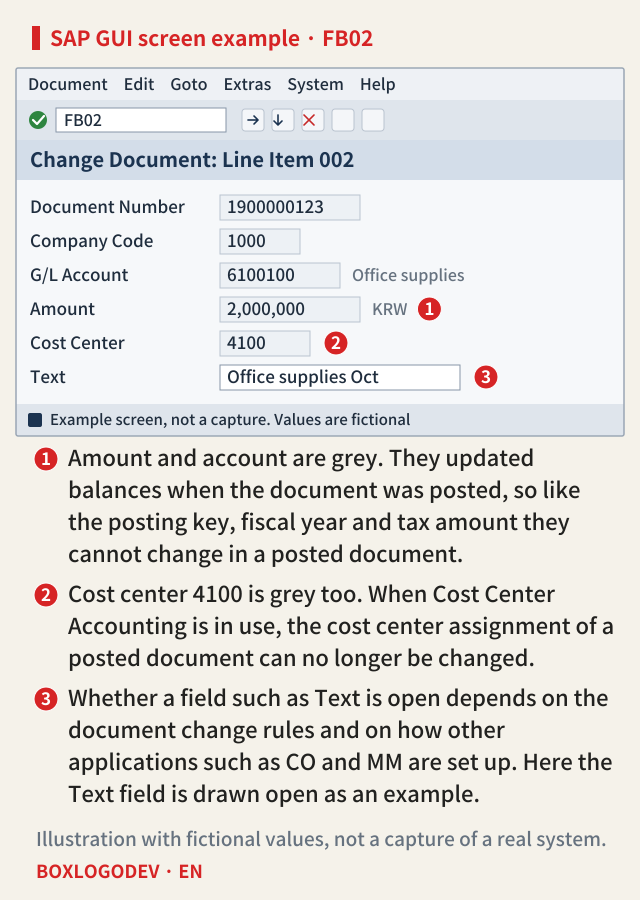
Why FB02 locks the cost center field
You can change a posted document in FB02, but not every field opens. Fields such as the amount, account, posting key, fiscal year and tax amount changed account balances the moment the document was posted, so they are locked from the start. Whether other fields open depends on the document change rules your system administrator defined, and on whether other applications such as CO or MM are in use and how they are set up.
The cost center is a case of the last kind. In a system that uses Cost Center Accounting, the cost center assignment of a posted document can no longer be changed. SAP says these change conditions exist to prevent changes that would make reconciliation impossible. Applied to the cost center, this most likely means the following: a cost posted in FI with a cost center reaches 4100 in CO as 2,000,000 KRW right away, so changing only the cost center on the FI line would leave the FI and CO records disagreeing. Because this restriction comes from using CO rather than from the change rules, it is unlikely to be something you can solve by opening the field in the change rules.
Fix one: reverse and post again
Reverse document 1900000123 in FB08, then post a new document with 500,000 KRW on 4100 and 1,500,000 KRW on 4200. The reversal document reuses the original values and takes 2,000,000 KRW off 4100, and the new document puts the amounts back on the two cost centers, leaving three documents in all.
FB08 accepts the reversal only if a few conditions hold.
- No line may be cleared. If the vendor invoice has already been paid and cleared, reset the clearing first; resetting is covered in the FBRA note.
- Every line must be a customer, vendor or G/L account line, and the document must have been posted in FI. A document that came from MM is reversed with MM's own function.
- What was entered in the original, for example the cost center, business area or tax code, must still be valid.
- If the original document's period is already closed, enter a reversal posting date in an open period, and the reversal reason you enter must allow a posting date that differs from the original.
If the G/L account, the amount or the tax code is wrong as well, the correction has to be made in FI like this. A CO reposting can only correct errors that concern a cost accounting object, such as a cost center or an order. Reversal is not the only way to correct a document in FI; this note covers only reversal in FB08.
Fix two: repost the line item and move only the amount
Repost Line Items lets you pick line items of a CO document and correct a posting error by moving their amount from the current CO object (here cost center 4100) to one or more other CO objects. Because it works on individual line items, the primary postings that came from FI can still be traced all the way to the cost center or order they end up on. The SAP GUI transaction is KB61 (menu Actual Postings → Repost Line Items → Enter), and in Fiori the app Repost Line Items - Cost Accounting reposts line items and displays or reverses them.
There is one prerequisite: the CO document must refer to the original primary posting document. For a cost that came from an FI document, as in this example, you pick the items from the CO document that belongs to that FI document.
The work has two steps. First, select the items to move. On the initial screen you can select by an account assignment object (a cost center, for instance), by general criteria, or by document number. CO, however, creates matching CO documents with numbers of their own for the primary postings it receives from FI, so whether the FI document number can go straight into that document number field was not confirmed. Here you select by cost center 4100, cost element 6100100 and the posting period (October 2026) and execute. When the list of line items appears, find the row for this cost and change its amount and object.
- Overwrite the 2,000,000 on the 4100 row with 500,000 and press Enter.
- The system shows the difference, 1,500,000, in a new row on the same object, 4100. Change that row's object to 4200.
- Check that the two rows add up to the original 2,000,000, then Post. The system checks the changed rows, updates them all at once if there are no errors, and tells you the number of the document it created.
On the Header screen you enter the posting date and document date of the reposting and a description for it. The Check Total button in the toolbar checks the reposted quantities, totalled per unit of measure; for the amounts, add up the rows yourself as in step 3 and compare them with the original.
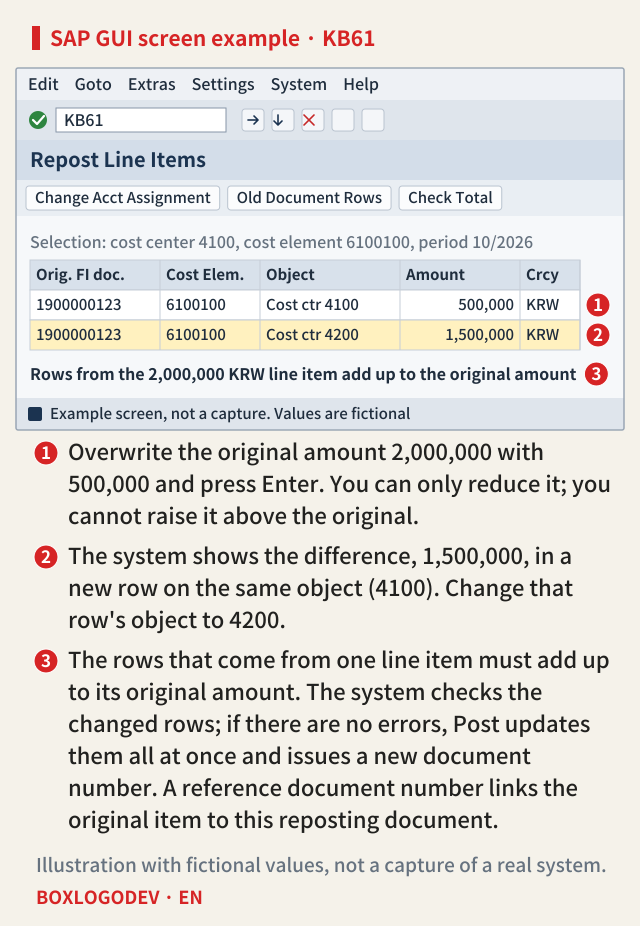
The amounts have limits. You cannot raise a row above the original amount, and the rows that come from one line item must add up to its original amount. You can also move only part of the amount to a new object and leave the rest on the original one, or move all of it to a single other object.
The result is not an edited original but one more document. Seen from the sending object, Repost Line Items works like a reversal posting, because it takes the debit/credit indicator over from the original item and updates sender and receiver at once. The net result is 500,000 KRW on 4100 and 1,500,000 KRW on 4200. The original item and the reposting document are linked by a reference document number, and the lines of the original document 1900000123 still point to 4100. Whether the 1,500,000 KRW leaving 4100 appears in reports as a credit or as a reduced debit was not confirmed.
A similar function is manual reposting of costs (KB11N, or the Fiori app Reassign Costs and Revenues, F2009). It keeps the cost element and moves an amount. In a system with parallel valuations such as transfer prices, however, manual reposting cannot move the parallel valuation values, and you have to use Repost Line Items instead.
After a reposting, reversal has an order
If you repost with KB61 and later try to reverse the original FI document, you get an error telling you to reverse the reposting first. You do that in the same menu under Repost Line Items → Reverse: mark the reposting row in the list, choose Reversal indicator and Post. In Customizing, under General Controlling → Change Message Control, this error can be turned into a warning. If you do that and reverse only the original document, the reposting stays, and by simple arithmetic 4100 ends at −1,500,000 KRW and 4200 at 1,500,000 KRW; to bring both cost centers back to zero, the reposting still has to be reversed.
Check the period of the reposting's posting date as well. The CO period lock (OKP1) locks by business transaction and by period, and the business transaction for line item reposting is RKU3 (Reposting of CO Line Items). If a correction to a closed month is blocked, see whether RKU3 is locked for that period, and check the FI posting periods (OB52 or the app) too. In S/4HANA, actual postings in CO also create journal entries in the universal journal, and SAP Learning says both the FI posting periods (OB52) and the CO period lock (OKP1) apply to FI-relevant CO postings. In other words, the FI period must be open and the business transaction must not be locked in OKP1. In OB52, postings from CO to FI use the third period interval, and if that interval is not filled, intervals 1 and 2 apply. On a system that activates the business function FINS_PERIOD_CTRL_BY_BTTYPE, also check the F4684 app (Manage Posting Periods – Cost Accounting). The details are covered in the OB52 note.
Which fix to choose
It comes down to what is wrong. The figure below puts the documents and cost center amounts left by the two fixes for the same error side by side.
SAP NOTES
What each fix leaves behind
Fictional FI document 1900000123: move 1,500,000 of 2,000,000 KRW office supplies from 4100 to 4200
Reverse and post again (FB08)
- Three documents: original 1900000123, reversal, new document
- 4100: +2,000,000 −2,000,000 +500,000
- 4200: +1,500,000 (from the new document)
- One FI correction for when the G/L account, amount or tax is wrong too
Repost line items (KB61)
- Original document 1900000123 not edited, still on 4100
- One reposting document, linked to the original item by a reference document number
- 4100: 1,500,000 of the 2,000,000 moved out, net 500,000
- 4200: +1,500,000, same cost element 6100100
- Use it when only the CO object, such as the cost center, is wrong
Reversing the original after a reposting
- Reversing the source document stops with an error
- Reverse the reposting first: Repost Line Items → Reverse
Fictional company code 1000. Amounts in KRW; + is an increase, − a decrease. In S/4HANA, actual postings in CO also create journal entries in the universal journal. Based on SAP Help Portal, S/4HANA 2025 FPS02. Not the result of a run on an SAP system.
If only a CO object such as the cost center or order is wrong, move it with KB61. If the G/L account, amount or tax code is wrong too, go to an FI correction such as a reversal in FB08. SAP's own wrong-cost-center example uses manual reposting (KB11N). KB61 moves individual line items, keeps the reference to the original item and also covers parallel valuations.
When 4100 and 4200 belong to different profit centers, it was not confirmed which lines appear on the profit center and segment side, or which lines the reposting leaves in a ledger with document splitting or in the universal journal (ACDOCA). On such a system, compare the profit center reports before and after the reposting.
When FB02 shows a grey cost center field, do not start with a reversal: first write down in one line whether the cost center is the only thing that is wrong. That one line tells you whether to go to KB61 or to FB08.
Add your perspective.
Share a question, another approach, or something you have tried.
Checking sign-in…
Loading comments…