You entered a G/L account in OBYC and saved. Then the goods issue fails with M8147 again. Account determination does not use the row you typed. It searches for a row where every value matches, so with one value different, the row you entered may as well not exist. After reading this you will be able to find which value is off and decide between adding a row and fixing another setting.
The sources are public SAP Learning courses (inventory management in SAP S/4HANA and Materials Management customizing), the SAP Best Practices YCOA account descriptions (2025-FPS1), Help Portal support content and the public parts of SAP Knowledge Base Articles. The chart of accounts ZCOA, plants, materials, valuation class 3001, code ZBR and account numbers are invented, and this explains how the documents apply to a fictional setup, not what an SAP system returned. Amounts are in KRW and quantities in EA.
Account determination searches for a row matching five values
The message reads "Account determination for entry & not possible". Help Portal support content traces it by showing the T030 lookup inside function module MR_ACCOUNT_ASSIGNMENT. There are five conditions: chart of accounts (KTOPL), transaction key (KTOSL), valuation modifier (BWMOD, the valuation grouping code), account modifier (KOMOK) and valuation class (BKLAS). What counts is not which row you entered but whether a row exists for the five values this movement produces. A row can leave some of these blank: the example table in SAP Learning has a PRD row with neither a valuation grouping code nor an account grouping code. The point on rules further down says why.
The values come from three places. According to SAP Learning, the plant determines the company code and chart of accounts, and the valuation grouping code of the valuation area. The material determines the valuation class. The movement type leads to a value string, and that string holds every transaction key this kind of movement can use. The ones a given posting actually needs are the ones it must find. The assignment of value strings cannot be changed. The account modifier is also called the account grouping code (general modification) and is assigned to combinations of movement type and indicators such as special stock.
SAP NOTES
Where the five values come from
What one goods movement looks up in table T030
From the plant
KTOPL · BWMOD- Chart of accounts, via the company code
- Valuation grouping code of the valuation area
From the material
BKLAS- Valuation class in the accounting view
From the movement type
KTOSL · KOMOK- Transaction key set by the value string
- Account grouping code (general modification)
T030 lookup
- If no row matches all five values,
- no account is found for that key
Combines SAP Learning and Help Portal support content on M8147. The field names appear in the query shown in that content.
One movement does not search only once. Issuing 10 EA of a fictional material at KRW 5,000 to a cost center comes to 10 × 5,000 = KRW 50,000, with the stock side found through BSX and the offset through GBB. The BSX description says it is used for goods issues from own stock, and the GBB description says the offset depends on the account grouping assigned to the movement type. So a new GBB row does not help if the BSX row is empty, and the same message appears. This is how this note reads the two descriptions.
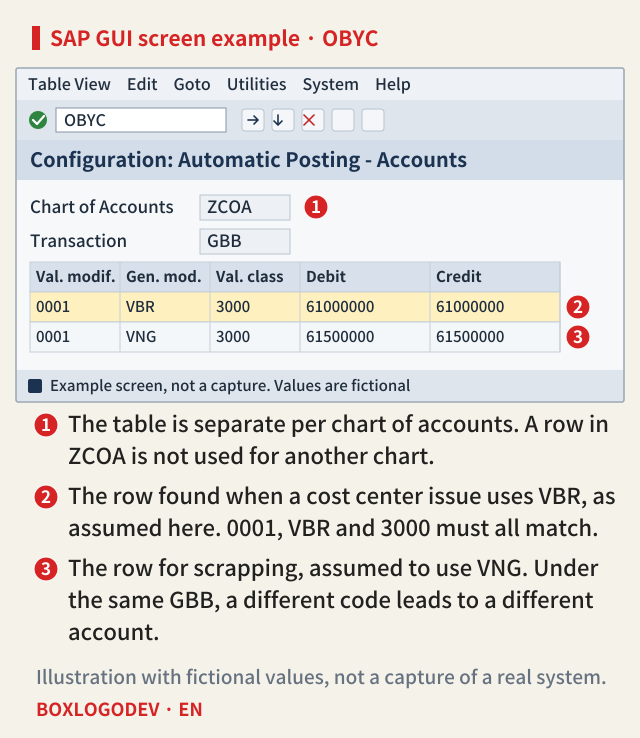
In the table below, marker 1 is the chart of accounts. SAP Learning says that because the meaning of an account depends on the chart of accounts, account determination has to be set up separately for each chart. Markers 2 and 3 show what account grouping codes do. The Best Practices description lists VBR for internal goods issues such as to a cost center and VNG for scrapping, and SAP Learning gives the example of different consumption accounts for movement types 201 and 551. This note assumes that 201 uses VBR and 551 uses VNG. The actual assignment has to be read from the Account Grouping view of the system.
Four ways a row exists and is still missed
Using the table above, here are four invented mismatches. First, the same material is issued from plant P200. If P200 has valuation grouping code 0002, the 0001 row does not apply. If it works in P100 and fails only in P200, this value is the first one to suspect. A plant in a company code with another chart of accounts gives the same symptom (the fourth case), so read both values in the message. Second, a new material has valuation class 3001 in its accounting view. With only a 3000 row in the table, nothing is found.
Third, a movement type was copied and its account grouping code changed to ZBR. A VBR row exists, but no ZBR row does. SAP Learning says to copy all dependent entries when copying a movement type and then adapt the settings. Fourth, a new company code uses chart of accounts ZCOB. Rows entered for ZCOA do not apply. The table in SAP Learning also has a client column, so a setting entered in another client and never transported is worth ruling out. That last sentence is this note's inference.
SAP NOTES
Four ways a row exists and is still missed
Fictional setup: ZCOA, GBB, 0001, 3000 with VBR and VNG rows only
Plant P200 has grouping code 0002
BWMOD- There is no 0002 row
- Check the plant's code in OMWD
New material has valuation class 3001
BKLAS- There is no 3001 row
- Check OMSK and the accounting view
Copied movement type has code ZBR
KOMOK- There is no ZBR row
- Check Account Grouping in OMJJ
New company code uses chart ZCOB
KTOPL- The table is separate per chart of accounts
- Rows entered for ZCOA do not apply
All four are invented setups. The transactions to check follow Help Portal support content.
The order for finding the value that is off
Start by reading the message. The "&" is filled with the entry the system could not find. The public preview of SAP Knowledge Base Article 3415836 writes the message as chart of accounts / key / valuation grouping code / account modifier / valuation class, the same five values. So write those five down first: they describe the row that is missing. The preview of article 1619320 gives one such symptom after an upgrade to ECC 6.00, pointing to transaction key KDM and account modifier ERN. The full text of both sits behind a login and has not been read here. Next comes the first step in the support content, the simulation. Open OMWB, cancel the popup if one appears, choose Simulation and enter the plant, material and movement type in question. Double-click the movement you were trying to post and choose the Account Assignments button to see an account per key. The point is to enter the failing values as they are, as at marker 1. Skip rows that have an account, as at marker 2. The empty row, as at marker 3, is what you are looking for.
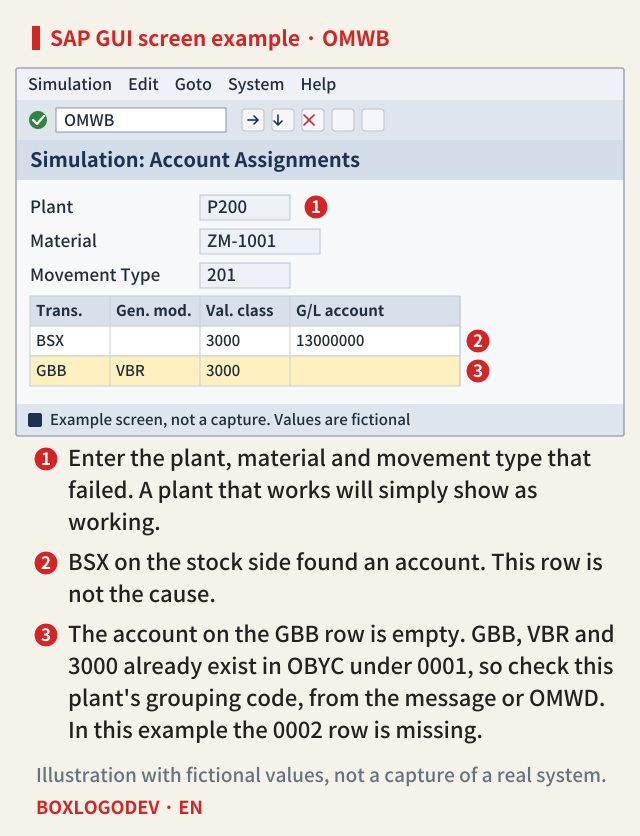
The simulation needs one caution. According to SAP Learning it shows all transaction keys of the value string, whether or not they matter for your company code, and names EIN, EKG and FRE as examples. So do not conclude that an empty cell is the cause. It is safer to match it against the key in the message. The same course says the function matters most in inventory management, since there, unlike invoice verification, the application itself offers no simulation.
Once you have the empty row, go through the checklist in the support content: in OX14 whether the valuation area is the plant, in OMWM whether the valuation grouping code is active, in OMWD how the valuation area is assigned to a chart of accounts and grouping code, in OMWN the account grouping assigned to the movement type (the support content says "material type" here, but the public preview of SAP Knowledge Base Article 1826140 treats OMWN and OMJJ as where account grouping is added to a movement type), in OMSK the valuation class assignment, and finally the transaction key and accounts in OBYC. A developer with debugging rights can follow the same document, set a breakpoint in MR_ACCOUNT_ASSIGNMENT and read the five variables used to search T030. That is not something to do in a production system.
Outside the normal path
Non-valuated material is different. The support content cites SAP Note 441991 (the note itself has not been read here) and explains that even when the account for the receiving plant is determined from the sending plant's data, a lookup for the receiving plant still happens internally. So if no row exists at all for that combination, M8147 appears and a minimal row is needed, with debit and credit left blank. The reason given is that an account in a row without a valuation class may be used as the default when creating a purchase order for material without a valuation class. This comes from the support content and was not confirmed on a system, so test it by posting in a test system.
Three more points. The OBYC and OMWB steps here follow support content that names no edition; for SAP S/4HANA Cloud Public Edition, SAP Knowledge Base Article 3495311 instead points to configuration activity SSCUI 100297 (Automatic Account Determination). For each key, a rule decides which values divide it, and in the standard system general modification is active only for some keys such as GBB, though you can enable it for others. That changing a rule may change which row is searched for is this note's inference and was not confirmed on a system. And SAP Learning says that account grouping codes cannot be used for invoice verification transactions, so the check in the third case applies to goods movements.
A vanished error does not mean a correct account
The quickest way to remove M8147 is to enter an account for the combination in the message. Doing that before asking why that value arrived can leave a wrongly assigned valuation class or code in place. The posting then works and may go to an account you did not intend. That is this note's judgement. Before opening OBYC, write down the five values in the message, look at the empty row in the simulation and answer which value differs from what you expected.
Add your perspective.
Share a question, another approach, or something you have tried.
Checking sign-in…
Loading comments…