F.13 ran at month-end and the GR/IR account balance has not moved. It looks like a failed program, but F.13's job is to clear groups that sum to zero. After reading this you will be able to look at a remaining balance, choose between F.13, F.19 and MR11, and explain what each tool does to that balance.
The sources are the SAP Help Portal documentation for SAP S/4HANA 2025 FPS02, public SAP Learning courses and Help Portal support content. The purchase order (PO) numbers, quantities and amounts below are invented, and the figures are calculations that apply the documented rules to fictional values, not results from an SAP system. Amounts are in KRW and quantities in EA. There is no tax, and goods receipts are assumed to post to GR/IR at the PO price.
The balance comes from the gap between receipt and invoice
A line lands on the GR/IR account each time a goods receipt or a material-related invoice posts, and lines of the same PO item are not cleared on their own at that point. Take fictional PO 4500000123, item 10. Receiving 100 EA at KRW 10,000 credits GR/IR with KRW 1,000,000, and an invoice for 80 EA debits it with KRW 800,000. Since 1,000,000 − 800,000 = 200,000, this item sums to a credit of KRW 200,000: the 20 EA received but not yet invoiced. A credit balance reads as received but not invoiced, and a debit balance as invoiced but not received.
SAP NOTES
100 EA received, 80 EA invoiced: what is left
Fictional PO 4500000123 item 10, price KRW 10,000
Goods receipt, 100 EA
- GR/IR credit KRW 1,000,000
- 100 EA × KRW 10,000
Invoice, 80 EA
- GR/IR debit KRW 800,000
- 80 EA × KRW 10,000
Sum for the PO item
- Credit KRW 200,000: 20 EA not invoiced
- Not zero, so F.13 leaves both lines open
All values are fictional. No tax; the receipt is assumed to post at the PO price.
F.13 removes only groups that sum to zero
F.13 (or F.13E) groups open items by PO number and item, clears a group if it sums to zero, and leaves anything that does not sum to zero or has no match as open. The example sums to KRW 200,000, so both lines staying open is what the rule produces.
One more conclusion follows. The open item documentation says that the balance of a G/L account always equals the balance of its open items. If only zero-sum lines are cleared, clearing does not change the account balance. So F.13 shortens the open item list and does not reduce the balance. That is this note's reading of the two documents together. An older SAP ERP (ECC) role description names further goods receipts, return deliveries, invoices and credit memos as the ways a difference goes away, says that otherwise the person responsible has to clear it, and lists MR11 among the role's transactions. There is no way to clear these lines by hand on a normal clearing screen: according to the Help documentation you can post manually to this account but cannot clear it manually, and maintenance goes through MR11.
F.19 is for closing presentation and is soon reversed
What puts this balance in the right place at closing is F.19 (program RFWERE00). According to Help Portal support content, it reads the lines open at the key date and creates adjustment postings in a batch input session for items whose open lines do not sum to zero per PO number and item in local currency. A credit counts as delivered but not invoiced, a debit as invoiced but not delivered. Separate postings go out for each combination of company code, GR/IR account, reconciliation account and business area, and profit center is not one of those splits. They are undone on the reversal date you give, or the next day if you give none. SAP Learning describes reversal on the first day of the next period, which is the same day for a month-end key date when periods are calendar months.
With a key date of October 31, 2026 in this example, KRW 200,000 is posted between the adjustment account and the target account used for presentation, and reversed on November 1. The support content says that clearing is not this program's job and that F.13 should run first so fewer open items remain. What it reads is open items in FI, not PO data and status in MM. So running F.19 does not solve the 20 EA on the PO item.
MR11 posts the document that says nothing more is coming
The tool that closes the balance itself is MR11, or the Clear GR/IR Clearing Account app in Fiori. SAP Learning says it is for PO items where no further receipts or invoices will post, and that clearing a quantity difference creates an account maintenance document. The same page warns you to establish first that nothing further is expected. A supplier confirming that it will not bill the remaining 20 EA is that kind of situation. On timing, two courses on the same platform differ slightly: one says periodically or at fiscal year-end, the other recommends monthly.
SAP NOTES
What each tool does to the balance
The same credit balance of KRW 200,000, key date October 31, 2026
F.13 automatic clearing
SAPF124- Clears lines only if the PO item sums to zero
- In this example it clears nothing
F.19 analysis and adjustment
RFWERE00- Posts KRW 200,000 to adjustment and target accounts
- Reversed on the reversal date. Clears nothing
MR11 account maintenance
MR11 / MR11SHOW- Settles the quantity difference with a new document
- First confirm that nothing more will come
Based on Help Portal S/4HANA 2025 FPS02, SAP Learning and Help Portal support content (F.19). Amounts are fictional.
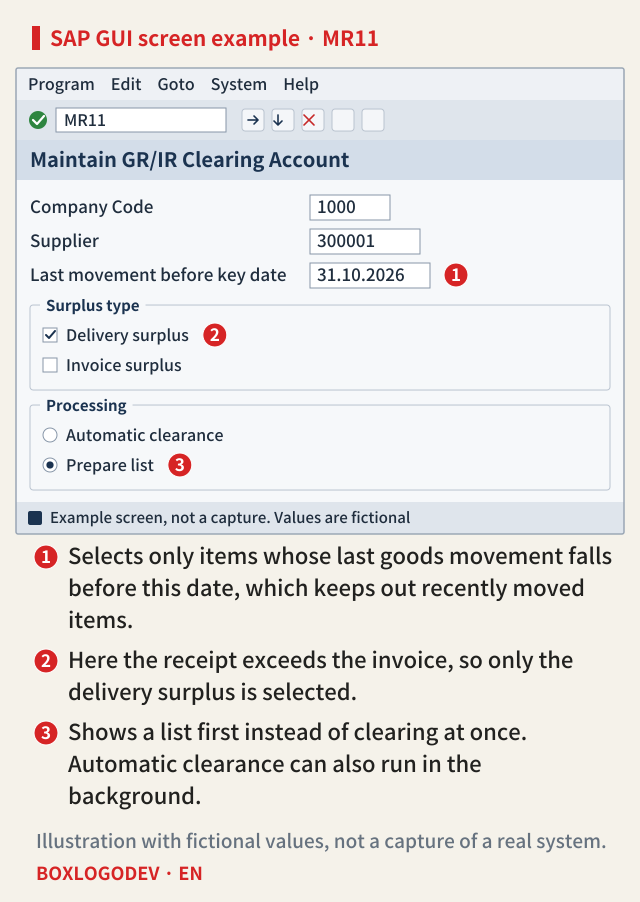
Selection criteria include supplier, purchasing organization and group, plant, purchasing document, document type, surplus type, and the size of the variance as a percentage or an amount. Marker 1, "Last movement before key date", keeps only items whose last goods movement falls before that date. Marker 2 decides whether to look at delivery surplus, invoice surplus or both. There are two ways to process: Automatic clearance can also run in the background, and marker 3, Prepare list, lets you see the items and choose before clearing.
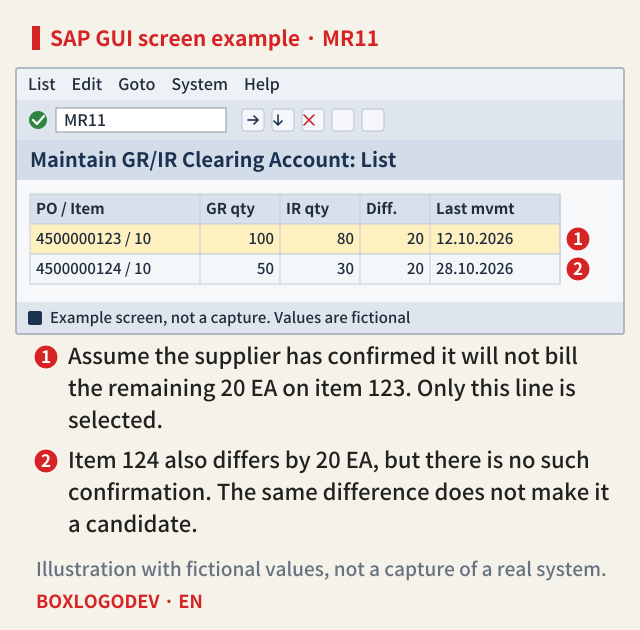
The reason to see a list first is that the same difference does not mean the same situation. In the example below, both items differ by 20 EA. The item at marker 1 has the supplier's confirmation; the item at marker 2 has none and has to wait for an invoice. The numbers on the screen cannot separate the two, so this note's judgement is that you need a record of the confirmation.
The valuation method decides the offsetting account
The offsetting entry follows the same rules as posting an invoice. For a material at moving average price it goes to the stock account, but if the stock quantity is smaller than the quantity to clear, only the proportion of actual stock goes to the stock account and the rest goes to a price difference account. With only 5 EA in stock, 5 × 10,000 = KRW 50,000 goes to the stock account and 200,000 − 50,000 = KRW 150,000 to the price difference account. For standard price material it goes to a price difference account, and for a PO with account assignment to the cost or fixed asset account on the PO. The balance here is a credit, so closing it debits GR/IR and puts the offset on the credit side. Another page of the same documentation release states this direction for moving average material (material credited on a delivery surplus). For standard price material and POs with account assignment the pages consulted do not spell it out, so there it is this note's reading by the same logic.
SAP NOTES
MR11 offsetting entry: 20 EA, KRW 200,000
Where the other side of the KRW 200,000 GR/IR debit goes
Moving average, stock of 20 EA or more
- Stock account KRW 200,000
Moving average, only 5 EA in stock
- Stock account KRW 50,000 (5 EA × KRW 10,000)
- Price difference account KRW 150,000
Standard price
- Price difference account KRW 200,000
PO with account assignment
- Cost or fixed asset account on the PO, KRW 200,000
The rules are from Help Portal S/4HANA 2025 FPS02. The figures apply them to fictional values.
The moving average case has a follow-on effect. With 100 EA in stock worth KRW 1,000,000, reducing only the value by KRW 200,000 gives 800,000 ÷ 100 = KRW 8,000, so the price per unit falls. The documentation does not contain this calculation. It is this note's inference from the rule above. After clearing, the account maintenance document appears in the PO history as its own transaction, and if a receipt or invoice arrives after all, you can cancel it with MR11SHOW (the Display/Cancel Account Maintenance Document app).
What about F.13 after MR11? The three lines now sum to zero, so by F.13's criterion they read as candidates for its next execution. No public document was found that says the MR11 line actually falls into the same group, so this too is an inference.
Outside the normal path
The S/4HANA 2025 FPS02 documentation describes extended open item management. On a GR/IR account switched to it, F.13 no longer works and you have to schedule the program FINS_GR_IR_MASS_CLEARING. If the account serves other purposes too, lines from those purposes can be cleared only by that program as well. In this mode the documentation also rules out the manual postings mentioned earlier, while MR11 stays available as usual. The Display Line Item Entry app shows no GR/IR open items, so use the Display Line Items in General Ledger app. If F.13 seems to do nothing at all, this setting is worth checking. Earlier releases were not checked.
Nor can you say that lines with matching quantities, or lines summing to zero, always clear. The public previews of SAP Knowledge Base Articles show only the symptom, and the cause sits behind a login and has not been read here. The symptom in KBA 2050268 is an item with no quantity difference that F.13 cannot clear because the GR/IR accounts (WRX) of receipt and invoice differ or their totals differ, with message CKMLGRIR009 appearing in MR11. The symptom in KBA 2016383 is zero-balance lines still open after F.13. In these cases, check the full KBA on SAP for Me.
One question to answer first
When you see a balance, compare the receipt and invoice quantities per PO item before running anything, and start by answering whether more receipts or invoices will come. If they will, there is no reason to use MR11, and at closing F.19 only adjusts the presentation. If they will not, keep a record of that confirmation and close with MR11. F.13 and the account settings are the place to look when the lines sum to zero and are still open. If the quantities match but the lines do not sum to zero, MR11 may select nothing, so start with KBA 2050268 above.
Add your perspective.
Share a question, another approach, or something you have tried.
Checking sign-in…
Loading comments…