Run MB5B for October 31 for a stock audit and the figure can differ from MMBE. A few days later the same selection can differ from your earlier list as well. Both look like errors, yet if you follow the calculation SAP's documents describe, neither has to be one. After reading this you will be able to reconcile the two figures through material documents and know what to record alongside a month-end stock figure.
The sources are a public SAP Learning course (inventory management in SAP S/4HANA), the inventory reporting documentation for SAP S/4HANA Cloud Public Edition 2608, and the SAP S/4HANA 2025 FPS02 documentation. The on-premise 2025 FPS02 entry for MB5B covers only the use of CWM, so MB5B's behaviour here follows the first two sources. Materials, plants, quantities and amounts are invented, and the figures apply the documented method to fictional values, not results from an SAP system. Quantities are in EA and amounts in KRW.
MMBE has no date and MB5B has a period
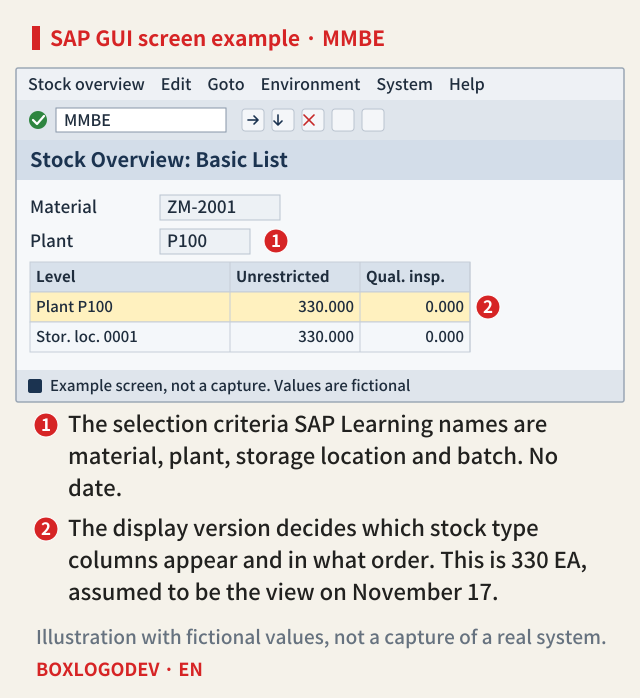
MMBE is an overview of one material's stock across organizational levels. The selection criteria SAP Learning names are material, plant, storage location and batch, and there is no date. The display version decides which stock type columns appear, and the initial screen decides whether to show special stocks. In the figure, marker 1 shows that the selection has no date, and marker 2 shows the 330 EA row, whose columns come from the display version. So MMBE reads naturally as the stock at the moment you look. The documentation does not use the word "current" for MMBE, so this is this note's reading from the absence of a date.
MB5B takes a period, covering the start date from 00:00 through the end date until 24:00, and the basis is the posting date. The documentation takes care to say that the posting date may differ from the entry date and the document date. It also gives the direction of the calculation: start from the current stock and work back through material documents to the stock on that posting date. Say fictional material ZM-2001 has 330 EA on November 17, after a receipt of 80 EA on November 5 and an issue of 50 EA on November 12. Stock at the end of October 31 is 330 + 50 − 80 = 300 EA. The 30 EA gap to MMBE equals the net rise after the key date, the 80 EA received minus the 50 EA issued.
SAP NOTES
Working back from the current stock
Fictional material ZM-2001, as of November 17, 2026, in EA
Current stock, November 17
330 EA- What MMBE shows
Undo the issue of 50 EA, November 12
330 + 50 = 380 EA- It was an issue, so add it back
Undo the receipt of 80 EA, November 5
380 − 80 = 300 EA- It was a receipt, so subtract it
Stock at 24:00, October 31
300 EA- What MB5B shows
- The 30 EA gap to MMBE is the net rise since
All quantities are fictional. This is a hand calculation using the method described by SAP Learning and the Help Portal.
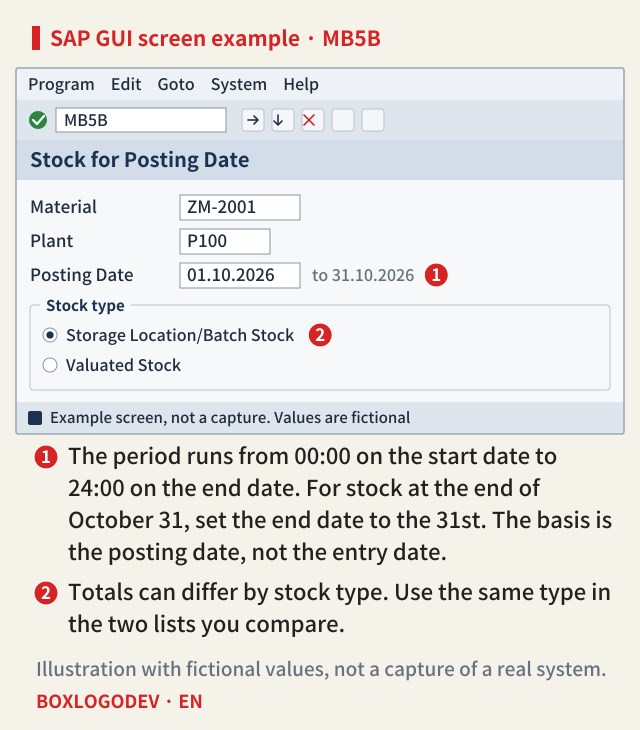
As marker 1 in the next figure shows, month-end stock is read with the period ending on the last day of that month. SAP Learning says the list gives more than the two end figures: alongside quantity and value at each end of the period, it totals what came in and what went out, with their values, and it lists the material documents of that period. So a figure that does not match can be traced through that document list.
Why the same selection gives a new number
The second effect follows from the basis being the posting date and not the entry date. According to the Help documentation, goods movements can be posted with a date in the previous period, and stock quantity and value then change in both the previous and the current period. Say a receipt of 40 EA is entered on November 18 with a posting date of October 30. MMBE goes from 330 to 370 EA. MB5B returns 370 + 50 − 80 = 340 EA. The 300 EA in a list pulled on November 1 was true at the time, but it is not what a rerun returns now. That past figures change this way is this note's reading of the documented method and was not tried on a system for this note.
SAP NOTES
What one late receipt changes
Entered November 18, posting date October 30, receipt of 40 EA
MB5B stock on October 31
300 → 340 EA- 300 EA before the late receipt
- 340 EA after it
MMBE current stock
330 → 370 EA- 330 EA before the late receipt
- 370 EA after it
The gap between them
30 EA- Receipt of 80 EA and issue of 50 EA after the key date
- 370 − 340 = 30 EA, unchanged
All quantities are fictional. That a posting date on or before the key date changes the past figure is this note's reading of the documented method.
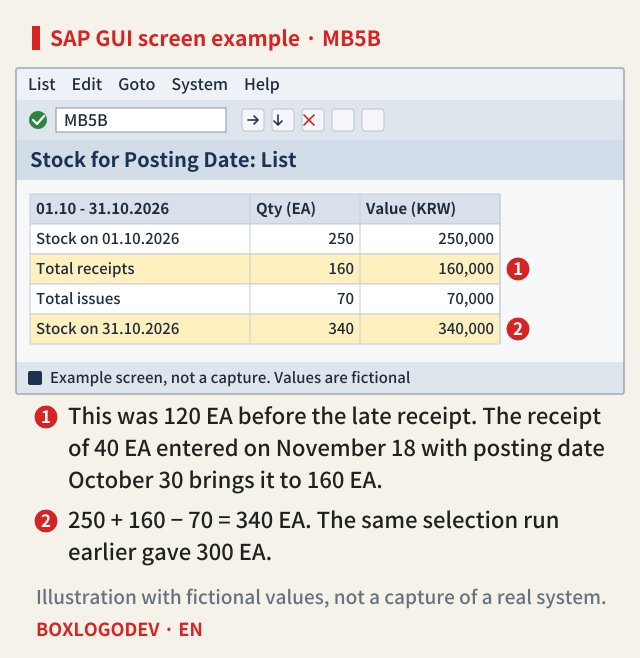
In the next figure, the October list, total receipts at marker 1 go from 120 EA to 160 EA, and marker 2 is the opening stock of 250 EA plus receipts minus issues of 70 EA: 250 + 160 − 70 = 340 EA. The amounts assume a flat price of KRW 1,000 throughout, and real amounts follow the valuation at each point.
For goods movements this change has limits. According to the Help documentation, a goods movement can reach back one period and no further, Invoice Verification can also reach the final period of the previous year, and the posting periods for the accounts must be correctly defined in Financial Accounting. So going by the documents, goods movements can change the October figure while October is the previous period. This too is this note's interpretation, so where reversals or period settings are involved, check on your system. The public preview of KBA 2000331 also describes several MB5B runs for the same selection showing different results even in a period already closed. Its cause sits behind a login and has not been read, so a change after closing cannot be ruled out. Back-postings for standard price material and price changes in a previous period can bring postings that realign value in the current period, so amounts are more complicated than quantities.
The same MB5B in another mode can give another result
The stock type selection, marker 2 on the earlier selection screen, can also separate figures. What follows are symptoms from public previews of SAP Knowledge Base Articles. The causes and fixes sit behind a login and have not been read here. KBA 2667351 describes total stock differing between "Valuated Stock" and "Storage Location/Batch stock", with some material documents missing from the "Valuated stock" list. KBA 1771093 describes message M7284 when you enter a storage location and choose "Valuated Stock". KBA 3338957 describes summed values from MB51 in valuated stock mode differing from the MB5B value. So this note's judgement is that comparing two lists starts with matching the stock type and organizational level.
The scope can differ too. The S/4HANA Cloud 2608 documentation says MB5B lists a company's own stocks, and MMBE can include special stocks from its initial screen. That does not mean MB5B never deals with special stock: the public preview of KBA 2570849 describes special stock not appearing in MB5B results as expected. So check which special stocks each list covers on your system. Whether on-premise systems behave the same was not confirmed. On values, the S/4HANA Cloud 2608 documentation labels the MB52 app deprecated and calls its stock value a simplified calculation for information only, so it is safer not to use it as it stands for reconciling stock value.
When a negative figure appears
When the order of posting dates differs from the order of events, MB5B's intermediate calculation can look odd. The public preview of KBA 1667353 describes that within a period a goods issue can be posted with a posting date before the goods receipt, and that MB5B can then show negative figures even if negative stocks are not allowed. As an invented example, suppose stock is 10 EA at the end of October 31, a receipt of 40 EA dated November 2 is entered, and then an issue of 30 EA dated November 1. For posting date November 1 the calculation gives 10 − 30 = −20 EA, and by November 2 stock is 20 EA. The example is this note's, and the full KBA has not been read. Start by using the posting dates in the document list to see whether the stock really was negative.
What SAP documents point to besides MB5B
The S/4HANA Cloud 2608 documentation adds to its MB5B entry a recommendation of the Fiori app Stock - Multiple Materials (F1595) for material stock information. It does not say the app gives the same posting date list. S/4HANA 2025 FPS02 also has CDS view C_MaterialStockByKeyDate, which aggregates material movements up to a key date. Its basis too is the posting date of the material document, so it does not appear to remove the effect of late postings.
What to record with a month-end figure
When you pass on a month-end stock figure, record the key posting date, the day you ran it, the stock type and the organizational level along with the number. If the number later fails to match, start from it, add the receipts and subtract the issues in the material documents with a posting date after the key date, and see whether you arrive at the current stock. In this example 340 + 80 − 50 = 370 EA reaches MMBE. The earlier 300 EA gives 300 + 80 − 50 = 330 EA, which falls 40 EA short: that is the late receipt, entered after the run with a posting date before the key date. If the gap is not explained that way, look at differences of scope or type. The public preview of KBA 1917752 also describes MB5B run to the current date not matching MMBE, and its cause has not been read.
Add your perspective.
Share a question, another approach, or something you have tried.
Checking sign-in…
Loading comments…