Suppose you open two invoices of the fictional vendor 300200 in company code 1000 with FB02, one after the other. On 5100000201 you can type a new date into the baseline date field; on 5100000202 the same field is grey and will not take input. Both are invoices for the same vendor, posted with posting key 31. The difference comes from the state of each document and from the document change rule that checks that state. By the end you will be able to work backwards from a grey field: is it a field that can never be changed, or which condition of which rule is holding it? Document numbers, amounts, dates and rule values are all invented, and nothing here was run on an SAP system.
Fields the rules decide, and fields they cannot
A posted document can still be changed, but fields such as the amount, the tax amount, the account, the posting key and the fiscal year, which already updated account balances at posting and so tie into reconciliation, stay locked whatever the rules say. Those five are only examples; other fields that affect reconciliation are locked too. Some fields also close depending on whether other applications are in use, CO (Controlling) or MM (Materials Management) for example, and how they are configured: with Cost Center Accounting in use, a cost center account assignment can no longer be changed. That case is explained separately in the note on costs posted to the wrong cost center.
For the remaining fields, the baseline date on vendor and customer items among them, the document change rules your system administrator has defined decide whether they open. Other fields are blocked only in particular transactions; under the net procedure, for instance, the cash discount amount cannot be changed when the payment is posted.
The rules apply in the same way whether you open the document in FB02 or change line items from an account. A baseline date that is grey in FB02 will meet the same rule if you try to change it from the vendor's line items instead.
The two invoices side by side in FB02
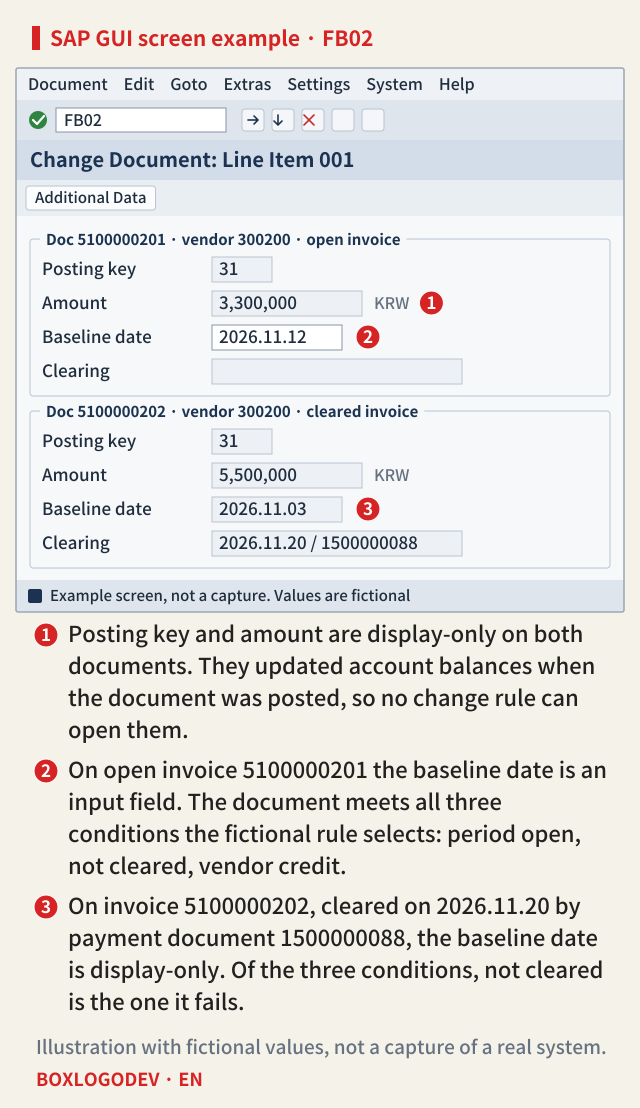
The figure puts the vendor item screens of the two invoices on one image. (1) Posting key 31 and the amount are display-only on both documents. As described above, they updated balances, so they are locked regardless of any rule.
(2) On open invoice 5100000201, the baseline date 2026.11.12 is an input field. November is open, the item is not cleared yet, and the invoice was posted to the credit side of the vendor account.
(3) Invoice 5100000202, posted in November, was cleared on 2026.11.20 by payment document 1500000088, and its baseline date 2026.11.03 is display-only. In this example, what closes the field is a condition that the fictional rule shown below selects: the item must not be cleared yet. Looking at the rule alone, under a rule without that condition the baseline date of a cleared invoice could be changeable. Whether cleared items carry a restriction of their own outside the rules is not something the public documents settle.
A rule row has a scope, a changeable flag and conditions
Document change rules are set in Customizing, in Rules for Changing Documents under Document in the Financial Accounting settings. The same rule table also turns up under the name Document Change Rules, Line Item, so if the path does not match, look under Document for either name. You can write rules of your own, but SAP recommends keeping the standard ones. Each row describes one field in three parts.
The first part is the scope. The account type lets you keep separate rules for customer and vendor transactions. Header fields get no account type, because header rules apply to every account type. A transaction class is entered only for the special G/L transactions down payments and bills of exchange, and a row with one applies only to that transaction. That is how the baseline date can be locked for down payments yet left changeable for bills of exchange. A company code makes the row specific to that company code; everywhere else, the row with no company code applies.
The second part is the changeable flag. The field can be changed only when it is set; left blank, the field is blocked whatever the conditions.
The third part is the conditions. The system comes with five: the posting period has not been closed; the item has not been cleared yet (on accounts managed on an open item basis); the item is a debit on a customer account or a credit on a vendor account; the document is not a credit memo that refers to an invoice; and it is not a credit memo that came from a down payment. The last three mean nothing for G/L accounts (account type S) and are not offered there. Only the selected conditions are checked, and when several are selected, every one must hold before the field opens.
SAP NOTES
A fictional rule for the baseline date
A row of Rules for Changing Documents, written with invented values
Area of validity
- Field: baseline date
- Account type: K (vendor)
- Transaction class: blank (not a bill of exchange or down payment row)
- Company code: blank (applies where no company code row exists)
Changeable flag: on
- Selected · posting period still open
- Selected · line item not yet cleared
- Selected · customer debit or vendor credit
- Not selected · not a credit memo referenced to an invoice
- Not selected · not a credit memo from a down payment
- All three selected conditions must hold to open the field
With the changeable flag off, the field cannot be changed whatever the conditions. Account type S (G/L account) does not offer the last three conditions. The rule values are invented; check the real standard rules in your own system. Based on SAP Help Portal, S/4HANA 2025 FPS02.
The figure shows an invented rule row for the baseline date field. The account type is K (vendor), transaction class and company code are blank, the changeable flag is on, and the first three of the five conditions are selected. The real values of the standard rules were not checked here, and your company may have changed them or added rules of its own, so check the rule table in your own system.
A credit memo, a cleared item and a closed period against the rule
SAP NOTES
Four documents against the same rule
Fictional vendor 300200 · company code 1000 · November open, October closed
5100000201 · open invoice
- All three hold: period open, not cleared, vendor credit
- Result: baseline date can be entered
5100000202 · cleared invoice
- Fails the not-cleared condition (cleared 2026.11.20)
- Result: display only
5100000203 · credit memo
- Fails the vendor-credit condition (a debit on the vendor account)
- Result: display only
5100000190 · October invoice
- Fails the period-open condition (October is closed)
- Result: display only
One failed condition is enough to close the field. Fields that updated balances at posting, such as amount, account and posting key, stay closed regardless of this table. Document numbers and dates are invented; this is not output from an SAP system.
Now hold four documents of vendor 300200 against this rule. Open invoice 5100000201 meets all three conditions, so its baseline date is open. Invoice 5100000202, posted in November but cleared, fails one condition, "not cleared".
Credit memo 5100000203, posted in November and not yet cleared, is the less obvious case. A credit memo, which reduces what you owe the vendor, goes the opposite way to an invoice: onto the debit side of the vendor account (posting key 21 in the standard system). So it fails one condition, "customer debit or vendor credit". The rule does not select the fourth and fifth conditions, the ones that name credit memos, and still the baseline date of the credit memo is closed, with or without an invoice reference. That is why you cannot assume credit memos stay open just because no selected condition mentions them.
Invoice 5100000190, posted in October, is not cleared and is a vendor credit, but October is closed, so it fails "period open". The same invoice can turn grey once its period is closed.
What to check when you meet a grey field
First, see whether the field is one that updated balances at posting and ties into reconciliation, such as the amount, the tax amount, the account, the posting key or the fiscal year. If it is, no rule can open it, and there is no point searching the rule table.
If it is not, find the field's row in the change rule table. Look for the row with the item's account type (K for vendor, D for customer). A row with a transaction class applies only to bills of exchange or down payments, so for an ordinary invoice read the row with no transaction class. For a bill of exchange or a down payment, look for the row with that transaction class. For the company code, a row for that company code counts if it exists; otherwise read the row with no company code. Two things were not confirmed: whether a line item row with no account type applies to every account type, and whether the row with no transaction class applies when no row for that transaction class exists. So a table with only such blank rows does not by itself mean that no row matches.
If no matching row exists at all, first ask whether the field is one a rule can open; it may be tied to reconciliation, but the public documents do not cover this case. If there is a row and the changeable flag is off in it, you have your answer; if it is on, hold each selected condition against the state of the document. If every condition holds and the field is still blocked, look next at restrictions tied to a particular transaction, or at other applications such as CO or MM and their settings.
When a rule does let you change the baseline date, the change is logged: which field, the old and new value, who changed it and when. You can see it from the document itself, or collect changes with report RFBABL00, selecting by company code, document number, fiscal year, change date and user.
The basis is the public help for SAP S/4HANA 2025 FPS02 on-premise and a public SAP Learning lesson. Not compared: changes made in the Fiori app Manage Journal Entries, any message the system gives when you try to change a blocked field, and the Customizing node names and field labels shown on screen.
Back to the two invoices at the start: what separated 5100000201 from 5100000202 was neither the vendor nor the posting key but one condition in one rule row, "not cleared". For any other grey baseline date, write the field's rule row next to the state of the document; that shows whether the changeable flag, one of the selected conditions (here clearing, a closed period or the debit/credit side), a missing row or a restriction outside the rules is what blocks it, and with that, whom to ask about what.
Add your perspective.
Share a question, another approach, or something you have tried.
Checking sign-in…
Loading comments…